Loading
Form preview
  • US Legal Forms
  • Other Templates
  • Tax Forms
  • Executive Department Treasury IRS Forms
  • Irs Instruction W-3pr 2014

Get Irs Instruction W-3pr 2014

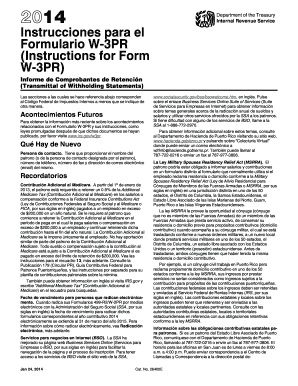
Nados con el Formulario W-3PR y sus instrucciones, como leyes promulgadas despu s de que dichos documentos se hayan publicado, por favor visite www.irs.gov/w3pr. Qu Hay de Nuevo Persona de contacto. Tiene que proporcionar el nombre del patrono (o de la persona de contacto designada por el patrono), n mero de tel fono, n mero de fax y direcci n de correo electr nico (email) del mismo. Recordatorios Contribuci n Adicional al Medicare. A partir del 1 de enero de 2013, el patrono est.

This website is not affiliated with IRS

How it works

  1. Open form

    Open form follow the instructions

  2. Easily sign form

    Easily sign the form with your finger

  3. Share form

    Send filled & signed form or save

How to fill out the IRS Instruction W-3PR online

Filling out the IRS Instruction W-3PR is essential for employers in Puerto Rico to correctly report wages and taxes to the Social Security Administration (SSA). This guide provides a comprehensive, step-by-step approach to completing this form online, ensuring all necessary information is accurately submitted.

Follow the steps to complete the IRS Instruction W-3PR online.

  1. Press the ‘Get Form’ button to obtain the form and open it in the online editor.
  2. Indicate the type of payer by checking the appropriate box in section 'a'. Only select one box unless exceptions apply.
  3. Fill in the employer’s name and address in boxes 'd' and 'e'. Ensure all details are accurate and complete.
  4. Enter the employer identification number (EIN) in box 'c'. If you do not have an EIN yet, write 'Applied For'.
  5. Provide the contact person's name, phone number, fax number, and email address for any inquiries the SSA may have.
  6. Complete boxes 1 through 4 and 6 through 16 with totals from the Forms 499R-2/W-2PR you are submitting. Make sure these totals reflect the wages and taxes accurately.
  7. In box 13, include the total amount of Additional Medicare Tax withheld, if applicable.
  8. Review the entire form for accuracy, ensuring there are no discrepancies in the totals provided.
  9. Save your changes in the online editor. You can then download, print, or share the completed Form W-3PR as needed.

Ensure to file your documents online without delay to meet IRS requirements.

Get form

Experience a faster way to fill out and sign forms on the web. Access the most extensive library of templates available.

Related content

Prior Year Products - Internal Revenue Service
Inst W-2 and W-3, Instructions for Forms W-2 and W-3, Wage and Tax Statement .... para el...
Learn more
Access Form W-2 | Office of the Controller
Follow these instructions to access your Form W-2. ... you need a duplicate copy of Form...
Learn more
Publication 4163 (Rev. 12 2017) P4163...
3.23 Preparing Supporting Data Required by IRS Forms or Form Instructions. 3.23.1 Example...
Learn more

Related links form

India Syndicate Bank Application for Opening of Savings/Current Accounts and Access to Products & Channels NZ Auckland Council AC2311 2012 PH Annex B-2 PH Colegio San Agustin Letter of Recommendation

Questions & Answers

Get answers to your most pressing questions about US Legal Forms API.

Contact support

Downloading a PDF from the IRS is straightforward. Navigate to the IRS site, find the specific form or instruction you need, such as IRS Instruction W-3PR, and select it. Click the download link, and the PDF will be saved to your device, ensuring easy access anytime you need it.

To extract your IP PIN from the IRS, you must log into your IRS account or visit the IRS website. Locate the section for Identity Protection PINs, where you can view or request your PIN. Keeping your IP PIN, along with the IRS Instruction W-3PR, handy will enhance the security of your tax filing process.

To obtain a PDF copy of your tax return, access your account on the IRS website. If you filed electronically, your return should be available for download. Look for options to download or print your return, ensuring the IRS Instruction W-3PR or any relevant documents are readily accessible for your needs.

To download a PDF from the income tax portal, log into your account using your credentials. After accessing your files, locate the desired document and click on the download option, which usually appears as a PDF icon. Ensure you save documents like the IRS Instruction W-3PR effectively for your records.

To access the IRS, go to their official website at IRS. You can find resources, forms, and instructions, including IRS Instruction W-3PR. If you need specific help, you may also access the IRS's online tools or contact their customer service for assistance.

Yes, you can download various forms from the IRS website. Simply visit the IRS forms and publications page, search for the specific form you need, like IRS Instruction W-3PR, and select the link to download it. This allows you to complete your forms offline and keeps your records organized.

To save an IRS form as a PDF, open the form in your browser or an appropriate software. Once the form is displayed, click on the 'File' menu and select 'Save As' or 'Download.' Choose 'PDF' as the file type, name your file, and select a location on your computer. This applies when working with IRS Instruction W-3PR to ensure you can access it anytime.

The W-8BEN form is a declaration that non-US individuals use to establish their status as foreign persons for withholding tax purposes. It aims to claim reduced rates of withholding tax under applicable tax treaties. Understanding this form is essential in light of IRS Instruction W-3PR, as it keeps you compliant while potentially lowering your tax obligations. Using uslegalforms can guide you through the nuances of this process.

You need to fill out a W-8BEN if you are a non-US individual receiving income from US sources. This form certifies your foreign status and helps prevent excessive tax withholding as outlined in IRS Instruction W-3PR. If you are unsure whether you qualify, consulting uslegalforms can provide clarity, ensuring your tax matters are handled appropriately. Proper submission can lead to significant tax savings.

When writing a letter to the IRS, begin with your name, address, and identification number at the top. Clearly state your purpose for writing, referencing any relevant forms, such as IRS Instruction W-3PR, to maintain focus. Conclude the letter with your signature and contact information. For convenience, uslegalforms offers templates that can assist you, ensuring your correspondence is clear and professional.

Get This Form Now!

Use professional pre-built templates to fill in and sign documents online faster. Get access to thousands of forms.
If you believe that this page should be taken down, please follow our DMCA take down processhere.
Get IRS Instruction W-3PR
  • Adoption
  • Bankruptcy
  • Contractors
  • Divorce
  • Home Sales
  • Employment
  • Identity Theft
  • Incorporation
  • Landlord Tenant
  • Living Trust
  • Name Change
  • Personal Planning
  • Small Business
  • Wills & Estates
  • Packages A-Z
  • Affidavits
  • Bankruptcy
  • Bill of Sale
  • Corporate - LLC
  • Divorce
  • Employment
  • Identity Theft
  • Internet Technology
  • Landlord Tenant
  • Living Wills
  • Name Change
  • Power of Attorney
  • Real Estate
  • Small Estates
  • Wills
  • All Forms
  • Forms A-Z
  • Other Templates
  • Legal Hub
  • About Us
  • Help Portal
  • Legal Resources
  • Blog
  • Affiliates
  • Contact Us
  • Delete My Account
  • Site Map
  • Industries
  • Forms in Spanish
  • Localized Forms
  • State-specific Forms
  • Forms Kit
  • Real Estate Handbook
  • All Guides
  • Notarize
  • Incorporation services
  • For Consumers
  • For Small Business
  • For Attorneys
  • USLegal
  • FormsPass
  • pdfFiller
  • signNow
  • altaFlow
  • DocHub
  • Instapage
Form Packages
  • Adoption
  • Bankruptcy
  • Contractors
  • Divorce
  • Home Sales
  • Employment
  • Identity Theft
  • Incorporation
  • Landlord Tenant
  • Living Trust
  • Name Change
  • Personal Planning
  • Small Business
  • Wills & Estates
  • Packages A-Z
Form Categories
  • Affidavits
  • Bankruptcy
  • Bill of Sale
  • Corporate - LLC
  • Divorce
  • Employment
  • Identity Theft
  • Internet Technology
  • Landlord Tenant
  • Living Wills
  • Name Change
  • Power of Attorney
  • Real Estate
  • Small Estates
  • Wills
  • All Forms
  • Forms A-Z
  • Other Templates
Customer Service
  • Legal Hub
  • About Us
  • Help Portal
  • Legal Resources
  • Blog
  • Affiliates
  • Contact Us
  • Delete My Account
  • Site Map
  • Industries
  • Forms in Spanish
  • Localized Forms
  • State-specific Forms
  • Forms Kit
Legal Guides
  • Real Estate Handbook
  • All Guides
Prepared for you
  • Notarize
  • Incorporation services
Our Customers
  • For Consumers
  • For Small Business
  • For Attorneys
Our Sites
  • USLegal
  • FormsPass
  • pdfFiller
  • signNow
  • altaFlow
  • DocHub
  • Instapage
Social Media
Call us now toll free:
+1 833 426 79 33
As seen in:
© Copyright 1999-2026 airSlate Legal Forms, Inc. 17 Station Street, Ste. 203, Brookline, MA 02445
  • Your Privacy Choices
  • Terms of Service
  • Privacy Notice
  • Content Takedown Policy
  • Bug Bounty Program
IRS Instruction W-3PR
This form is available in several versions.
Select the version you need from the drop-down list below.
2022 IRS Instruction W-3PR
Select form
  • 2022 IRS Instruction W-3PR
  • 2020 IRS Instruction W-3PR
  • 2019 IRS Instruction W-3PR
  • 2018 IRS Instruction W-3PR
  • 2017 IRS Instruction W-3PR
  • 2016 IRS Instruction W-3PR
  • 2015 IRS Instruction W-3PR
  • 2014 IRS Instruction W-3PR
  • 2013 IRS Instruction W-3PR
  • 2012 IRS Instruction W-3PR
  • IRS Instruction W-3PR_DSA
Select form