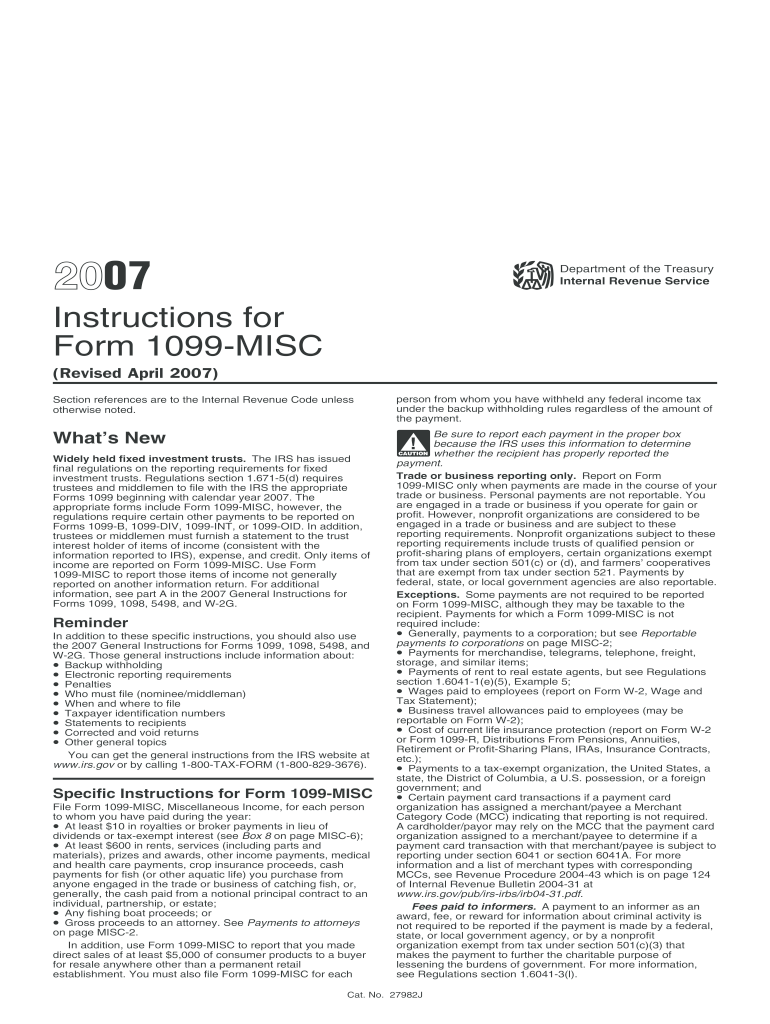
Ns on the reporting requirements for fixed investment trusts. Regulations section 1.671-5(d) requires trustees and middlemen to file with the IRS the appropriate Forms 1099 beginning with calendar year 2007. The appropriate forms include Form 1099-MISC, however, the regulations require certain other payments to be reported on Forms 1099-B, 1099-DIV, 1099-INT, or 1099-OID. In addition, trustees or middlemen must furnish a statement to the trust interest holder of items of income (consistent with.

Open form follow the instructions

Easily sign the form with your finger

Send filled & signed form or save
How to use or fill out the IRS Instruction 1099-MISC online
Filling out the IRS Form 1099-MISC can be straightforward when you have the right guidance. This guide provides detailed steps for accurately completing this form online, ensuring you meet federal reporting requirements.
Follow the steps to fill out the IRS Form 1099-MISC with ease.
- Click ‘Get Form’ button to obtain the form and open it in the editor.
- Identify the recipient’s information. You will need to enter the recipient's name, address, and Taxpayer Identification Number (TIN) in the appropriate fields.
- Fill out the payer's details including your name, address, and federal identification number in the designated areas of the form.
- Determine the type of payments. Review the types of payments that require reporting on Form 1099-MISC and select the correct box for reporting. For instance, if you are reporting nonemployee compensation, complete box 7.
- Enter the amounts. Provide the total amounts for the applicable categories such as rents, royalties, or other income in the corresponding boxes of the form.
- Report any federal income tax withheld in box 4 if applicable. This is important for backup withholding cases.
- Review all information entered for accuracy. Ensure that all fields are correctly filled, and that sums are calculated properly.
- Once completed, you can save changes, download, print, or share the form as needed before submitting it to the IRS.
Complete your IRS Form 1099-MISC online today to ensure you meet your tax obligations.
Experience a faster way to fill out and sign forms on the web. Access the most extensive library of templates available.
Related content
File Form 1099-MISC, Miscellaneous Information, for each person in the course of your...
Click on. Employer and Information Returns, and we'll mail you the forms you request and...
May 2, 2017 — Employers must report the compensation paid and any backup withholding on...
Get answers to your most pressing questions about US Legal Forms API.
Will a 1099 affect my tax return?
Yes, a 1099-MISC will affect your tax return by adding to your taxable income. It’s important to follow the guidelines set by IRS Instruction 1099-MISC when reporting this income. Accurate reporting is necessary to avoid unexpected tax bills or audits, so utilizing tools from uslegalforms can help facilitate a smooth filing process.
What are the instructions for correcting 1099-MISC?
If you discover errors on your 1099-MISC, you should request a corrected form from the issuer. According to IRS Instruction 1099-MISC, it is critical to address these discrepancies promptly to avoid issues with your tax return. You may also visit uslegalforms for guidance on navigating this correction process efficiently.
How will a 1099-MISC affect my tax return?
Receiving a 1099-MISC generally indicates additional income, which can increase your overall tax liability. It’s essential to accurately report this on your return as outlined in the IRS Instruction 1099-MISC. Depending on other income and deductions, your tax situation may change, so it’s wise to review your entire financial picture.
How do I avoid paying taxes on 1099-MISC?
To minimize taxes owed on a 1099-MISC, you can deduct allowable business expenses from your income. Additionally, IRS Instruction 1099-MISC allows for certain deductions, which can reduce your taxable income. Working with a tax professional or using resources like uslegalforms can provide clarity on legitimate deductions available to you.
Where do I enter a 1099s on my tax return?
You will typically enter the information from a 1099-MISC on your federal tax return, specifically on Schedule C if you are self-employed. According to IRS Instruction 1099-MISC, it’s also crucial to report any applicable amounts on the appropriate lines. Utilizing tax software, like the services offered by uslegalforms, can help simplify this process for you.
Do I have to report a 1099-MISC on my tax return?
Yes, you must report a 1099-MISC on your tax return if you received one. The IRS Instruction 1099-MISC states that individuals need to include this form as it reflects income earned throughout the year. Not reporting it may lead to discrepancies and potential penalties. Therefore, it's important to keep track of all 1099-MISC forms received.
What is the proper way to fill out a 1099?
Filling out a 1099 requires careful attention to detail and adherence to the IRS Instruction 1099-MISC. Begin with collecting accurate information from both parties involved, then accurately complete all necessary fields on the form. For further assistance, consider using platforms like US Legal Forms to simplify the process.
How do you fill out a 1099-MISC form?
To fill out a 1099-MISC form, start by gathering the required information about the payer and the recipient. Follow the IRS Instruction 1099-MISC carefully, ensuring you complete all necessary boxes accurately. Always review your entries for errors before submitting to maintain compliance and avoid delays.
What are the instructions for recipient included on Form 1099-MISC?
The IRS Instruction 1099-MISC includes critical guidance for recipients regarding how to report their income on their tax returns. Recipients should use the information from the 1099-MISC to report earnings accurately and ensure they understand their tax obligations. Clear instructions help recipients avoid potential issues with the IRS.
What boxes do I fill out for a 1099-MISC?
When filling out the IRS Instruction 1099-MISC, you need to complete specific boxes based on the type of payments you made. Boxes typically include amounts for rents, royalties, and nonemployee compensation. It's essential to accurately reflect all applicable payments in these boxes to comply with IRS regulations.
Use professional pre-built templates to fill in and sign documents online faster. Get access to thousands of forms.
If you believe that this page should be taken down, please follow our DMCA take down process here.
This form is available in several versions. Select the version you need from the drop-down list below.