Loading
Form preview
  • US Legal Forms
  • Other Templates
  • Tax Forms
  • Executive Department Treasury IRS Forms
  • Irs Instruction 1098-e & 1098-t 2010

Get Irs Instruction 1098-e & 1098-t 2010

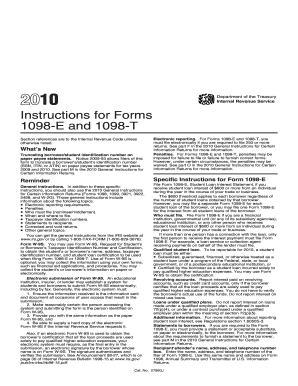
Ok to Print Instructions for Forms 1098-E and 1098-T (2010) 12:15 - 29-DEC-2009 The type and rule above prints on all proofs including departmental reproduction proofs. MUST be removed before printing. 2010 Department of the Treasury Internal Revenue Service Instructions for Forms 1098-E and 1098-T Section references are to the Internal Revenue Code unless otherwise noted. What s New Truncating borrower/student identification number on paper payee statements. Notice 2009-93 allows.

This website is not affiliated with IRS

How it works

  1. Open form

    Open form follow the instructions

  2. Easily sign form

    Easily sign the form with your finger

  3. Share form

    Send filled & signed form or save

How to use or fill out the IRS Instruction 1098-E & 1098-T online

Filing the IRS Instruction 1098-E and 1098-T online can seem daunting, but with the right guidance, it can be a straightforward process. This guide will provide you with clear, step-by-step instructions on how to correctly fill out these forms to ensure compliance with IRS regulations.

Follow the steps to accurately complete the IRS Instruction 1098-E & 1098-T online.

  1. Use the ‘Get Form’ button to access the document. This will open the form in an online editor where you can begin entering your information.
  2. Begin with Form 1098-E. Enter the recipient's name, address, and taxpayer identification number. This is essential for proper record-keeping and compliance.
  3. In Box 1 of Form 1098-E, record the total interest received on student loans during the calendar year, including any applicable loan origination fees or capitalized interest.
  4. For loans before September 1, 2004, if applicable, check the checkbox in Box 2 to indicate that loan origination fees and/or capitalized interest are not reported in Box 1.
  5. Proceed to Form 1098-T. Input the student's name, address, and taxpayer identification number in the designated fields.
  6. In Box 1, enter the total payments received for qualified tuition and related expenses for the calendar year, subtracting any refunds given.
  7. If you opted for amounts billed, record this in Box 2, ensuring any reductions are noted accurately.
  8. Complete Boxes 3 to 10 as applicable, marking checkboxes where necessary for identifying the student status or reporting methods used.
  9. Review the information entered to ensure accuracy and completeness. Make any necessary adjustments.
  10. Finally, save your changes, and choose to download, print, or share the completed forms as needed.

Take the first step towards completing your IRS forms online today!

Get form

Experience a faster way to fill out and sign forms on the web. Access the most extensive library of templates available.

Related content

Instructions for Forms 1098-E and 1098-T (2025)
File Form 1098-E, Student Loan Interest Statement, if you receive student loan interest of...
Learn more
2024 Instructions for Forms 1098-E and 1098-T
Who must file. • When and where to file. • Electronic reporting. • Corrected and...
Learn more
1098-E vs. 1098-T: What's the Difference?...
Oct 10, 2023 — 1098-E refers to the Student Loan Interest Statement. 1098-T pertains to...
Learn more

Related links form

SC 5027-A 2018 SC Form PDLA 2015 TX CR-3 2015 NC SF 401 2013

Questions & Answers

Get answers to your most pressing questions about US Legal Forms API.

Contact support

Yes, if you receive a 1098-T form, you generally need to report it on your tax return. The IRS Instruction 1098-E & 1098-T guide states that this form helps you claim education credits such as the American Opportunity Credit or the Lifetime Learning Credit. Reporting this form accurately can impact your tax refund or liability. It's beneficial to follow the instructions closely to avoid any issues.

To obtain your 1098-T form, reach out to the financial services office of your educational institution. Most schools publish these forms on their online portals, adhering to IRS Instruction 1098-E & 1098-T standards. If you experience difficulties navigating the website, don't hesitate to call their office for help.

Your 1098 mortgage statement can typically be obtained from your mortgage lender. They usually provide this statement through your online account or mail it directly to you, following IRS Instruction 1098-E & 1098-T requirements. If you're unsure, visit their customer support or website for more information.

You can file your taxes without your 1098 forms, but it's not recommended. IRS Instruction 1098-E & 1098-T forms provide essential information that can maximize your deductions and credits. Try to obtain the forms from your lender or servicer before filing, as this will help you prepare an accurate tax return.

You can look up your 1098-T online through your school's student portal or the IRS website. Educational institutions often provide these forms electronically, following IRS Instruction 1098-E & 1098-T guidelines. If needed, contact your school's financial office for further guidance.

Yes, you can download your 1098 form online from your lender's website or the IRS portal. After you log in, look for an option to download your IRS Instruction 1098-E & 1098-T forms. Be sure to save them for your records, as you will need them for tax filing.

To get a copy of your 1098 form online, visit the IRS website or your mortgage lender's site. Many lenders provide electronic copies of IRS Instruction 1098-E & 1098-T forms in your online account. You may need to log in with your credentials to access these documents.

Generally, you do not need to attach IRS Instruction 1098 to your tax return, but you should keep it for your records. While it is not submitted with the return, you must report the necessary information on your tax forms. Keeping a copy handy will help if the IRS requires verification.

Forgetting to add a 1099-INT can lead to underreporting your income, resulting in penalties. The IRS uses these forms to match reported income against what they have on file. If you realize you've missed it, consider amending your return and including it to avoid complications.

To enter your 1098-T on your tax return, fill out Form 8863 to claim education credits. Ensure that you accurately input the amounts from the 1098-T to benefit from potential tax deductions. For additional clarity, consult IRS Instruction 1098-E & 1098-T or explore resources from uslegalforms.

Get This Form Now!

Use professional pre-built templates to fill in and sign documents online faster. Get access to thousands of forms.
If you believe that this page should be taken down, please follow our DMCA take down processhere.
Get IRS Instruction 1098-E & 1098-T
  • Adoption
  • Bankruptcy
  • Contractors
  • Divorce
  • Home Sales
  • Employment
  • Identity Theft
  • Incorporation
  • Landlord Tenant
  • Living Trust
  • Name Change
  • Personal Planning
  • Small Business
  • Wills & Estates
  • Packages A-Z
  • Affidavits
  • Bankruptcy
  • Bill of Sale
  • Corporate - LLC
  • Divorce
  • Employment
  • Identity Theft
  • Internet Technology
  • Landlord Tenant
  • Living Wills
  • Name Change
  • Power of Attorney
  • Real Estate
  • Small Estates
  • Wills
  • All Forms
  • Forms A-Z
  • Other Templates
  • Legal Hub
  • About Us
  • Help Portal
  • Legal Resources
  • Blog
  • Affiliates
  • Contact Us
  • Delete My Account
  • Site Map
  • Industries
  • Forms in Spanish
  • Localized Forms
  • State-specific Forms
  • Forms Kit
  • Real Estate Handbook
  • All Guides
  • Notarize
  • Incorporation services
  • For Consumers
  • For Small Business
  • For Attorneys
  • USLegal
  • FormsPass
  • pdfFiller
  • signNow
  • altaFlow
  • DocHub
  • Instapage
Form Packages
  • Adoption
  • Bankruptcy
  • Contractors
  • Divorce
  • Home Sales
  • Employment
  • Identity Theft
  • Incorporation
  • Landlord Tenant
  • Living Trust
  • Name Change
  • Personal Planning
  • Small Business
  • Wills & Estates
  • Packages A-Z
Form Categories
  • Affidavits
  • Bankruptcy
  • Bill of Sale
  • Corporate - LLC
  • Divorce
  • Employment
  • Identity Theft
  • Internet Technology
  • Landlord Tenant
  • Living Wills
  • Name Change
  • Power of Attorney
  • Real Estate
  • Small Estates
  • Wills
  • All Forms
  • Forms A-Z
  • Other Templates
Customer Service
  • Legal Hub
  • About Us
  • Help Portal
  • Legal Resources
  • Blog
  • Affiliates
  • Contact Us
  • Delete My Account
  • Site Map
  • Industries
  • Forms in Spanish
  • Localized Forms
  • State-specific Forms
  • Forms Kit
Legal Guides
  • Real Estate Handbook
  • All Guides
Prepared for you
  • Notarize
  • Incorporation services
Our Customers
  • For Consumers
  • For Small Business
  • For Attorneys
Our Sites
  • USLegal
  • FormsPass
  • pdfFiller
  • signNow
  • altaFlow
  • DocHub
  • Instapage
Social Media
Call us now toll free:
+1 833 426 79 33
As seen in:
© Copyright 1999-2026 airSlate Legal Forms, Inc. 17 Station Street, Ste. 203, Brookline, MA 02445
  • Your Privacy Choices
  • Terms of Service
  • Privacy Notice
  • Content Takedown Policy
  • Bug Bounty Program
IRS Instruction 1098-E & 1098-T
This form is available in several versions.
Select the version you need from the drop-down list below.
2022 IRS Instruction 1098-E & 1098-T
Select form
  • 2022 IRS Instruction 1098-E & 1098-T
  • 2021 IRS Instruction 1098-E & 1098-T
  • 2020 IRS Instruction 1098-E & 1098-T
  • 2019 IRS Instruction 1098-E & 1098-T
  • 2018 IRS Instruction 1098-E & 1098-T
  • 2016 IRS Instruction 1098-E & 1098-T
  • 2015 IRS Instruction 1098-E & 1098-T
  • 2014 IRS Instruction 1098-E & 1098-T
  • 2013 IRS Instruction 1098-E & 1098-T
  • 2012 IRS Instruction 1098-E & 1098-T
  • 2010 IRS Instruction 1098-E & 1098-T
  • 2005 IRS Instruction 1098-E & 1098-T
Select form