On Form 990, Part IV, line 16. Part III can be duplicated if additional space is needed. Schedule F (Form 990) 2018 Part III (a) Type of grant or assistance (b) Region (c) Number of recipients (d) Amount of cash grant (e) Manner of cash disbursement (f) Amount of noncash assistance (g) Description of noncash assistance (h) Method of valuation (book, FMV, appraisal, other) (1) (2) (3) (4) (5) (6) (7) (8) (9) (10) (11) (12) (13) (14) (15) (16) (17) (18) Schedule F (Form 990) 2018.

Open form follow the instructions

Easily sign the form with your finger

Send filled & signed form or save
How to fill out the IRS 990 - Schedule F online
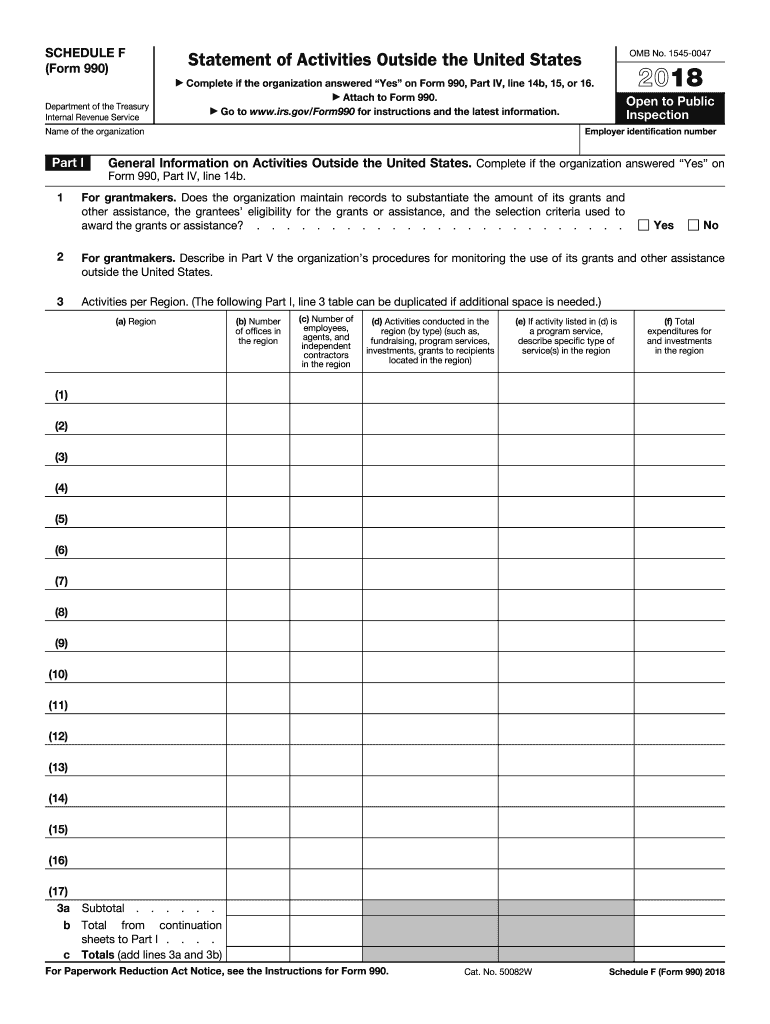
The IRS 990 - Schedule F is a crucial form for organizations that operate or have activities outside the United States. This guide provides a clear, step-by-step approach to help users complete this form accurately and efficiently when filing online.
Follow the steps to fill out the IRS 990 - Schedule F online
- Use the ‘Get Form’ button to access the IRS 990 - Schedule F and open it in your preferred editing tool.
- Beginning with Part I, provide the name of the organization and employer identification number. Indicate whether the organization maintains records to substantiate grants and assistance as outlined in the instructions.
- In Part I, you will list the activities conducted outside the United States. Complete the table by specifying the region, number of offices, employees, and activities conducted.
- Moving to Part II, if your organization provided grants or assistance exceeding $5,000, detail the recipient organizations. Include their names, tax eligibility status, regions, purposes of grants, and related monetary amounts.
- In Part III, report grants and assistance given to individuals outside the U.S. Enter the type of assistance, region, number of recipients, and financial details, ensuring accuracy.
- Part IV requires checking if your organization was involved with foreign corporations or trusts. Answer the questions affirmatively or negatively as they apply to your organization.
- For Part V, you are to provide supplemental information regarding monitoring of funds, accounting methods, and any other relevant additional information identified in earlier parts.
- Review the completed form for accuracy. Once everything is filled in correctly, save your changes, download a copy, print it, or share as needed.
Complete your documents online today to ensure compliance and proper submission.
Experience a faster way to fill out and sign forms on the web. Access the most extensive library of templates available.
Related content
Part I. General Information on Activities Outside the United States. Complete if the...
Schedule F Reporting GW is required by the IRS to report on its activities conducted...
1. Contributions, gifts, grants, etc., received (attach schedule). 2. Check ▷ if the...
Get answers to your most pressing questions about US Legal Forms API.
How is Schedule F income taxed?
Income reported on IRS 990 - Schedule F is generally not subject to income tax, as it is associated with tax-exempt organizations. However, it's essential to comply with existing regulations and ensure proper reporting. Failure to do so may lead to unintended tax consequences. For clarity and to ensure you handle the reporting correctly, consider consulting a tax expert.
Can an IRS Form 990 be filed electronically?
Yes, you can file IRS Form 990, including Schedule F, electronically. The IRS allows tax-exempt organizations to submit their forms online through approved e-filing software. This method facilitates faster processing and helps reduce errors associated with paper filings. Choose platforms like US Legal Forms that simplify this process for you.
What is the Schedule F of the 990?
IRS 990 - Schedule F is a supplemental form used by non-profits to report their fundraising activities. This schedule provides detailed information about the organization’s contributions and events. It helps the IRS assess the financial health of the organization and ensures transparency. By completing this form, you contribute to maintaining trust with your supporters and the public.
Who completes Schedule F?
IRS 990 - Schedule F is completed by tax-exempt organizations that engage in fundraising activities. This includes charities, non-profits, and other similar entities. Individuals responsible for the organization’s finances, such as treasurers or accountants, generally handle this task. It's crucial for them to ensure accuracy and compliance with IRS regulations.
Is Schedule F considered earned income?
No, income reported on IRS 990 - Schedule F is typically not considered earned income. Instead, it generally falls under the category of revenue from fundraising activities. Understanding this distinction is important as it affects how this income is reported and taxed. Always consult with a tax professional for personalized guidance on your situation.
How to file a Schedule F?
Filing IRS 990 - Schedule F involves several key steps. First, you need to gather all relevant financial information about your fundraising events and income sources. Next, complete the form accurately, ensuring that you include all required details. Finally, submit your completed Schedule F along with your IRS Form 990 to ensure everything is filed correctly.
Can you do a Schedule F on TurboTax?
Yes, you can complete IRS 990 - Schedule F using TurboTax. The platform provides a user-friendly interface that guides you through the necessary steps. By following the prompts, you can accurately report your organization’s fundraising activities and income. This ensures compliance with IRS regulations while simplifying the process for you.
What is the Schedule F rule?
The Schedule F rule requires tax-exempt organizations to report specific income and expenditures related to activities that may not be their primary purpose. This ensures proper accountability and compliance with IRS guidelines. Organizations must be diligent in reporting to avoid jeopardizing their exempt status.
Which TurboTax for Schedule F?
TurboTax offers specific versions that accommodate IRS 990 - Schedule F forms. Users should look for the TurboTax version designed for non-profit organizations, as it includes tailored guidance for completing this schedule. This software can simplify the process, ensuring an accurate and complete filing.
What is Schedule F 990?
Schedule F 990 is a specific form attached to the IRS 990 return that provides insight into the financial activities of tax-exempt organizations. It is crucial for reporting income from non-exempt activities and assessing compliance with IRS regulations. Organizations use it to give a comprehensive overview of their financial health.
Use professional pre-built templates to fill in and sign documents online faster. Get access to thousands of forms.
If you believe that this page should be taken down, please follow our DMCA take down process here.
This form is available in several versions. Select the version you need from the drop-down list below.