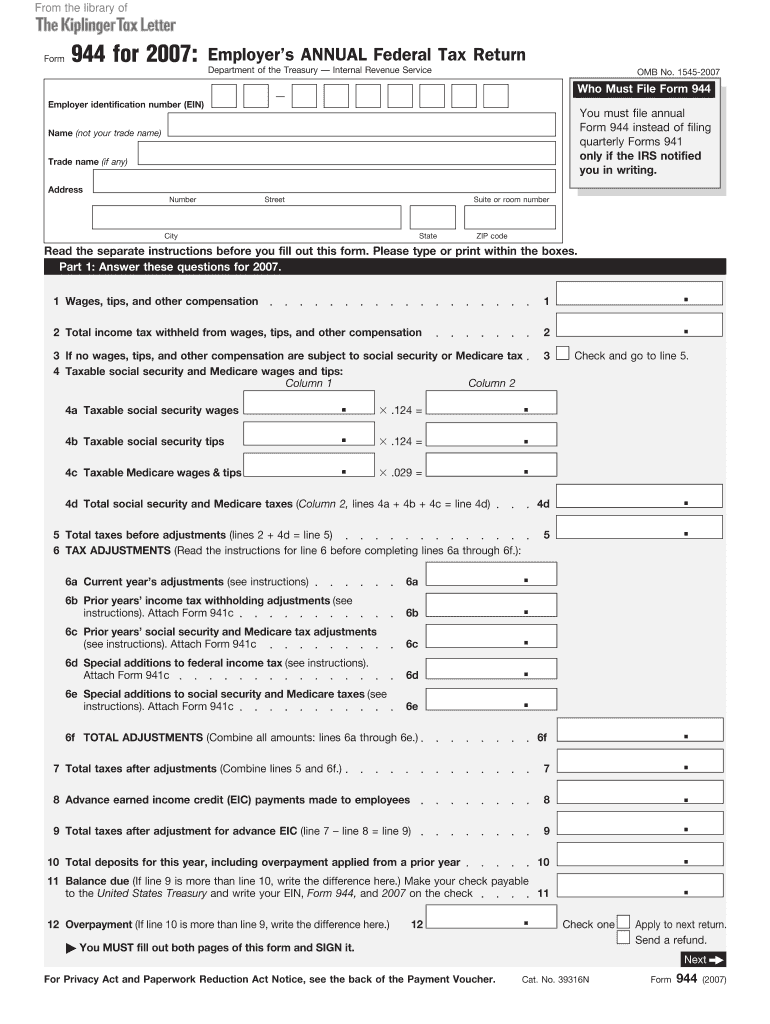
Ification number (EIN) You must file annual Form 944 instead of filing quarterly Forms 941 only if the IRS notified you in writing. Name (not your trade name) Trade name (if any) Address Number Street Suite or room number City State ZIP code Read the separate instructions before you fill out this form. Please type or print within the boxes. Part 1: Answer these questions for 2007. 1 Wages, tips, and other compensation 1 2 Total income tax withheld from wages, tips, and other compensati.

Open form follow the instructions

Easily sign the form with your finger

Send filled & signed form or save
How to fill out the IRS 944 online
The IRS 944 is an annual federal tax return designed specifically for employers with a low tax liability, allowing them to report their payroll taxes. This guide provides clear, step-by-step instructions on how to complete the form online, ensuring accuracy and compliance with IRS regulations.
Follow the steps to fill out the IRS 944 online.
- Click the ‘Get Form’ button to access the IRS 944 in your preferred online format.
- Enter your employer identification number (EIN) in the designated field. This is a unique number issued by the IRS for your business.
- Complete the name field with your legal business name, avoiding trade names.
- Provide your business address, ensuring to include street number, suite or room number, city, state, and ZIP code accurately.
- In Part 1, report wages, tips, and other compensation in the respective boxes. This is crucial for determining your tax liability.
- Next, enter the total income tax withheld from wages in the specified section.
- If you have no wages subject to social security or Medicare tax, check the corresponding box and proceed to line 5.
- In line 4, report taxable social security and Medicare wages and tips, breaking them down into the required columns.
- Calculate the total social security and Medicare taxes and input this figure in line 4d.
- Combine lines 2 and 4d to determine total taxes before adjustments and enter that in line 5.
- Follow instructions closely for line 6 to report any tax adjustments, entering information for current and prior years as necessary.
- Add all amounts from lines 6a through 6e for total adjustments in line 6f.
- Combine line 5 and line 6f to determine total taxes after adjustments in line 7.
- If advance earned income credit payments were made to employees, enter the amount in line 8 and calculate the final total taxes owed in line 9.
- Record your total deposits for the year in line 10. If line 9 exceeds line 10, calculate the balance due and enter it in line 11 or enter any overpayment in line 12.
- Complete Part 2 indicating your tax liability for the year and total it in the corresponding section.
- If applicable, complete Part 3 to inform the IRS about your business’s operational status or closure.
- Decide if you want to authorize a third-party designee for IRS discussions and fill out the necessary fields in Part 4.
- In Part 5, sign the document, confirming all information provided is accurate and complete; include your title and best daytime phone number.
- If applicable, complete Part 6 for paid preparers with the required details.
- After all fields are completed, save changes, download, print, or share the form as needed.
Begin your IRS 944 online filing today to ensure compliance and streamline your tax reporting.
Experience a faster way to fill out and sign forms on the web. Access the most extensive library of templates available.
Related content
Sep 17, 2024 — In general, if the IRS has notified you to file Form 944, you must file...
Complete Form 944-V, Payment Voucher, if you are making a payment with Form 944...
2.3.4 Acceptable Contact(s) for 94x as IRS Authorized Signer. The IRS Authorized Signer...
Get answers to your most pressing questions about US Legal Forms API.
How do I change my 941 to 944?
To change from IRS Form 941 to Form 944, you must first contact the IRS to request this change. The IRS will evaluate your eligibility based on your payroll tax liability and other factors. Once approved, you will receive instructions on how to proceed. Consider reaching out to a service like US Legal Forms for guidance throughout this transition to ensure everything is handled correctly.
Where can I get form 944?
You can obtain IRS Form 944 directly from the IRS website or through authorized tax form providers. Online platforms, such as US Legal Forms, offer easy access to IRS Form 944 and provide resources to assist you in completing your filing. These platforms often feature helpful instructions to ensure accurate submission, making it easier for you to manage your tax obligations.
What IRS forms can be filed electronically?
Several IRS forms can be filed electronically, including various employment tax forms, income tax returns, and extensions. Forms like 940, 941, and the 944 are commonly accepted for electronic submission. Using IRS-approved e-filing services helps ensure that you comply with all necessary regulations. Platforms like US Legal Forms can guide you through the process and simplify electronic filing.
How do I qualify for form 944?
To qualify for IRS Form 944, your estimated annual payroll tax liability must be $1,000 or less. Additionally, you must meet specific criteria, such as being a small employer with a lower employee count. If you meet these requirements, transitioning from filing Form 941 to Form 944 can be beneficial. It simplifies your tax obligations and can save you time each year.
Can form 944 be filed electronically?
Yes, IRS Form 944 can be filed electronically. Many tax software platforms provide the option for e-filing this annual form, which can greatly enhance the efficiency of your filing process. Using an electronic filing service, like US Legal Forms, ensures your submission meets IRS standards, reducing the chance of errors and expediting your filing experience.
What forms cannot be electronically filed?
Not all IRS forms can be filed electronically. Some forms, such as certain complex tax returns and W-2 forms for physical distribution, require paper filing. Additionally, specific situations may dictate that certain forms cannot be electronically submitted. It’s important to check with the IRS or consult a tax professional to ensure the correct filing method for your situation.
Can I file form 944 online?
Yes, you can file IRS Form 944 online through various IRS-approved e-file systems. Filing online streamlines the process and usually provides faster results. Many online platforms, including US Legal Forms, offer user-friendly solutions for individuals and businesses looking to file IRS Form 944. Utilizing these services can help reduce errors and ensure compliance with IRS regulations.
Can I file my own 941 electronically?
Yes, you can file your own IRS Form 941 electronically. Electronic filing simplifies the submission process and allows for quicker processing by the IRS. By using IRS-approved e-file software, you can ensure that your information is transmitted securely and efficiently. If you prefer to make the switch to IRS Form 944, consider the benefits that may come with filing annually.
What makes you a monthly depositor?
You become a monthly depositor if your monthly tax liabilities exceed a specific threshold set by the IRS. Employers with lower tax liabilities generally qualify as monthly depositors. Tracking your payroll taxes accurately will help ensure you meet the requirements for filing the IRS 944.
How do I know if I'm a monthly or semi-weekly depositor?
To figure out if you are a monthly or semi-weekly depositor, review your tax liability from the previous years. If your liability is over a certain amount, you may be classified as a semi-weekly depositor. Understanding your classification is essential, especially when filing the IRS 944.
Use professional pre-built templates to fill in and sign documents online faster. Get access to thousands of forms.
If you believe that this page should be taken down, please follow our DMCA take down process here.
This form is available in several versions. Select the version you need from the drop-down list below.