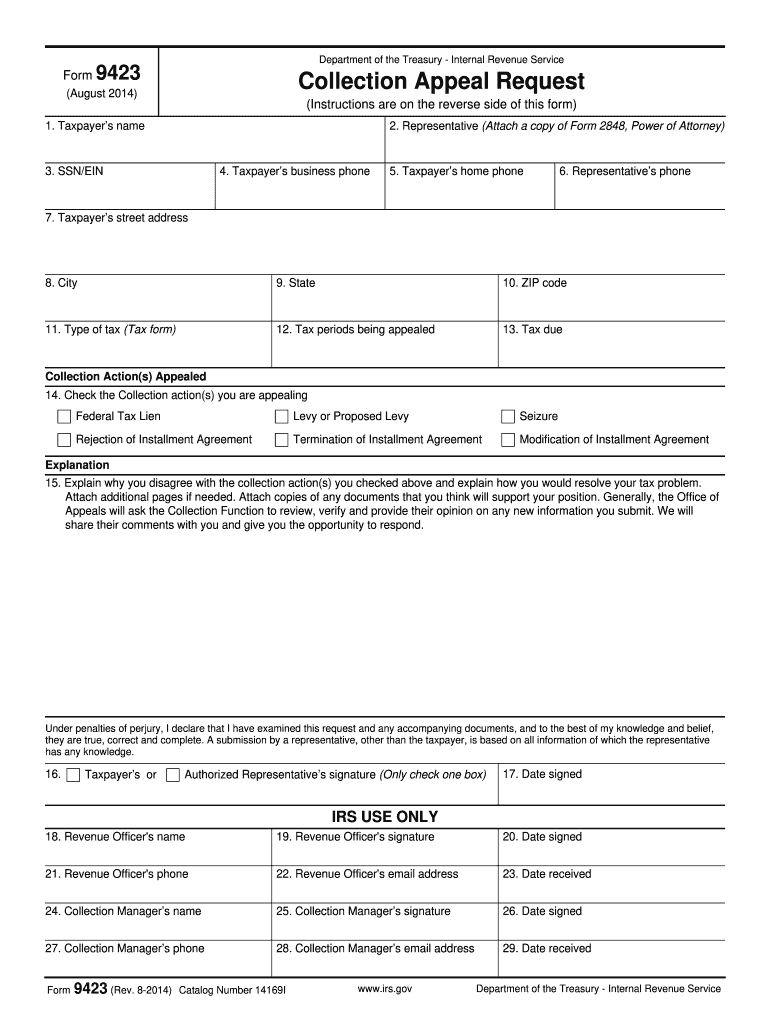
Th the decision of the IRS employee, and wish to appeal, you must first request a conference with the employee's manager. If you do not resolve your disagreement with the Collection manager, submit Form 9423 to request consideration by Appeals. Let the Collection office know within two (2) business days after the conference with the Collection manager that you plan to submit Form 9423. The Form 9423 must be received or postmarked within three (3) business days of the conference with the Collecti.
Loading

Open form follow the instructions

Easily sign the form with your finger

Send filled & signed form or save
How to fill out the IRS 9423 online
This guide provides clear instructions for users on how to complete the IRS Form 9423, also known as the Collection Appeal Request. The form is essential for appealing certain IRS collection actions, and the following steps will help ensure accurate and complete submission.
Follow the steps to successfully complete the IRS 9423 online
- Click 'Get Form' button to obtain the form and open it in the editor.
- Enter the taxpayer's name in the first field, ensuring to use legal names only as required.
- In the next section, provide the representative's name if applicable. Attach a copy of Form 2848, Power of Attorney, if someone is acting on your behalf.
- Enter the taxpayer's Social Security Number (SSN) or Employer Identification Number (EIN) accurately in the designated field.
- Provide the taxpayer's business phone number and home phone number in the respective fields.
- Document the representative's phone number if a representative is involved in handling the appeal.
- Fill in the taxpayer’s street address, followed by the city, state, and ZIP code to ensure correct identification.
- In the section for Type of tax, indicate the tax form relevant to the collection action being appealed.
- Specify the tax periods that are being appealed in the next field.
- State the tax amount due in the designated field.
- Mark the appropriate collection action(s) you are appealing, such as Federal Tax Lien or Levy, and any others that apply.
- In the explanation section, provide a detailed statement of why you disagree with the collection action(s) and suggest how you would resolve the issue. Attach any necessary documentation to support your appeal.
- Sign the form where indicated, making sure to check either the taxpayer's or authorized representative's box.
- Enter the date you are signing the form.
- Ensure that all relevant sections are filled out, then save your changes. Prepare to download, print, or share the form as needed.
Complete your IRS forms online today and ensure your submissions are accurate and timely.
Experience a faster way to fill out and sign forms on the web. Access the most extensive library of templates available.
Related content
Submit Form 9423 to the Collection office involved in the lien, levy or seizure action. 4...
Denial of Installment Agreement (30 days to appeal by Form 9423); Termination of...
The Form 9423 should be received or postmarked within four (4) business days of your...
Get answers to your most pressing questions about US Legal Forms API.
How do I write a reasonable cause letter to the IRS?
To write a reasonable cause letter to the IRS, present your situation clearly and provide any supporting evidence. State your request under IRS 9423 and explain the circumstances that led to your inability to comply with tax obligations. Be honest, concise, and ensure all relevant documentation is attached.
How do I write a letter of reconsideration?
Writing a letter of reconsideration involves several essential elements. Start with your contact information, followed by a clear subject heading stating your request for reconsideration. Reference your IRS 9423 case number, describe your circumstances, and end with a polite closing that expresses your hope for a favorable resolution.
How to appeal IRS penalties and interest?
To appeal IRS penalties and interest, you should draft a formal appeal letter outlining your reasons for disputing the charges. Reference your case under IRS 9423 and include any evidence that supports your claim. Make sure to send your appeal within the timeframe specified in the notice you received.
How long does it take to get a reconsideration from the IRS?
The time it takes to get a reconsideration from the IRS can vary significantly. Typically, it may take several weeks to a few months for the IRS to process your request after receiving your IRS 9423 letter. Stay proactive by checking your case status periodically to stay informed.
How to write an effective IRS protest?
Writing an effective IRS protest requires clarity and organization. Start by stating the details of the disagreement and your IRS 9423 case number. Use clear language and provide facts, supporting documentation, and a concise conclusion that clearly states what you seek from the IRS.
What is the best way to get out of IRS debt?
The best way to get out of IRS debt often involves negotiating with the IRS to reduce your obligation. Consider options such as an Offer in Compromise, or installment payment plans, to make the debt more manageable. Consulting resources like those available on the IRS 9423 can provide guidance on available solutions.
How do I write a reconsideration letter to the IRS?
Writing a reconsideration letter to the IRS involves several key steps. Begin with a proper greeting and clearly identify your situation and the specific decision you are contesting. Include your IRS 9423 case number, outline your arguments, and incorporate any supporting evidence to strengthen your position.
How to write a letter of reconsideration to the IRS?
To write a letter of reconsideration to the IRS, start with your personal information at the top. Clearly state your request for reconsideration and reference your IRS 9423 case number. Provide a detailed explanation of why you believe the decision should be reconsidered, attaching any relevant documentation to support your claims.
How do I write an effective letter of appeal to the IRS?
To write an effective letter of appeal to the IRS, start by clearly stating your purpose and include your tax information. Detail your situation in a straightforward manner without unnecessary jargon, and attach all relevant documentation. This structured approach can increase your chances of a successful appeal, and resources like IRS 9423 can guide you on best practices.
How long can you sue the IRS for holding your refund?
You can sue the IRS for holding your refund if you feel your claim has not been processed fairly. Typically, you have a window of two years from when the IRS denies your claim to file a lawsuit. Preparing for this can be intricate, so using resources like IRS 9423 can help you understand the necessary steps to take.
Use professional pre-built templates to fill in and sign documents online faster. Get access to thousands of forms.
If you believe that this page should be taken down, please follow our DMCA take down process here.
This form is available in several versions. Select the version you need from the drop-down list below.