Loading
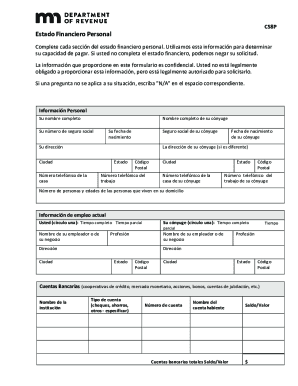
Get Mn Dor C58p 2019
How it works
-

Open form follow the instructions
-

Easily sign the form with your finger
-

Send filled & signed form or save
How to fill out the MN DoR C58P online
The Minnesota Department of Revenue C58P form is essential for providing your financial information, which is crucial for determining your ability to pay. Ensuring accurate completion of this form can prevent potential delays in your application process.
Follow the steps to complete the MN DoR C58P form successfully.
- Use the ‘Get Form’ button to access the C58P form. This will allow you to open the document in an easily editable format.
- Start by filling in your personal information. This includes your full name, social security number, date of birth, and contact details. If applicable, provide information for your spouse as well.
- In the employment section, indicate your employment status by circling either 'full-time' or 'part-time.' Also, include the name and address of your employer, and repeat this for your spouse if required.
- For bank accounts, list each account's institution name, type, account number, account holder, and current balance. Include all relevant accounts, such as checking, savings, and retirement accounts.
- Proceed to the real estate section. Provide details about any properties owned, including their addresses, mortgage balances, and current values.
- In the credit card section, list the names of the cards, credit limits, current balances, and the minimum monthly payments required.
- Next, fill in vehicle information. Include the year, make, model, financing bank, and current balance for each vehicle you own.
- Document your monthly maintenance expenses, specifying amounts for taxes, rent or mortgage, utilities, insurance, and other essential costs.
- Estimate any additional obligations such as personal loans or second mortgages. Provide details on each obligation, including current balances and minimum monthly payments.
- Summarize your total monthly expenses by calculating all earlier stated amounts. Be sure to double-check your calculations for accuracy.
- In the income section, report your gross monthly income and provide accompanying documentation such as pay stubs. Include income from your spouse and any additional sources.
- Finally, review the authorization section. Ensure all information is accurate before signing and dating the form. If you require a payment plan, fill out the banking information to authorize payments.
- Once all sections are complete, save your changes. You can download, print, or share the completed form as needed.
Complete and submit your MN DoR C58P form online today to ensure a smooth processing of your application.
Get form
Experience a faster way to fill out and sign forms on the web. Access the most extensive library of templates available.
If you are a full-year Minnesota resident, you must file a Minnesota income tax return if your income meets the state's minimum filing requirement. ... If you are a part-year resident or nonresident, you must file if your Minnesota gross income meets the state's minimum filing requirement.
Get This Form Now!
Use professional pre-built templates to fill in and sign documents online faster. Get access to thousands of forms.