Loading
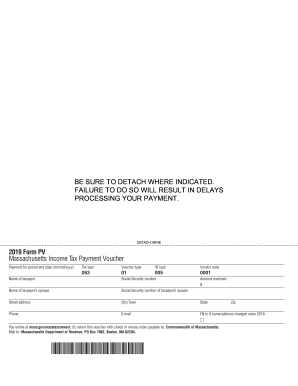
Get Ma Pv 2019-2026
How it works
-

Open form follow the instructions
-

Easily sign the form with your finger
-

Send filled & signed form or save
How to fill out the MA PV online
The MA PV, or Massachusetts Income Tax Payment Voucher, is an essential document for residents to ensure their tax payments are processed efficiently. This guide will provide clear, step-by-step instructions on how to complete the form correctly online.
Follow the steps to fill out the MA PV form
- Click ‘Get Form’ button to obtain the form and open it in the editor.
- Enter the payment period end date in the specified format (mm/dd/yyyy). Ensure the date corresponds to the tax year for which you are submitting payment.
- Select the appropriate tax type from the provided options, ensuring it matches your tax situation.
- Indicate the voucher type by selecting the corresponding number that reflects the nature of your payment.
- Fill in your ID type by choosing from the available identifiers. This helps identify your tax account.
- Input your vendor code, which typically consists of a series of digits specific to your tax account.
- Provide your name as the taxpayer, followed by your Social Security number without dashes.
- If applicable, enter the name and Social Security number of your spouse as the taxpayer's spouse.
- Complete your street address, city or town, and state. Ensure all provided information is current.
- Enter your phone number and email address for any follow-up communication regarding your payment.
- If there have been changes to your name or address since 2018, please indicate these modifications.
- Write in the amount you are enclosing with the voucher, making sure it matches the payment you are intending to submit.
- To finalize, choose whether to save changes, download, print, or share the form as needed.
Complete your MA PV form online today to ensure timely processing of your payment.