Open form follow the instructions
Easily sign the form with your finger
Send filled & signed form or save
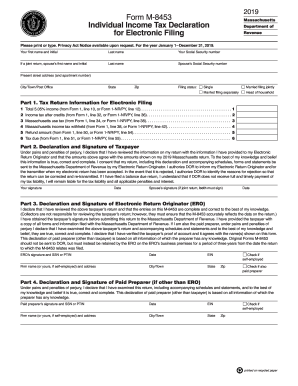
How to fill out the MA M-8453 online
The MA M-8453 is an essential form for individuals filing their Massachusetts income tax returns electronically. This guide provides clear, step-by-step instructions to help users complete the form accurately and efficiently.
Follow the steps to successfully complete the MA M-8453 online.
- Click ‘Get Form’ button to obtain the form and open it in the editor.
- Begin by entering your personal information, including your first name, last name, and Social Security number in the designated fields.
- If you are filing a joint return, provide your partner’s first name, last name, and Social Security number in the corresponding fields.
- Fill in your present street address, including any apartment number, along with your city or town, state, and zip code.
- Indicate your filing status by selecting one of the options: Single, Married filing jointly, Married filing separately, or Head of household.
- Complete Part 1 by entering the required tax return information, such as total income, tax after credits, use tax, income tax withheld, refund amount, and tax due based on the relevant lines from Form 1 or Form 1-NR/PY.
- In Part 2, read the declaration carefully and provide your signature and date. If filing jointly, include your partner’s signature and date as well.
- Proceed to Part 3, where the Electronic Return Originator (ERO) needs to sign and date the declaration, providing their SSN or PTIN, EIN, firm name, and address as applicable.
- If there is a paid preparer aside from the ERO, they must fill out Part 4, including their signature, date, SSN or PTIN, EIN, firm name, and address.
- Review all entered information for accuracy and completeness before saving your changes, downloading, printing, or sharing the completed form.
Complete your MA M-8453 online today for a smoother filing experience.
Experience a faster way to fill out and sign forms on the web. Access the most extensive library of templates available.
Related content
Sep 25, 2019 - Form M-8453P: Partnership Tax Declaration for Electronic Filing · Tax Year...
Nov 21, 2019 - Years prior to 2018 in this report still reference the Massachusetts codes...
1.7.2.1 Schema and Business Rules Posting; 1.7.2.2 Form 8975 and Form 8975 Schedule A;...
Get answers to your most pressing questions about US Legal Forms API.
What are tax brackets for 2019?
The new rates, which relate to the tax return you'll file in 2019, are 10 percent, 12 percent, 22 percent, 24 percent, 32 percent, 35 percent and 37 percent. NerdWallet broke down the 2018 and 2019 federal income tax brackets. Below are the 2018 brackets, which relate to the tax return you're filing in 2019.
How much do you have to make to file taxes in Massachusetts?
Generally, if you make $8,000 or more you'll need to file a Massachusetts tax return. Full year residents who receive or accrue Massachusetts gross income in excess of $8,000 during the taxable year are required to file a Massachusetts income tax return.
Who has to file Massachusetts taxes?
Nonresidents. If you're a nonresident with an annual Massachusetts gross income of more than either $8,000 or the prorated personal exemption, whichever is less, you must file a Massachusetts tax return.
What is a Form 1 NR PY?
Form 1: Massachusetts Resident Income Tax Return. Form 1-NR/PY: Massachusetts Nonresident Income Tax Return. Additional Income Tax Forms and Schedules. Estimated Tax Payment Vouchers.
How do I pay Massachusetts taxes online?
Go to MassTaxConnect. Click Make a Payment Click Individual Payment Enter your SSN or ITIN and choose the type of tax payment you want to make. Choose your payment method and enter the required information. Click Submit. Review your payment and click OK .
Where do I mail my Massachusetts tax payment?
Form 1 or a Form 1-NR/PY: Refund: Mass. DOR, PO Box 7000, Boston, MA 02204. Payment: Mass. DOR, PO Box 7003, Boston, MA 02204.
Who do I call about my mass state tax refund?
To check the status of your tax refund by phone, call (617) 887-6367 or toll-free in Massachusetts (800) 392-6089 and follow the automated prompts.
How do I contact Mass government?
Official Name: Commonwealth of Massachusetts. Governor: Charlie Baker. Email: cis@sec.state.ma.us. Phone Number: 1-617-727-7030. Toll Free: 1-800-392-6090. TTY: 1-617-878-3889.
How do I contact Massachusetts Department of Revenue?
Contacting Massachusetts Department of Revenue (DOR) - by phone or otherwise. While 800-392-6089 is Massachusetts Department of Revenue (DOR)'s best toll-free number, there are 2 total ways to get in touch with them.
When can I file my tax returns 2019?
The Internal Revenue Service (IRS) began accepting and processing 2018 federal tax returns on January 28, 2019. The deadline to file federal taxes for most taxpayers was April 15, 2019, unless you filed for an extension.
Use professional pre-built templates to fill in and sign documents online faster. Get access to thousands of forms.
If you believe that this page should be taken down, please follow our DMCA take down process here.
This form is available in several versions. Select the version you need from the drop-down list below.