Loading
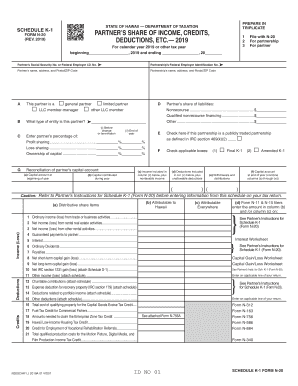
Get Hi Dot N-20 - Schedule K-1 2019
How it works
-

Open form follow the instructions
-

Easily sign the form with your finger
-

Send filled & signed form or save
How to fill out the HI DoT N-20 - Schedule K-1 online
Filling out the HI DoT N-20 - Schedule K-1 is essential for partners involved in partnerships in Hawaii. This guide will walk you through the process of completing this form online, ensuring that all necessary information is accurately reported.
Follow the steps to complete your Schedule K-1 accurately.
- Press the ‘Get Form’ button to access the HI DoT N-20 - Schedule K-1 and open it in your online editor.
- Begin by entering the partner’s Social Security number or Federal Employer Identification number in the appropriate field. Make sure this is accurate to avoid any issues.
- Input the partnership’s Federal Employer Identification number as well. This is crucial for proper tax identification.
- Provide the partner’s name, full address, and Postal/ZIP code. Ensure that this information matches official records.
- Next, fill in the partnership’s name, address, and Postal/ZIP code in the designated fields.
- Indicate the partner’s role by selecting one of the options provided for general partner, limited partner, LLC member-manager, or other.
- In section B, specify the type of entity for the partner to ensure correct classification.
- Complete section C by entering the percentage for profit sharing, loss sharing, and ownership of capital. Be accurate with these figures as they affect tax calculations.
- Document the reconciliation of the partner’s capital account, including the capital at the beginning of the year and any contributions during the year.
- Enter the partner’s share of liabilities, listing amounts for nonrecourse and qualified nonrecourse financing.
- If applicable, check the box if the partnership is publicly traded.
- In section F, mark the relevant boxes for income, deductions, and whether it is a final or amended K-1.
- Fill in the table for Credits and Deductions (lines 1 through 36), ensuring you categorize correctly.
- Review all entries for completeness and accuracy.
- Once you have filled out all necessary sections, save your changes. You can then download, print, or share the completed form as required.
Ensure your partnership documents are completed correctly by filing online.
Get form
Experience a faster way to fill out and sign forms on the web. Access the most extensive library of templates available.
Use Schedule K-1 to report a beneficiary's share of the estate's or trust's income, credits, deductions, etc. on your Form 1040, U.S. Individual Income Tax Return. ... Don't file it with your tax return, unless backup withholding was reported in box 13, code B.
Get This Form Now!
Use professional pre-built templates to fill in and sign documents online faster. Get access to thousands of forms.