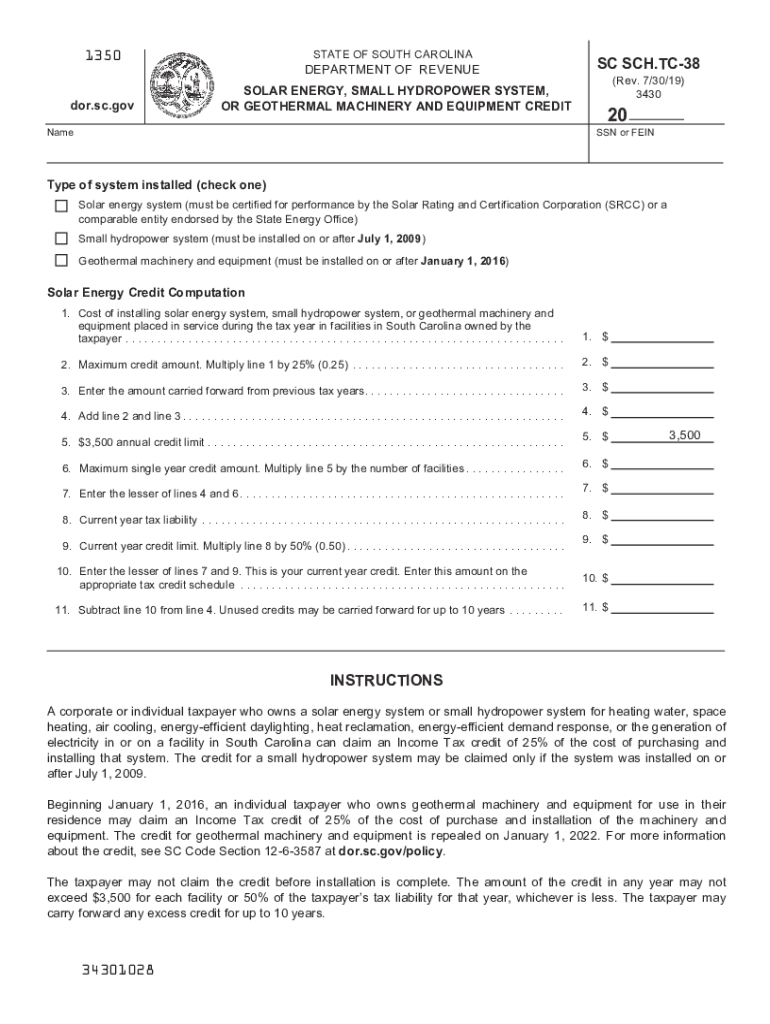
Inery and equipment for use in their residence may claim an Income Tax credit of 25% of the cost of purchase and installation of the machinery and equipment. The credit for geothermal machinery and equipment is repealed on January 1, 2022. For more information about the credit, see SC Code Section 12-6-3587 at dor.sc.gov/policy. The taxpayer may not claim the credit before installation is complete. The amount of the credit in any year may not exceed $3,500 for each facility or 50% of the taxpaye.
Loading

Open form follow the instructions

Easily sign the form with your finger

Send filled & signed form or save
How to fill out the SC SC SCH. TC-38 online
Filling out the SC SC SCH. TC-38 form online is a straightforward process designed to help individuals and businesses claim tax credits for solar energy, small hydropower systems, or geothermal machinery. This guide will walk you through each section, ensuring you have the necessary information to complete the form accurately.
Follow the steps to successfully complete your SC SC SCH. TC-38 online.
- Click ‘Get Form’ button to obtain the form and open it in the editor.
- Enter your name in the designated field. This should match the name on your tax records.
- Select the type of system installed by checking one of the boxes: solar energy system, small hydropower system, or geothermal machinery and equipment.
- In line 1, enter the total cost for installing the chosen system. Ensure this reflects the expenses incurred within the tax year for facilities owned by you in South Carolina.
- If applicable, enter any amounts carried forward from previous tax years in line 3. This figure should represent unused credits that may be used within a 10-year period.
- Add the amounts found in lines 2 and 3 and enter the total in line 4.
- In line 6, multiply the amount in line 5 by the number of facilities to find your maximum single year credit amount, then enter it.
- Enter your current year tax liability in line 8.
- In line 10, enter the lesser of the values from lines 7 and 9. This amount will be your current year credit.
- After completing the form, save your changes, download, print, or share the document as needed.
Complete your SC SC SCH. TC-38 form online today to claim your tax credits.
Experience a faster way to fill out and sign forms on the web. Access the most extensive library of templates available.
Related content
Need forms assistance? SCDOR news SCDOR twitter SCDOR facebook. Copyright © 2019 South...
2016 News Archive · Mechanical Engineering News · 2017 News Archive .... Title:...
Maintenance Schedule ................................ 6-2 ... Ask the child restraint...
Use professional pre-built templates to fill in and sign documents online faster. Get access to thousands of forms.
If you believe that this page should be taken down, please follow our DMCA take down process here.
This form is available in several versions. Select the version you need from the drop-down list below.