PAID PREPARER S PHONE PAID PREPARER S EIN / / TITLE DATE / / MAY DOR DISCUSS THIS RETURN WITH THE PREPARER? PAID PREPARER S SIGNATURE DATE Yes / / NAME OF DESIGNATED TAX MATTERS PARTNER IDENTIFYING NUMBER OF TAX MATTERS PARTNER BE SURE TO COMPLETE ALL 10 PAGES OF FORM 3. MAIL TO MASSACHUSETTS DEPARTMENT OF REVENUE, PO BOX 7017, BOSTON, MA 02204. IS PAID PREPARER SELF-EMPLOYED? Yes 2019 FORM 3, PAGE 2 NAME OF PARTNERSHIP FEDERAL IDENTIFICATION NUM.
Loading
Open form follow the instructions
Easily sign the form with your finger
Send filled & signed form or save
How to fill out the MA DoR 3 online
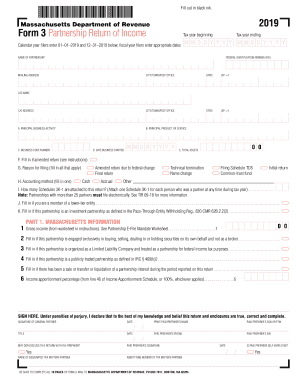
This guide provides a clear and supportive overview of filling out the Massachusetts Department of Revenue Form 3, designed for partnerships. This form is essential for reporting income, deductions, and credits for the tax year, ensuring you comply with state requirements.
Follow the steps to successfully complete the MA DoR 3.
- Click the ‘Get Form’ button to obtain the form and open it in your preferred editor.
- Begin by entering the tax year for which you are filing. If you are a calendar year filer, input '01-01-2019' for the beginning date and '12-31-2019' for the ending date. If you are a fiscal year filer, enter the appropriate dates in the MM DD YYYY format.
- Fill in the name of the partnership and the federal identification number (FID) in the designated fields.
- Provide the mailing address of the partnership, including city/town, state, and ZIP code. If there is a different address for correspondence, fill in the C/O address fields as necessary.
- Complete Section A by specifying the principal business activity and the principal product or service the partnership provides.
- In Section D, enter the date the business started in MM DD YYYY format.
- Input the total assets for the partnership in the designated field.
- If the return is amended, complete Section F and state the reason for filing in Section G. Indicate the accounting method used in Section H by checking the relevant box (Cash, Accrual, etc.).
- Enter the number of Schedules 3K-1 attached to this return in Section I. Ensure that you have an attached Schedule 3K-1 for each partner.
- Complete any applicable sections regarding partnerships under audit, withholding amounts, and payments made, as described in the form.
- Sign the form where indicated, including both the general partner's signature and the paid preparer's details, if applicable.
- Make sure to review the filled-out form for accuracy. At the end, users can save changes, download, print, or share the completed form.
Complete your MA DoR 3 form online today to ensure timely filing and compliance.
Experience a faster way to fill out and sign forms on the web. Access the most extensive library of templates available.
Related content
Sep 25, 2019 - 25th, 2019, 3:39 pm Read more. Hide Show Alerts ... DOR has released its...
... any exemptions. Source Publication: FY2016 Assessed Values by Class, Massachusetts...
Dorchester is the county town of Dorset, England. It is situated between Poole and...
Get answers to your most pressing questions about US Legal Forms API.
Do I need to file a Kentucky tax return?
A. No, you do not have a filing requirement with Kentucky because your modified gross income is not greater than $12,140; however, you will need to file a return to claim a refund of any Kentucky income tax withheld. ... This form will allow the employer to discontinue withholding state tax from your pay.
Can I file Massachusetts taxes online?
E-file your personal income taxes for free. ... Please note that the Massachusetts Department of Revenue does not endorse or recommend any particular tax preparation software. Also, check out Fillable Forms a new free option for Massachusetts taxpayers to file a personal income tax return.
Do you have to file state taxes if you don't owe?
State tax-filing requirements, however, differ from state to state, so even if you don't owe state tax you may be required to file a return. In some cases, there may be other reasons you'll want to file even if you don't have a legal requirement.
Who must file a ma tax return?
If you're a nonresident with an annual Massachusetts gross income of more than either $8,000 or the prorated personal exemption, whichever is less, you must file a Massachusetts tax return. You are an individual nonresident if you are neither a full-year or part-year resident.
Do I have to file a Massachusetts tax return?
Generally, if you make $8,000 or more you'll need to file a Massachusetts tax return. ... Part-year residents who receive or accrue Massachusetts gross income in excess of $8,000 during the taxable year are required to file a Massachusetts income tax return.
How long does it take to get Massachusetts tax refund 2019?
Today we'll be taking in all returns electronically filed to date and we expect to issue our first refunds on Monday, February 4. In general, the expected turnaround time for a MA income tax refund is 4-6 weeks for an e-filed return or 8-10 weeks for a paper return. Taxpayers can check on the status of a refund online.
When can I file my tax returns 2019?
The Internal Revenue Service (IRS) began accepting and processing 2018 federal tax returns on January 28, 2019. The deadline to file federal taxes for most taxpayers was April 15, 2019, unless you filed for an extension.
When can I file my Massachusetts tax return?
(Boston, MA) The Massachusetts Department of Revenue (DOR) announced today that the state tax filing season opens on Monday, January 23, and the deadline to file is Tuesday, April 18, 2017.
When can I file my Massachusetts tax return 2019?
Massachusetts State Income Tax Return forms for Tax Year 2018 (Jan. 1 - Dec. 31, 2018) can be e-Filed in conjunction with an IRS Income Tax Return until October 15, 2019. In January 2020, you can e-File Tax Year 2019.
How do I contact Massachusetts Department of Revenue?
Contacting Massachusetts Department of Revenue (DOR) - by phone or otherwise. While 800-392-6089 is Massachusetts Department of Revenue (DOR)'s best toll-free number, there are 2 total ways to get in touch with them.
Use professional pre-built templates to fill in and sign documents online faster. Get access to thousands of forms.
If you believe that this page should be taken down, please follow our DMCA take down process here.