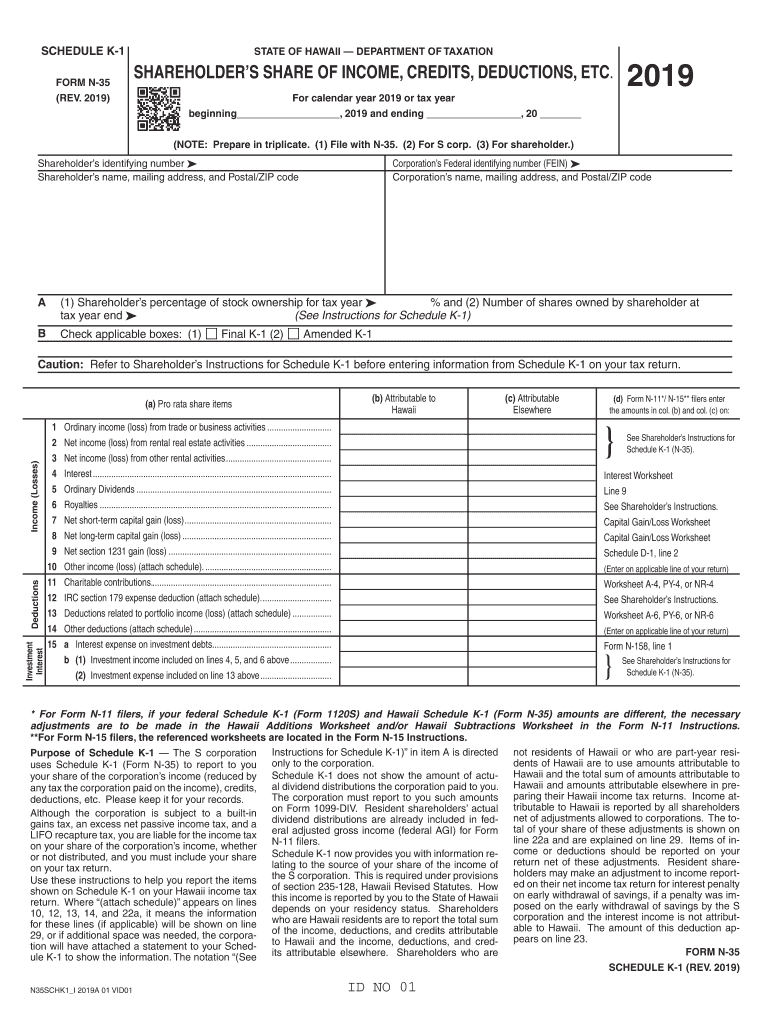
INCOME, CREDITS, DEDUCTIONS, ETC. , 20 (NOTE: Prepare in triplicate. (1) File with N-35. (2) For S corp. (3) For shareholder.) Shareholder s identifying number Shareholder s name, mailing address, and Postal/ZIP code Corporation s Federal identifying number (FEIN) Corporation s name, mailing address, and Postal/ZIP code A (1) Shareholder s percentage of stock ownership for tax year % and (2) Number of shares owned by shareholder at tax year end (See.
Loading

Open form follow the instructions

Easily sign the form with your finger

Send filled & signed form or save
How to fill out the HI Schedule K-1 Form N-35 online
Filling out the HI Schedule K-1 Form N-35 online can be a straightforward process with the right guidance. This guide will walk you through each section of the form, ensuring that you understand how to accurately report your share of income, credits, and deductions from the S corporation.
Follow the steps to complete the HI Schedule K-1 Form N-35 online.
- Click the ‘Get Form’ button to obtain the form and open it in the editor.
- Fill in the shareholder’s identifying number and name, along with their mailing address and Postal/ZIP code. Ensure the information is accurate.
- Enter the corporation's Federal identifying number (FEIN) and the corporation's name, mailing address, and Postal/ZIP code.
- In section A, input the shareholder’s percentage of stock ownership for the tax year and the total number of shares owned by the shareholder at the tax year end.
- Indicate whether this is a final K-1 or an amended K-1 by checking the respective boxes.
- Proceed to fill in the income categories, including ordinary income, rental income, interest, ordinary dividends, and others as listed. Enter amounts attributable to Hawaii and elsewhere as appropriate.
- Complete the credits section by detailing any tax credits applicable to the shareholder, following the instructions for the corresponding forms.
- If necessary, attach additional schedules for any items requiring further details or explanations, especially for deductions.
- Once all fields are filled out correctly, review the form for accuracy and completeness.
- Finally, save your changes. You can choose to download, print, or share the completed form as needed.
Start filling out your HI Schedule K-1 Form N-35 online today for a smooth filing experience.
Experience a faster way to fill out and sign forms on the web. Access the most extensive library of templates available.
Related content
May 30, 2019 - 2018 N-3 Declaration of Estimated Income Tax for Corporations and S...
(a) Married individuals filing joint returns and surviving spousesThere is hereby...
May 2, 2017 — Railroad Retirement Tax Return; or Schedule H (Form. 1040) filed ... 97-9...
Get answers to your most pressing questions about US Legal Forms API.
Where is Schedule K 1 reported on Form 1040?
Use Schedule K-1 to report a beneficiary's share of the estate's or trust's income, credits, deductions, etc. on your Form 1040, U.S. Individual Income Tax Return. Keep it for your records. Don't file it with your tax return, unless backup withholding was reported in box 13, code B.
Do I need to report k 1 with no income?
K1 No Income - Do I need to report? All income needs to be reported --however all losses do not have to be reported --As long as return is substantially correct.
How is k1 income taxed?
How is K1 Income Taxed? ... Partnerships, S Corporations, estates and trusts provide K-1 forms to partners and shareholders for filing their individual tax returns. Income and tax liabilities are passed through the corporation or entity to the taxpayer. K-1 income or loss is passed through to the individual tax return.
Is a k1 considered earned income?
K-1s are provided to the IRS with the partnership's tax return and also to each partner so that they can add the information to their own tax returns. For example, if a business earns $100,000 of taxable income and has four equal partners, each partner should receive a K-1 with $25,000 of income on it.
Does a k1 count as income?
A Schedule K-1 is not entirely like a 1099 or W2, though. If you're getting a Schedule K-1 form from an entity you partly own, you may also be able to claim a share of the losses, deductions, and credits, as well as your share of the income.
How much of a business loss can I deduct?
Limits on Some Deductions For instance, if you plan to deduct net operating losses, the IRS limits carry-back to 50 percent of your taxable income in the fifth year. If you are a business employee, you can only deduct up to 50 percent of the cost of your business meals in most situations.
How many years can you claim a business loss on your taxes?
The IRS will only allow you to claim losses on your business for three out of five tax years. If you don't show that your business was profitable longer than that, then the IRS can prohibit you from claiming your business losses on your taxes.
Do I have to pay taxes if my business shows a loss?
If your net business income was zero or less, you may not need to pay taxes. The IRS may still require you to file a return, however. Even when your business runs in the red, though, there may be financial benefits to filing. If you don't owe the IRS any money, however, there's no financial penalty if you don't file.
Can business losses offset personal income?
Yes, The IRS allows taxpayers to write off the loss from a business on your personal tax return. Example, if you have a regular day job, you can use the loss from a side business to offset your W2 or other income. For more information, please see; Taking Business Tax Deductions.
How does business loss affect personal taxes?
If you own an LLC, S corporation, or partnership, your share of the business's losses affects your individual tax return. You can deduct a business loss from personal income the same way a sole proprietor does. C corporation owners cannot deduct business losses on their personal tax returns.
Use professional pre-built templates to fill in and sign documents online faster. Get access to thousands of forms.
If you believe that this page should be taken down, please follow our DMCA take down process here.
This form is available in several versions. Select the version you need from the drop-down list below.