Loading
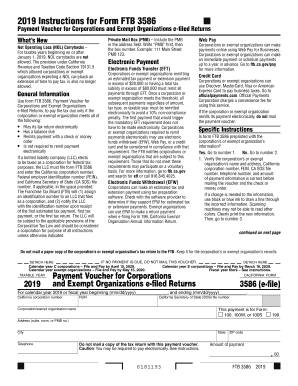
Get Ca Ftb 3586 2019
How it works
-

Open form follow the instructions
-

Easily sign the form with your finger
-

Send filled & signed form or save
How to fill out the CA FTB 3586 online
Filling out the CA FTB 3586 form online is a straightforward process. This guide is designed to provide you with clear, step-by-step instructions to ensure you complete the Payment Voucher for Corporations and Exempt Organizations confidently and accurately.
Follow the steps to complete the CA FTB 3586 form online.
- Click the ‘Get Form’ button to obtain the form and open it in the editor.
- Verify if the form is preprinted with the corporation’s or exempt organization’s information. If yes, check that the name, address, California corporation number, Federal Employer Identification Number (FEIN), California Secretary of State (CA SOS) file number, telephone number, and payment amount are correct. If there are any inaccuracies, use black or blue ink to cross out the incorrect information and clearly print the correct details.
- If the form is not preprinted, you will need to fill out the corporation’s or exempt organization’s name and address (in capital letters), California corporation number, FEIN, CA SOS file number, telephone number, and amount of payment in the specified fields.
- Ensure that the information on the CA FTB 3586 matches the information submitted electronically to the FTB and printed on the paper copy of the corporation’s or exempt organization’s 2019 tax return.
- Make the payment using a check or money order made payable to the 'Franchise Tax Board.' Write the California corporation number, FEIN, CA SOS file number, and '2019 FTB 3586' on the payment instrument.
- Enclose, but do not staple, the check or money order with the completed voucher. Mail it to the Franchise Tax Board at the specified address.
- After completing all sections, users can save changes, download, print, or share the form as needed.
Complete your forms online today to ensure timely and accurate submissions.
Get form
Experience a faster way to fill out and sign forms on the web. Access the most extensive library of templates available.
Make out a money order or check to the Franchise Tax Board. Write down the SOS file number and your Employer Identification Number (EIN), plus the words "2017 [or current year] FTB 3522" on your form of payment. Separate the voucher from the lower part of the page.
Get This Form Now!
Use professional pre-built templates to fill in and sign documents online faster. Get access to thousands of forms.