Loading
Get Ca Ftb 3525 2019
How it works
-

Open form follow the instructions
-

Easily sign the form with your finger
-

Send filled & signed form or save
How to fill out the CA FTB 3525 online
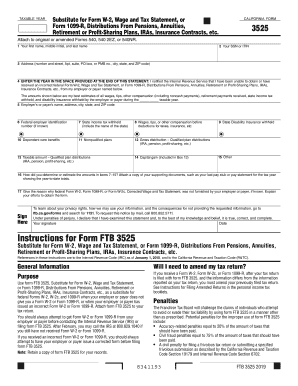
The CA FTB 3525 form serves as a substitute for federal Form W-2 or Form 1099-R when you have not received or have received an incorrect version from your employer. This guide provides clear, step-by-step instructions on filling out the form online to ensure accurate submission and compliance with tax regulations.
Follow the steps to fill out the CA FTB 3525 online:
- Press the ‘Get Form’ button to access the CA FTB 3525 and open it in the editing tool.
- In the first section, enter your first name, middle initial, and last name as they appear on official documents.
- Next, provide your Social Security Number (SSN) or Individual Taxpayer Identification Number (ITIN).
- Complete your address by filling in the number and street, apartment or suite number, post office box or PMB number, city, state, and ZIP code.
- Indicate the taxable year by entering the year that corresponds with your statement regarding the IRS notifications about your inability to obtain or the receipt of an incorrect Form W-2 or Form 1099-R.
- Fill in the name, address, city, state, and ZIP code of your employer or payer in the appropriate fields.
- If known, enter the federal employer identification number (FEIN) for your employer or payer.
- Report the state income tax withheld, making sure to include the name of the state.
- Continue by entering the total wages, tips, or other compensation received before any deductions for taxes or insurance.
- If applicable, fill out any dependent care benefits you have received, as well as any amounts related to nonqualified plans or gross distributions from qualified plans.
- Calculate and enter the taxable amount derived from qualified plan distributions.
- Provide any capital gains included in the amount reported for qualified plan distributions in the designated box.
- List any other relevant amounts that may apply to your situation in the other income field.
- In the next section, detail how you determined or estimated the amounts reported in items 7-15 and be sure to attach supporting documents such as your last pay stub.
- Finally, provide a reason for not receiving Federal Form W-2 or Form 1099-R, detailing your efforts to obtain these forms from your employer.
- Sign and date the form to certify that all information provided is true and accurate to the best of your knowledge.
Complete the CA FTB 3525 online to ensure your tax situation is accurately reported.
Get form
Experience a faster way to fill out and sign forms on the web. Access the most extensive library of templates available.
During the tax filing season, many libraries and post offices offer free tax forms to taxpayers. Some libraries also have copies of commonly requested publications. Many large grocery stores, copy centers and office supply stores have forms you can photocopy or print from a CD.
Get This Form Now!
Use professional pre-built templates to fill in and sign documents online faster. Get access to thousands of forms.