Loading
Get In Dor It-40 2019
How it works
-

Open form follow the instructions
-

Easily sign the form with your finger
-

Send filled & signed form or save
How to fill out the IN DoR IT-40 online
Filling out your Indiana Full-Year Resident Individual Income Tax Return (IT-40) online can be a straightforward process when you have the right guidance. This guide will lead you through each section and field of the form, ensuring that you complete it accurately and efficiently.
Follow the steps to complete your IT-40 online
- Click ‘Get Form’ button to obtain the form and open it in the editor.
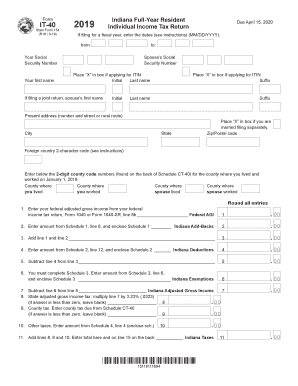
- Begin by entering your personal information. This includes your Social Security Number, first and last name, and your spouse's details if applicable. Make sure to place an 'X' in the box if you are applying for an Individual Taxpayer Identification Number (ITIN).
- Provide your present address, including your street address, city, state, and ZIP code. If you are residing in a foreign country, include its 2-character code.
- List the county codes for where you lived and worked, as well as your spouse's information, as requested on the form.
- Enter your federal adjusted gross income from your federal tax return (Form 1040 or Form 1040-SR) in the specified field, rounding as instructed.
- Input the amount from Schedule 1, and include that schedule with your submission. Add this amount to your federal adjusted gross income.
- Identify and enter Indiana-specific deductions from Schedule 2, followed by calculating your Indiana adjusted gross income.
- Complete Schedule 3 to determine your Indiana exemptions, and enter the amount accordingly.
- Calculate your Indiana adjusted gross income tax by multiplying the previous line by the tax rate of 3.23%. Make sure to leave it blank if the result is negative.
- If applicable, fill in additional taxes due from Schedule CT-40 and other relevant schedules.
- Sum the taxes calculated in previous lines and enter the total in the designated area.
- Detail all applicable credits and deductions from the relevant schedules, ensuring to total them correctly.
- If your credits exceed your taxes due, calculate any potential refund and indicate how much of it you wish to apply to your estimated tax account for the upcoming year.
- Enter your banking information if you choose to receive a direct deposit for your refund, selecting the correct type of account.
- Finally, review all entries for accuracy, sign and date the return, and enclose any necessary schedules before submission. Choose to save changes, download, print, or share the finished form.
Complete your IN DoR IT-40 online today to ensure a smooth filing process.
Get form
Experience a faster way to fill out and sign forms on the web. Access the most extensive library of templates available.
Related links form
Get This Form Now!
Use professional pre-built templates to fill in and sign documents online faster. Get access to thousands of forms.