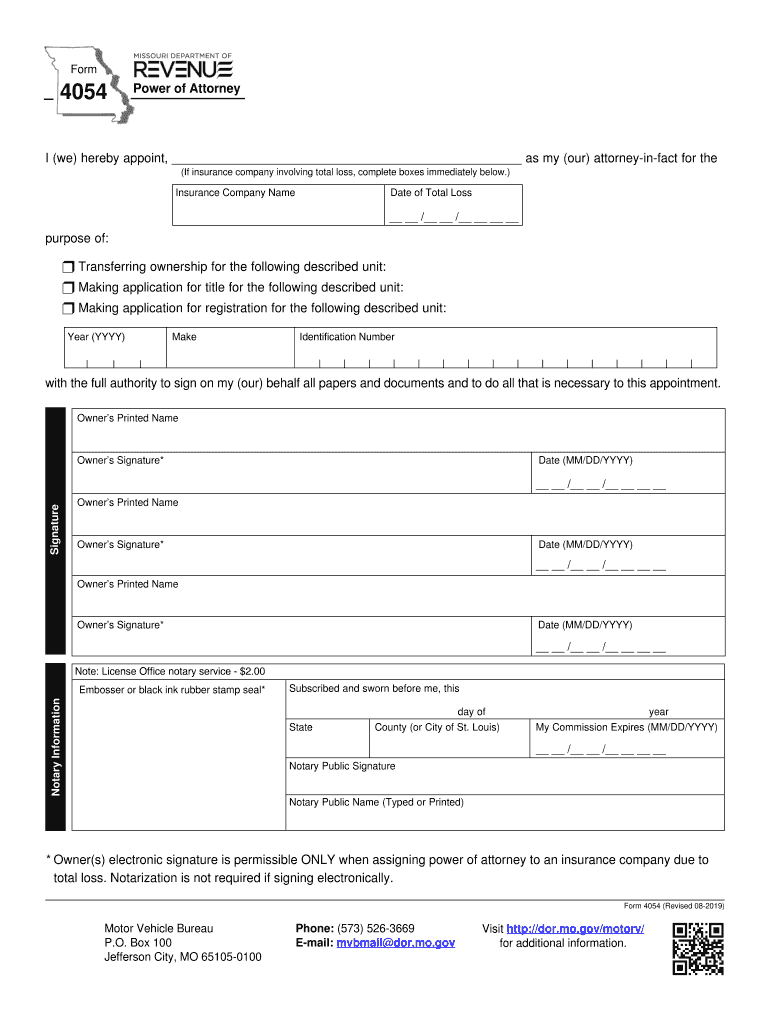
Total loss, complete boxes immediately below.) Insurance Company Name Date of Total Loss / / purpose of: r Transferring ownership for the following described unit: r Making application for title for the following described unit: r Making application for registration for the following described unit: Year (YYYY) Make Identification Number with the full authority to sign on my (our) behalf all papers and documents and to do all that is necessary to thi.
Loading

Open form follow the instructions

Easily sign the form with your finger

Send filled & signed form or save
How to fill out the MO 4054 online
The MO 4054 form, known as the power of attorney document, allows users to appoint an attorney-in-fact for various purposes, including transferring ownership or applying for title and registration. This guide will provide clear and actionable steps to complete the MO 4054 form online.
Follow the steps to accurately fill out the MO 4054 form online.
- Click ‘Get Form’ button to obtain the form and open it in the editor.
- Begin filling out the form by appointing your attorney-in-fact. Enter the full name of the person you are designating in the designated field.
- If the form involves an insurance company due to a total loss, fill in the insurance company name and the date of total loss in the appropriate boxes.
- Select the purpose of the appointment by checking the corresponding box for transferring ownership, making application for title, or making application for registration.
- Provide the year, make, and identification number of the vehicle or unit being transferred or registered.
- Type the owner’s printed name, sign the form, and add the date in the respective fields.
- If there are additional owners, repeat step 6 for each owner, ensuring all signatures and dates are completed.
- Complete the notary section, if necessary, by providing notary information, including the notary public's signature and name, and the expiration date of their commission.
- Once all sections are filled, review the form for accuracy. You can then save changes, download, print, or share the completed form.
Start completing your MO 4054 form online today!
Experience a faster way to fill out and sign forms on the web. Access the most extensive library of templates available.
Related content
My Commission Expires (MM/DD/YYYY). Notary Public Signature. Notary Public Name (Typed or...
Jan 27, 2014 — rity Act, the Missouri Unemployment Compensation Law was enacted in...
LTC4054-4.2/LTC4054X-4.2 Standalone Linear Li-Ion Battery Charger with Thermal ... JEDEC...
Use professional pre-built templates to fill in and sign documents online faster. Get access to thousands of forms.
If you believe that this page should be taken down, please follow our DMCA take down process here.