Loading
Get Ne Form 10 2020-2026
How it works
-

Open form follow the instructions
-

Easily sign the form with your finger
-

Send filled & signed form or save
How to fill out the NE Form 10 online
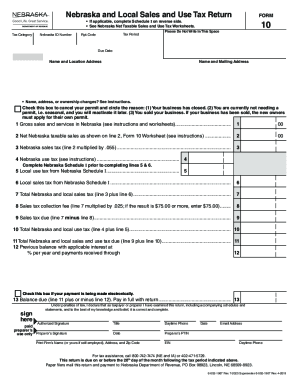
This guide offers a clear and comprehensive overview of how to complete the Nebraska and Local Sales and Use Tax Return, known as Form 10, online. Whether you are filing for the first time or are familiar with the process, this step-by-step guide will help ensure that you successfully complete the form.
Follow the steps to complete your NE Form 10 online
- Click ‘Get Form’ button to obtain the form and open it in the editor.
- Enter your Nebraska ID number, ensuring that it matches your sales tax permit to avoid any discrepancies.
- Specify the tax period for which you are filing this return. Make sure to enter the correct reporting code as well.
- Fill in your name and mailing address. If there have been any changes in your business name or address, refer to the provided instructions on how to properly update this information.
- Complete the sales and services section by entering your gross sales in Nebraska. Refer to the Nebraska Net Taxable Sales and Use Tax Worksheets for assistance with any exemptions or deductions.
- Calculate the Nebraska sales tax by multiplying your net taxable sales by the tax rate provided in the instructions.
- If applicable, fill out Schedule I for local sales and use tax by entering the amounts from the local tax worksheet.
- Review your calculations for sales tax collection fees and total tax due. Ensure all figures are accurate to prevent penalties.
- Sign and date the form in the designated areas. Remember that electronic filers must provide the name of the person completing the return during the filing process.
- Once all sections of the form are complete, you can save the changes, download, print, or share the form as needed.
Start completing your NE Form 10 online today for a seamless filing experience!