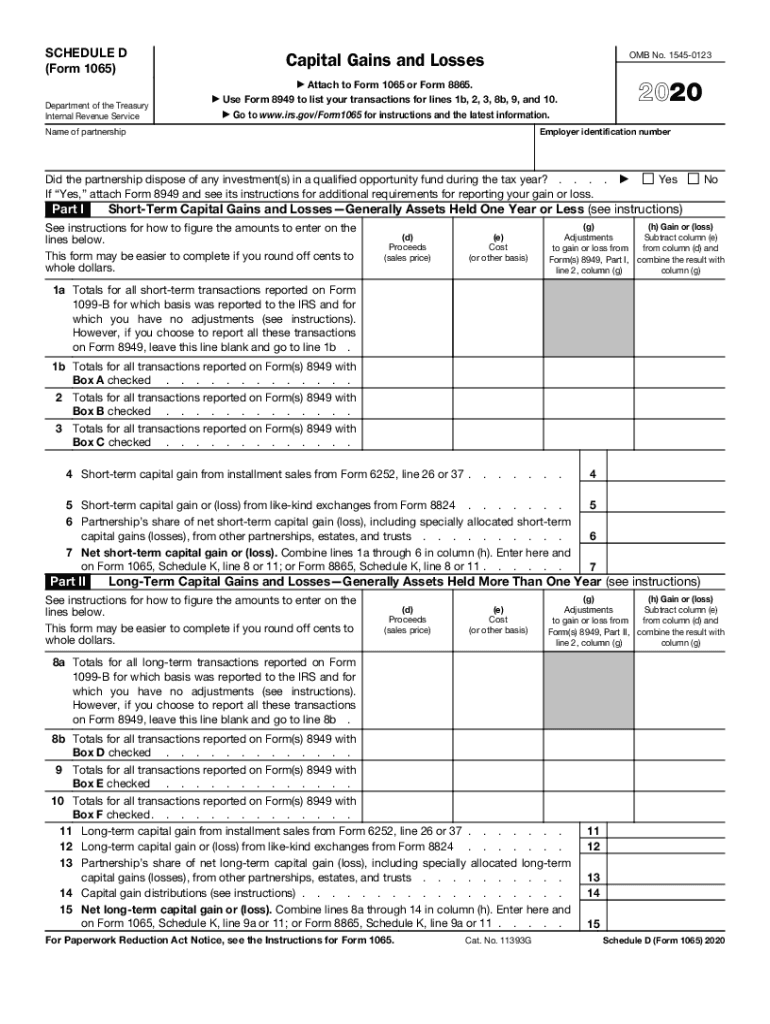
Ransactions for lines 1b, 2, 3, 8b, 9, and 10. Go to www.irs.gov/Form1065 for instructions and the latest information. Employer identification number Name of partnership Did the partnership dispose of any investment(s) in a qualified opportunity fund during the tax year? . . . . If Yes, attach Form 8949 and see its instructions for additional requirements for reporting your gain or loss. Part I Yes No Short-Term Capital Gains and Losses Generally Assets Held One Year or L.
Loading

Open form follow the instructions

Easily sign the form with your finger

Send filled & signed form or save
How to fill out the IRS 1065 - Schedule D online
Filling out the IRS 1065 - Schedule D can be a straightforward process with the right guidance. This document is essential for reporting capital gains and losses associated with partnerships, making it important for your tax submissions.
Follow the steps to complete Schedule D accurately.
- Press the ‘Get Form’ button to access the form and open it in the editor.
- Begin by entering the employer identification number and name of the partnership at the top of the form.
- Indicate whether the partnership disposed of any investments in a qualified opportunity fund during the tax year by selecting ‘Yes’ or ‘No.’ If ‘Yes,’ make sure to attach Form 8949 and follow its instructions for additional reporting requirements.
- Proceed to Part I where you will report short-term capital gains and losses. You will need to gather the proceeds and cost basis for your short-term transactions.
- For lines 1a through 1b, enter totals for transactions reported on Form 1099-B and Form 8949, noting whether basis was reported to the IRS.
- Continue filling out lines 2 through 7 by entering any additional short-term gains or losses as required (e.g., from installment sales or like-kind exchanges).
- After completing Part I, move on to Part II, which focuses on long-term capital gains and losses. Repeat the process of entering proceeds and cost basis for assets held more than one year.
- Fill out lines 8a through 15 in Part II similar to how you completed Part I, ensuring all necessary data from Form 8949 is included.
- Review all entries for accuracy. Each calculation should be verified against your transaction records.
- Once you have completed and reviewed the form, save your changes, and you can then download, print, or share the form as needed.
Take the next step in managing your capital gains and losses by completing your documents online today.
Experience a faster way to fill out and sign forms on the web. Access the most extensive library of templates available.
Related content
Instructions for Schedule D (Form 1065) (2018) ... 1065) and its instructions, such as...
Generally, the threshold amount for the upcoming year is updated by IRS each fall...
Publication 4163 Modernized e-File (MeF) Information for Authorized IRS e-File Providers...
Get answers to your most pressing questions about US Legal Forms API.
How do I report a wash sale loss disallowed?
To report your disallowed loss, you'll first look at the Form 1099-B that comes from your broker at the start of the year. Box 5 on that form will be checked, indicating that the reported loss was a noncovered security. To report it on Schedule D, start with Form 8949: Sales and Other Dispositions of Capital Assets.
How do I report a wash sale of stock?
Reporting Wash Sales All sales of investments such as stocks or other securities are reported on IRS Form 8949, Sales and Other Dispositions of Capital Assets, and then inputted on a Schedule D (Form 1040), Capital Gains and Losses.
How do you avoid capital gains distributions?
Buy and Hold You can't control whether your fund will make a capital gains distribution. However, you can avoid triggering your own capital gains by hanging on to your mutual fund shares. Even if you have a profit in your fund, it doesn't become taxable until you sell your shares.
How are capital gains taxed in 2019?
The current capital gains tax rates under the new 2018 tax law are zero, 15 percent and 20 percent, depending on your income. The 2018 capital gains tax rate is holding steady through 2019, but the income required for each rate has changed.
What is the difference between capital gains and capital gain distributions?
Capital gains are when you sell an asset for more than it was purchased for. ... A capital gain distribution is when the mutual fund, or ETF, has sold assets and now has capital gains. They then pass the gains onto the investors.
What is a capital gain distribution and how is it taxed?
A capital gains distribution is the investor's share of the proceeds of a fund's sale of stocks and other assets. The investor must pay capital gains taxes on distributions, whether they are taken as cash or reinvested in the fund.
How do I report capital gain distributions?
Consider capital gain distributions as long-term capital gains no matter how long you've owned shares in the mutual fund. Report the amount shown in box 2a of Form 1099-DIV on line 13 of Schedule D (Form 1040), Capital Gains and Losses.
Why is there ordinary income on a sale of a partnership interest?
Hot Assets The selling partner must recognize the income just as if those assets were sold, with the ordinary income being allocated to the partner. This rule prevents the conversion of ordinary income into capital income that is usually taxed at a lower rate through the sale of the partnership interest.
Do partnerships pay capital gains tax?
Therefore by virtue of s.59, if a partnership disposes of a chargeable asset and makes a capital gain, that resulting capital gain is charged on the individual partners and not on the partnership itself. Partnerships therefore do not pay capital gains tax. Similarly, partnerships do not pay income tax.
Is the sale of a partnership interest a capital gain?
Partnership taxation establishes the general rule that gain on sale a partnership interest receives favorable capital gain treatment. ... To the extent that a sale is attributable to the selling partner's share of the hot assets, the resulting gain or loss is taxed at ordinary income rates.
Use professional pre-built templates to fill in and sign documents online faster. Get access to thousands of forms.
If you believe that this page should be taken down, please follow our DMCA take down process here.