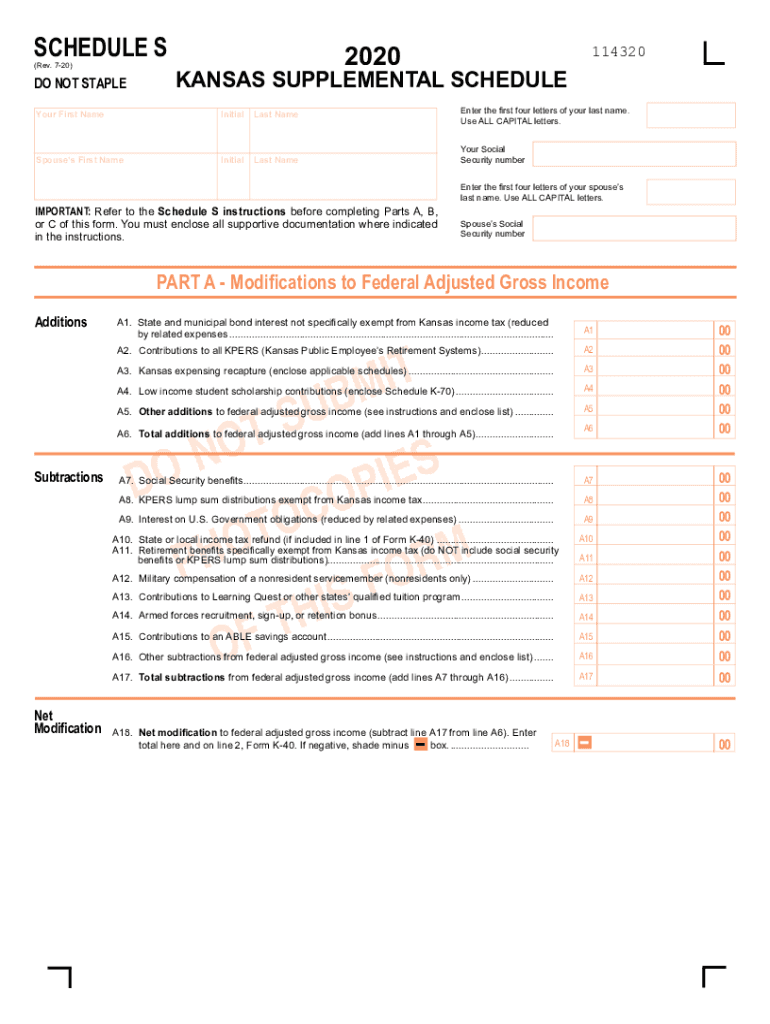
Ctions before completing Parts A, B, or C of this form. You must enclose all supportive documentation where indicated in the instructions. 114320 Enter the first four letters of your last name. Use ALL CAPITAL letters. Your Social Security number Enter the first four letters of your spouse s last name. Use ALL CAPITAL letters. Spouse s Social Security number PART A - Modifications to Federal Adjusted Gross Income Additions A1. State and municipal bond interest not specifically exempt fro.
Loading

Open form follow the instructions

Easily sign the form with your finger

Send filled & signed form or save
How to fill out the KS DoR Schedule S online
Filling out the KS DoR Schedule S is an essential step for accurately reporting modifications to your federal adjusted gross income. This guide provides clear, step-by-step instructions to help you complete the form online with confidence.
Follow the steps to fill out the KS DoR Schedule S with ease.
- Click ‘Get Form’ button to access the KS DoR Schedule S form online and open it in the designated editor.
- Begin by entering your first name, middle initial, and last name in the appropriate fields. Ensure that your entries are free of errors.
- Input your spouse's first name, middle initial, and last name, if applicable. Again, double-check for accuracy.
- Follow the instructions provided in the form to fill out the sections labeled 'Part A', 'Part B', and 'Part C'. Make sure to gather and enclose any required supportive documentation as indicated.
- For 'Part A', report any additions to your federal adjusted gross income in the designated fields A1 through A6. Add the total additions and enter the sum in line A6.
- Proceed to the subtractions in 'Part A' by specifying amounts in fields A7 through A17. Calculate the total subtractions and record it on line A17.
- Calculate your net modification by subtracting the total subtractions from total additions in line A18.
- In 'Part B', document your income for nonresidents and part-year residents. Fill out fields B1 through B23 according to the instructions provided, ensuring all information pertains to Kansas sources.
- For 'Part C', report your Kansas itemized deductions by entering values in fields C1 through C6 and record the total on line C6.
- Once all sections are completed accurately, save your changes to the form. You will have the option to download, print, or share your completed KS DoR Schedule S.
Start filling out your KS DoR Schedule S online today to ensure your financial records are accurate and complete.
Experience a faster way to fill out and sign forms on the web. Access the most extensive library of templates available.
Related content
A service provided through a partnership of the Kansas Department of Revenue and...
Examples of moving conformity date states include: AK, CO, DE, DC, IL, KS, LA, MD, MA, MO...
A flat tax is a tax with a single rate on the taxable amount, after accounting for any...
Get answers to your most pressing questions about US Legal Forms API.
What is a Schedule 3 non refundable tax credit?
New on the 2019 draft version of Schedule 3 is the addition of refundable credits and other payments. A refundable tax credit can result in a refund even if it drops your tax owed past $0. If the credit reduces the amount of tax you owe to $0, you can get the refundable portion of the credit back as a refund.
What is a Schedule 3 on Turbotax?
What is a schedule 3? Schedule 3 is for nonrefundable credits. Did you contribute to a retirement plan, either directly or by having money taken out of your paycheck, such as for a 401(k) plan? If so, you might be eligible for the retirement savings contributions credit ("Saver's Credit"), which requires Schedule 3.
What is a Schedule 3 tax?
New Schedule 3: (Nonrefundable Credits) These include the credits for higher-education expenses, child and dependent care expenses, adoption expenses, retirement savers, residential energy-saving expenditures, electric vehicles, and foreign taxes.
What is a Schedule 3 on taxes?
New Schedule 3: (Nonrefundable Credits) These include the credits for higher-education expenses, child and dependent care expenses, adoption expenses, retirement savers, residential energy-saving expenditures, electric vehicles, and foreign taxes.
What is a form 8962?
The purpose of Form 8962 is to allow filers to calculate their Premium Tax Credit (PTC) amount and to reconcile that amount with any Advance Premium Tax Credit (APTC) payments that have been made for the filer throughout the year. Not everyone can file Form 8962 and claim the Premium Tax Credit.
What is a Schedule 4 tax form?
Schedule 4 is where you'll report other taxes you might owe in addition to your standard income tax.
What is a Schedule 1 tax form?
Schedule 1, Additional Taxes and Adjustments to Income Taxpayers use this schedule to report income or adjustments to income that can't be entered directly on Form 1040. ... This also includes the student loan interest deduction, self-employment tax, or educator expenses.
What is the schedule 2 tax form 2018?
Schedule 1 is for taxpayers with additional sources of income (not from a W-2) or adjustments to income, such as IRA contributions, student loan interest, and health savings account contributions. Schedule 2 is a form for people with some other forms of taxes, such as on a child's unearned income.
What is a Schedule 2 tax form?
Schedule 2 Use this if you need to report additional taxes owned such as the alternative minimum tax or taxes on other forms of income such as a child's unearned income from investments. ... That can include self-employment tax, uncollected Social Security taxes and additional taxes on IRA withdrawals.
Is 1040a the same as 1040 Schedule A?
If you need to file an individual federal tax return, you'll use IRS Form 1040, 1040EZ or 1040A. ... 1040A is longer and a bit more complex, and Form 1040 is the most detailed and challenging of the lot. While anyone can file Form 1040, you must meet certain requirements to use the shorter 1040EZ or 1040A forms.
Use professional pre-built templates to fill in and sign documents online faster. Get access to thousands of forms.
If you believe that this page should be taken down, please follow our DMCA take down process here.
This form is available in several versions. Select the version you need from the drop-down list below.