Loading
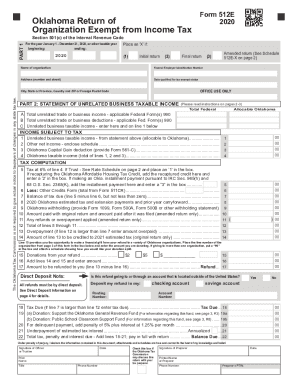
Get Ok Otc 512e 2020
How it works
-

Open form follow the instructions
-

Easily sign the form with your finger
-

Send filled & signed form or save
How to fill out the OK OTC 512E online
This guide provides comprehensive instructions on how to fill out the OK OTC 512E online. Whether you are an experienced user or filling out the form for the first time, this step-by-step guide will help you navigate through each section of the form with confidence.
Follow the steps to complete the OK OTC 512E online
- Press the ‘Get Form’ button to access the OK OTC 512E. This will allow you to open the form in your preferred online editor for completion.
- Begin with Part 1, which requires you to provide your organization's name, address, and federal employer identification number. Ensure to indicate whether this is your initial or final return by placing an ‘X’ in the appropriate box.
- Enter the period covered by your tax return, specifying the beginning and ending dates for the year or other taxable year.
- If applicable, check the amended return box at the top of the document when you are submitting a revised return and complete Schedule 512E-X.
- Proceed to Part 2 where you will report any unrelated business taxable income. Fill in the total unrelated trade or business income and total deductions as derived from the applicable Federal Forms 990.
- Calculate the unrelated business taxable income and enter it in the designated section.
- Complete the income subject to tax section, including calculating your Oklahoma taxable income based on the figures you have entered.
- In the tax computation section, report the tax at a rate of 6% on the taxable income found previously, and list any other credits applicable to your return.
- Finally, review the refund or tax due sections of the form, calculating any amounts that need to be reported. Ensure to fill in the direct deposit information for your refund if applicable.
- Once you have filled out all sections of the form thoroughly, save your changes. You can then choose to download, print, or share the completed form as needed.
Complete the OK OTC 512E online today for efficient processing of your tax information.
Get form
Experience a faster way to fill out and sign forms on the web. Access the most extensive library of templates available.
Get This Form Now!
Use professional pre-built templates to fill in and sign documents online faster. Get access to thousands of forms.