Print completed form and remember to add your signature. Phone Number Date View full page.

How it works
  • Open form

    Open form follow the instructions

  • Easily sign form

    Easily sign the form with your finger

  • Share form

    Send filled & signed form or save

How to fill out the WI DoR WT-7 online

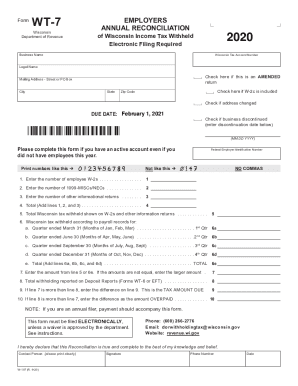
The WI DoR WT-7 form is essential for reporting annual reconciliation of Wisconsin income tax withheld by employers. This guide provides clear and supportive instructions to help users with little legal experience fill out the form online effectively.

Follow the steps to complete the WI DoR WT-7 accurately.

  1. Press the ‘Get Form’ button to access the WT-7 form and open it in the designated online editor.
  2. Fill in the year for which you are reporting. If it is not 2020, adjust the year accordingly.
  3. Enter your 15-digit Wisconsin Tax Account Number without dashes.
  4. Provide your business name and legal name in the designated fields.
  5. If you are submitting an amended return, check the relevant box.
  6. Complete your mailing address, including street or PO Box, city, state, and zip code.
  7. If your W-2c is included, check the corresponding box.
  8. If your address has changed, check the appropriate box.
  9. Indicate if your business has been discontinued, and if so, enter the discontinuation date.
  10. Enter your 9-digit Federal Employer Identification Number without dashes or commas.
  11. Fill in the number of employee W-2s, 1099-MISCs/NECs, and other informational returns as applicable.
  12. Add lines 1, 2, and 3 to provide the total in line 4.
  13. Enter the total Wisconsin tax withheld shown on your W-2s and other information returns in line 5.
  14. Input the taxable amounts according to your payroll records for each quarter in the designated sections.
  15. Calculate and enter the total from lines 6a, 6b, 6c, and 6d into line 6e.
  16. Choose the larger amount from line 5 or line 6e and enter it on line 7.
  17. Report total withholding from deposit reports (Forms WT-6 or EFT) on line 8.
  18. Calculate the tax amount due or overpaid as indicated on lines 9 and 10.
  19. Once all fields are completed, save your changes, download the form, print it, and remember to add your signature.

Complete your WI DoR WT-7 form online today for a smooth filing experience.

Get form

Experience a faster way to fill out and sign forms on the web. Access the most extensive library of templates available.

Related content

Form WT-7 - Wisconsin Department of Revenue...

It is a secure process developed by the Department of Revenue (DOR) for employers and/or...

Learn more
Wisconsin Department of Revenue

Jun 18, 2009 - Wisconsin Department of Revenue ... DORIncome@revenue.wi.gov ... sales use...

Learn more
W166 Wisconsin Employers Withholding Tax Guide...

State of Wisconsin Department of Revenue Wisconsin Withholding Tax ...... A separate...

Learn more
Questions & Answers

Get answers to your most pressing questions about US Legal Forms API.

Contact support

What is my state income tax rate Wisconsin?

Wisconsin individual income tax rates vary from 4.00% to 7.65%, depending upon marital status and income. Note: Nonresidents and part-year residents must prorate the tax based on the ratio of their Wisconsin income to their federal adjusted gross income. See the Wisconsin Form 1NPR for further details.

The Wisconsin state income tax rate is currently 4% on the low end and 7.65% on the high end. The income tax rate varies over 4 income brackets. More on Wisconsin taxes can be found in the tabbed pages below.

Yes. All income received by a Wisconsin resident is reportable to Wisconsin regardless of where it is earned. Wisconsin allows a credit for the net income tax you pay to other states on income that is taxed by both Wisconsin and the other state. ... Attach a copy of the other state's income tax return.

Employee is a resident of a state with which Wisconsin has a reciprocity agreement. Wisconsin currently has reciprocity agreements with Illinois, Indiana, Kentucky, and Michigan. ... Written verification is required to relieve the employer from withholding Wisconsin income taxes from such employee's wages (Form W-220).

While top individual income tax rate is 39.6%, maximum rate on long-term capital gains is 20% (10% for those in the 15% bracket).

Certain sales and purchases by hotels which are subject to the 5% state sales and use tax may also be subject to the: (a) 0.5% county sales and use tax, (b) 0.1% baseball stadium sales and use tax, (c) local exposition taxes, and (d) 0.5% premier resort area sales tax for the City of Bayfield, the City of Eagle River, ...

The state general sales tax rate of Wisconsin is 5%. Wisconsin cities and/or municipalities don't have a city sales tax. Every 2019 combined rates mentioned above are the results of Wisconsin state rate (5%), the county rate (0% to 0.5%), and in some case, special rate (0% to 0.1%).

Wisconsin State Payroll Taxes The state income tax rates range from 4% to a high of 7.65%.

Wisconsin workers are subject to a progressive state income tax system with four tax brackets. The tax rates, which range from 4% to 7.65%, are dependent on income level and filing status. Most people claim 0-5 allowances, check W-4 rules for details. You can't withhold more than your earnings.

Federal withholding, also known as payroll withholding tax, is a tax on income that is withheld from your wages and sent directly to the IRS, which acts like a credit against your tax liability that you are required to pay that year.

Get This Form Now!

Use professional pre-built templates to fill in and sign documents online faster. Get access to thousands of forms.

If you believe that this page should be taken down, please follow our DMCA take down process here.

Get WI DoR WT-7