Loading
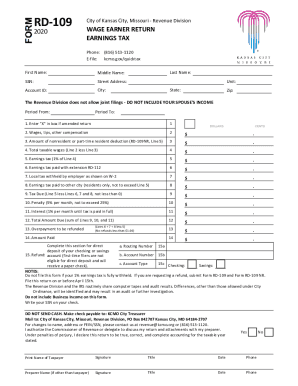
Get Mo Rd-109 - Kansas City 2020
How it works
-

Open form follow the instructions
-

Easily sign the form with your finger
-

Send filled & signed form or save
How to fill out the MO RD-109 - Kansas City online
This guide aims to provide clear and systematic instructions for completing the MO RD-109 form online, specifically designed for individuals filing their earnings tax returns in Kansas City. Whether you have legal experience or not, this guide will help you navigate through each section with confidence.
Follow the steps to successfully complete your MO RD-109 form online.
- Press the ‘Get Form’ button to access the MO RD-109 online form and open it in your browser.
- Fill in your personal information including your first name, middle name, last name, social security number, street address, unit (if applicable), city, state, and zip code.
- Enter your Account ID and the tax period for which you are filing, specifying the 'Period From' and 'Period To'. Be certain to input this accurately to avoid future complications.
- Indicate if this return is an amended return by placing an 'X' in the designated box.
- In Line 2, enter the total amount of wages, tips, and other compensation. Make sure to attach copies of all W-2s and 1099s to support this figure.
- If you are a nonresident or part-time resident, enter the deduction amount on Line 3, using the Nonresident Schedule (Form RD-109NR) as guidance.
- Calculate your total taxable wages by subtracting Line 3 from Line 2, and record the result on Line 4.
- Compute the earnings tax by multiplying the total taxable wages (Line 4) by 1% and write the result on Line 5.
- Enter any tax paid with an extension (Form RD-112) on Line 6, and the local tax withheld by your employer(s) on Line 7.
- For residents only, enter any earnings tax paid to another city on Line 8, ensuring it does not exceed the amount on Line 5.
- Calculate the tax due by subtracting the sum of Lines 6, 7, and 8 from Line 5, and write the amount on Line 9. If the result is negative, enter zero.
- If applicable, add any penalties for past-due amounts on Line 10 and interest on Line 11. Then, sum these amounts on Line 12.
- If you qualify for a refund, specify the overpayment amount on Line 13.
- Indicate the total amount you are paying on Line 14, and ensure to write your social security number on your payment check.
- If you prefer direct deposit for refunds, complete the requirements on Line 15 with your account's routing number, account number, and select the account type. Remember that first-time filers are not eligible for direct deposit.
- Sign the form to affirm that the information provided is true and accurate. Ensure to provide the date and contact information as required.
- Once you have completed the form, save the changes, and proceed to download or share the document as needed.
Complete your MO RD-109 form online today for a convenient and efficient filing experience!
Get form
Experience a faster way to fill out and sign forms on the web. Access the most extensive library of templates available.
Get This Form Now!
Use professional pre-built templates to fill in and sign documents online faster. Get access to thousands of forms.