Loading
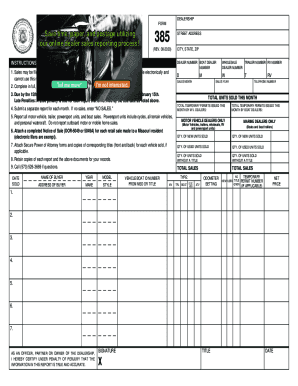
Get Mo Dor 385 2020
How it works
-

Open form follow the instructions
-

Easily sign the form with your finger
-

Send filled & signed form or save
How to fill out the MO DoR 385 online
Filling out the MO DoR 385 form is essential for submitting your dealership's monthly sales report. This guide will walk you through the process of completing the form accurately and efficiently to ensure compliance.
Follow the steps to complete your dealer's report successfully.
- Press the ‘Get Form’ button to access the form and open it for editing.
- Enter your dealership information in the designated fields, including your dealer number, the city, state, and ZIP code.
- Include your sales month and year, as well as the total units sold and temporary permits issued for that month.
- If applicable, attach completed Notice of Sale forms for each retail sale made to a Missouri resident. Note that electronic filers may be exempt from this requirement.
- Report all transactions involving motor vehicle, trailer, powersport units, and boats. Make sure to enter the quantities accurately.
- Affix Secure Power of Attorney forms and corresponding title copies for vehicles sold, if necessary.
- Review the accuracy of all information provided before signing the report. Ensure that the certification statement is complete.
- Once everything is properly filled out, you can save your changes, download, print, or share the completed form as needed.
Complete your MO DoR 385 form online today!
Get form
Experience a faster way to fill out and sign forms on the web. Access the most extensive library of templates available.
Get This Form Now!
Use professional pre-built templates to fill in and sign documents online faster. Get access to thousands of forms.