Of this patient and information relayed to me by this individual, I, reasonably and in good faith, believe that is: Patient Name Recommended license restriction(s): Daylight Driving Only No Highway/Freeway Driving Hand Control Mile Radius Only Restricted MPH Steering Device Specialty Cushion Foot Device Automatic Transmission Only Must Choose One Specialty (Required) Fit to operate a motor vehic.
Loading

Open form follow the instructions

Easily sign the form with your finger

Send filled & signed form or save
How to fill out the CO DoR DR 2401 online
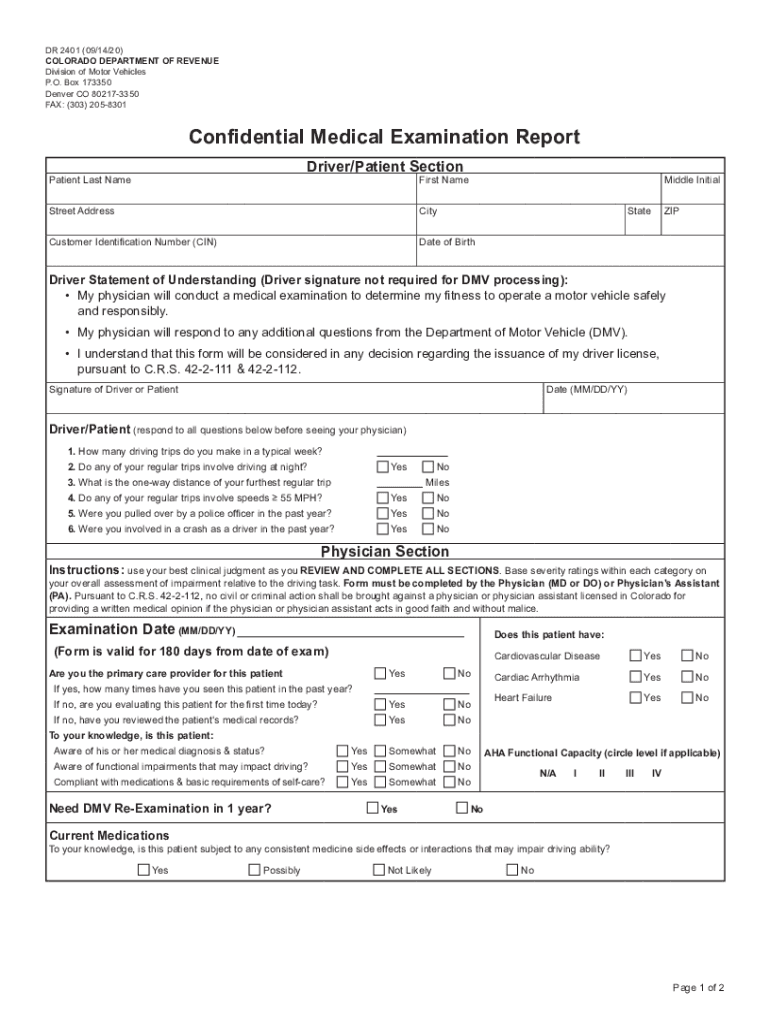
The CO DoR DR 2401 is a vital document used for confidential medical examinations related to driving fitness. Completing this form accurately is essential for a smooth processing experience with the Colorado Department of Revenue.
Follow the steps to complete the form correctly.
- Press the ‘Get Form’ button to access the document and open it in the editor.
- Begin with the Driver/Patient section. Enter the patient's last name, first name, and middle initial. Fill in the street address, city, state, customer identification number (CIN), date of birth, and ZIP code.
- Review the 'Driver Statement of Understanding.' This section does not require the driver’s signature for DMV processing, but ensure that the information is carefully read and understood.
- Respond to the questions in the Driver/Patient section, which concern driving habits and experiences. Answer each question by selecting 'Yes' or 'No' and provide any necessary details, such as one-way distance.
- In the Physician Section, the physician should provide their evaluation based on their clinical judgment. They must fill in the examination date and answer a series of questions regarding the patient's medical fitness and any relevant health conditions.
- The physician must indicate whether the patient is fit to drive and if any license restrictions are recommended. They should complete the sections related to specific conditions and document the patient's awareness of their medical status.
- Finally, ensure that the form is completed by a licensed physician or physician's assistant. The physician must print their name, sign the form, and include the date.
- Once the form is complete, you can save your changes, download the document, print it, or share it as needed.
Complete your forms online securely and efficiently today.
Experience a faster way to fill out and sign forms on the web. Access the most extensive library of templates available.
Related content
DMV Forms and Documents: All Forms and Documents in Number Order · License Forms and...
NET 179 Schneider & Koch & Co, Datensysteme GmbH Thomas Ruf ..... 62 27 34 0 695...
The Dr. Is In | ... annually, monthly, by BNP Media, Inc., 2401 W. Big Beaver Rd., Suite...
Use professional pre-built templates to fill in and sign documents online faster. Get access to thousands of forms.
If you believe that this page should be taken down, please follow our DMCA take down process here.