Loading
Get Fl Dr-700025 2020-2026
How it works
-

Open form follow the instructions
-

Easily sign the form with your finger
-

Send filled & signed form or save
How to fill out the FL DR-700025 online
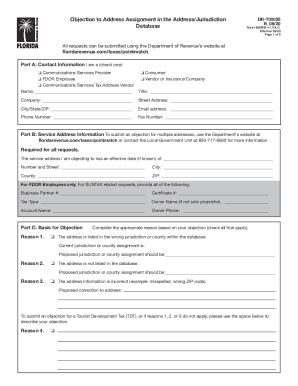
This guide provides clear, step-by-step instructions for completing the FL DR-700025 form online. Whether you are a communications services provider, consumer, or FDOR employee, this guide will assist you in filling out the necessary fields accurately and effectively.
Follow the steps to complete the FL DR-700025 form online:
- Click the ‘Get Form’ button to obtain the FL DR-700025 form and open it in the online editor.
- In Part A, provide your contact information. Indicate your status by selecting one of the provided options: Communications Services Provider, FDOR Employee, Communications Services Tax Address Vendor, Consumer, or Vendor or Insurance Company. Complete the fields for your name, title, company, street address, city/state/ZIP, email address, phone number, and fax number as applicable.
- Proceed to Part B, where you will enter the service address information for the address you are objecting to. Provide the effective date if known, the street number and name, city, county, and ZIP code.
- For FDOR employees, further details must be filled out, including your Business Partner Number, Certificate Number, Tax Type, Owner Name (if not a sole proprietor), Account Name, and Owner Phone.
- In Part C, specify the basis for your objection. You may select one or more reasons, such as the address being listed incorrectly in the database, not being listed at all, or having incorrect information. If none of the reasons apply, describe your objection in the space provided.
- Complete Part D by providing competent evidence to support your objection. Check the boxes next to the types of evidence you are submitting, such as a voter registration card, property tax bill, or other documentation.
- Finally, in Part E, sign and date the form. Ensure that your signature is clear and that the date reflects when the form is completed.
- Review all provided information for accuracy. Once satisfied, save your changes, and you can download, print, or share the form as needed.
Complete your FL DR-700025 form online today and ensure your objection is submitted accurately.
The standard filing fee for Form 1023 will cost you $750, but your fee will be reduced by $400 if you don't expect revenue to exceed $40,000. The financial considerations involved in starting a nonprofit require a lot of legwork and more than a little paperwork, but you will be rewarded with financial security.