Loading
Get Fl Dr-420mm 2020
How it works
-

Open form follow the instructions
-

Easily sign the form with your finger
-

Send filled & signed form or save
How to fill out the FL DR-420MM online
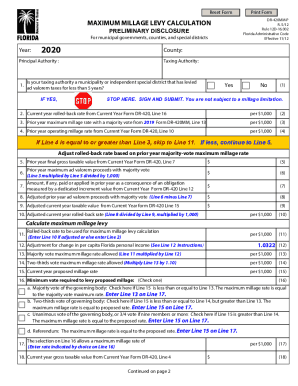
The FL DR-420MM form is vital for municipal governments, counties, and special districts to report their maximum millage levy calculations. This guide provides clear, step-by-step instructions for completing the form online to ensure accurate submission.
Follow the steps to effectively complete the FL DR-420MM online.
- Press the ‘Get Form’ button to access the FL DR-420MM and open it in your preferred editor.
- Identify if your taxing authority is a municipality or independent special district that has levied ad valorem taxes for less than five years. If yes, stop here, sign, and submit the form.
- Locate the current year rolled-back rate on Line 2 from the Current Year Form DR-420, Line 16, and enter it per $1,000.
- In Line 3, enter the prior year maximum millage rate with a majority vote as indicated from the 2019 Form DR-420MM, Line 13, per $1,000.
- Find the prior year operating millage rate from the Current Year Form DR-420, Line 10, and input it in Line 4 per $1,000.
- If the value in Line 4 is greater than or equal to Line 3, skip to Line 11. If it is less, continue with Line 5.
- On Line 5, enter the prior year final gross taxable value from Current Year Form DR-420, Line 7.
- Complete Line 8 with the adjusted prior year ad valorem proceeds, which is Line 6 minus Line 7.
- In Line 9, provide the adjusted current year taxable value from Current Year Form DR-420, Line 15.
- Calculate the adjusted current year rolled-back rate by dividing Line 8 by Line 9 and then multiplying by 1,000, entering the result in Line 10.
- Indicate the rolled-back rate to be used for maximum millage levy calculation in Line 11, using Line 10 if adjusted, or Line 2 otherwise.
- Enter the adjustment for change in per capita Florida personal income as specified on Line 12.
- Calculate the majority vote maximum millage rate allowed in Line 13 by multiplying Line 11 by Line 12.
- Determine the two-thirds vote maximum millage rate allowed on Line 14 by multiplying Line 13 by 1.10.
- Provide the current year proposed millage rate in Line 15.
- Choose the minimum vote required to levy the proposed millage by checking the appropriate box in Line 16.
- Record the maximum millage rate allowed based on your selection in Line 17.
- Enter the current year gross taxable value from Current Year Form DR-420, Line 4, in Line 18.
- Calculate the current year proposed taxes in Line 19 using Line 15, Line 18, and dividing by 1,000.
- Complete the total taxes levied at the maximum millage rate in Line 20 by multiplying Line 17 by Line 18, divided by 1,000.
- If applicable, add Line 21 for dependent special districts and MSTUs, entering their current year proposed taxes.
- Sum the total current year proposed taxes in Line 22 by adding Line 19 and Line 21.
- Calculate total maximum taxes in Line 23 from dependent special districts and MSTUs.
- Determine total taxes at the maximum millage rate in Line 24 by adding Line 20 and Line 23.
- Confirm whether total current year proposed taxes in Line 22 are equal to or less than total taxes levied in Line 24 by checking the appropriate box in Line 25.
- Sign and date the form at the bottom, including the contact name, title, mailing address, physical address, phone number, and fax number.
- Save your changes, then download, print, or share the completed form as needed.
Begin filling out your FL DR-420MM online today for a smooth submission process.
Get form
Experience a faster way to fill out and sign forms on the web. Access the most extensive library of templates available.
Get This Form Now!
Use professional pre-built templates to fill in and sign documents online faster. Get access to thousands of forms.