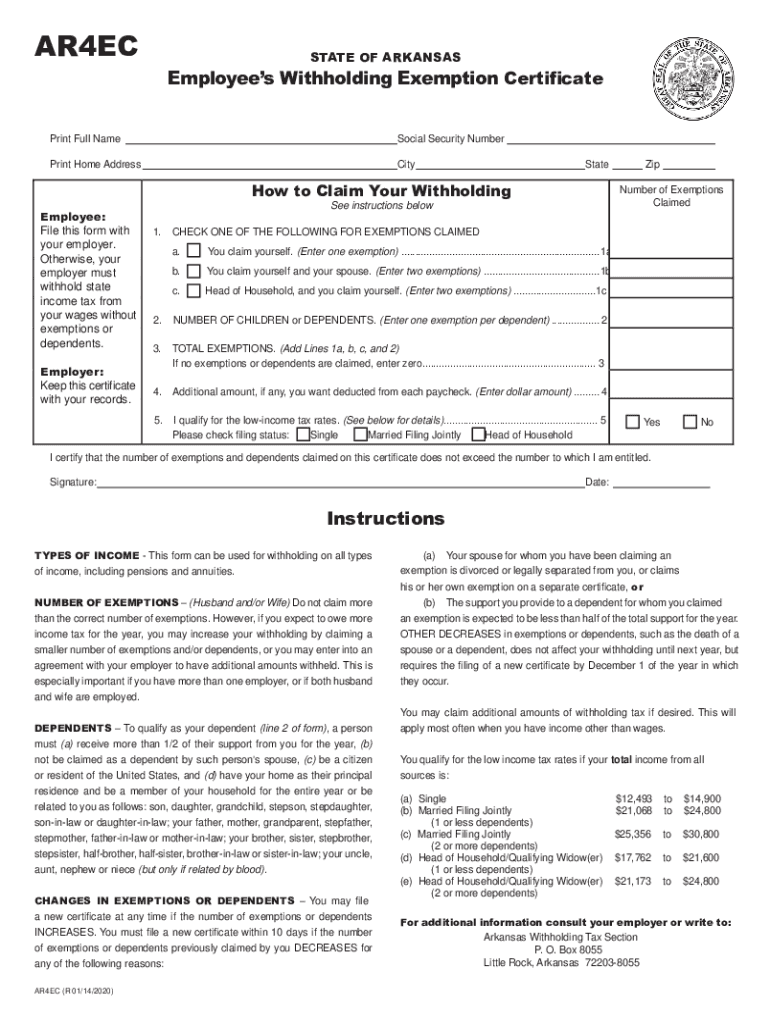
Mployer. Otherwise, your employer must withhold state income tax from your wages without exemptions or dependents. Employer: Keep this certificate with your records. Number of Exemptions Claimed See instructions below 1. Zip CHECK ONE OF THE FOLLOWING FOR EXEMPTIONS CLAIMED a. You claim yourself. (Enter one exemption) ......................................................................1a b. You claim yourself and your spouse. (Enter two exemptions) .
Loading

Open form follow the instructions

Easily sign the form with your finger

Send filled & signed form or save
How to fill out the AR AR4EC online
The AR AR4EC is an Employee’s Withholding Exemption Certificate used in the state of Arkansas. This guide will provide you with clear, step-by-step instructions to complete the AR AR4EC online efficiently and accurately.
Follow the steps to successfully fill out the AR AR4EC online.
- Press the 'Get Form' button to access the AR AR4EC form and open it in your preferred editor.
- Print your full name in the designated field.
- Enter your social security number clearly in the specified box.
- Indicate your home address by writing your street address, city, state, and zip code.
- In the 'How to Claim Your Withholding' section, understand that you must file this form with your employer to claim your exemptions.
- For the number of exemptions claimed, check one of the following options: a) You claim yourself (one exemption), b) You claim yourself and your partner (two exemptions), or c) Head of household claiming yourself (two exemptions). Add any applicable exemptions or dependents in the next section.
- In the section for the number of children or dependents, enter the number of dependents you are claiming, if any.
- Calculate the total exemptions by adding the values from the previous sections and enter this number.
- If you wish to have an additional amount deducted from each paycheck, enter that amount in the appropriate field.
- Indicate whether you qualify for the low-income tax rates by selecting 'Yes' or 'No'.
- Select your filing status: Single, Married Filing Jointly, or Head of Household.
- Finally, certify that the information provided is accurate, then sign and date the form.
- Once completed, save your changes, and you can download, print, or share the form as needed.
Complete your AR AR4EC online today for accurate withholding and peace of mind.
Experience a faster way to fill out and sign forms on the web. Access the most extensive library of templates available.
Related content
AR-1R | Combined Business Tax Registration Instructions, 07/24/2015 ... AR4EC-TX Texarkana...
Employee's State Withholding Exemption Certificate (Form AR4EC). Please call Financial...
... a form art form ais1089h form art definition form ar-a form arm form a-8 form adv-e...
Get answers to your most pressing questions about US Legal Forms API.
What is the bonus tax rate 2018?
If your bonus is provided to you in a separate check, it's considered supplemental wages. Supplemental wages were taxed at a flat 25% tax rate in 2017 and will be taxed at a flat rate of 22% in 2018, provided the bonus is under $1 million.
Are bonuses taxed at 40 %?
Why Did My Bonus Check Get Taxed 40%? These bonuses, although supplemental to a person's regular income, are taxed like regular income. For people in higher tax brackets, this can mean that as much as 40 percent of a person's bonus will be withheld from the bonus check before it is issued.
What is the tax rate on bonuses in 2019?
The first $1 million is subject to a 22% withholding rate as of 2019. Just like that, your bonus shrinks to $780,000 because $220,000 goes to the IRS right off the top. Now brace yourself.
What is the tax rate on bonuses in Arkansas?
As an employer in Arkansas, you have to pay unemployment insurance to the state. The 2019 rates range from 0.1% to 14% on the first $10,000 in wages paid to each employee in a calendar year. If you're a new employer (congratulations on getting started!), you pay a flat rate of 2.9%.
What is the SUTA rate for 2018?
2018 SUI tax rates and taxable wage base The SUI taxable wage base for 2018 remains at $7,000 per employee. The 2018 California employer SUI tax rates will continue to range from 1.5% to 6.2% on Schedule F+. The new employer SUI tax rate remains at 3.4% for 2018.
How is Arkansas unemployment calculated?
If you are eligible to receive unemployment, your weekly benefit rate is 1/26 of your earnings during the highest paid quarter of the base period. You can look up your weekly benefit amount in the DWS table, Calculating Your Weekly Benefit Amount and Duration. ... You may receive benefits for a maximum of 25 weeks.
What is Arkansas payroll tax rate?
Arkansas' state income tax rates do not change based of your marital status. Instead the state's system is based on an individual's income level. There are seven tax brackets with rates ranging from 0.9% on your first $4,399 up to a rate of 6.9% on income above $77,401.
What is the SUTA rate for 2019?
For example, the SUTA tax rates in Texas range from 0.36% 6.36% in 2019.
What is Arkansas unemployment tax rate?
Arkansas State Tax Unemployment Insurance (SUI): New employers use 3.2% for 2019, including a basic tax rate of 2.9% and a fund-stablization of 0.3%.
Where is my Arkansas state tax refund check?
State: Arkansas. Refund Status Website: https://www.atap.arkansas.gov/_/ Refund Status Phone Support: 1-800-882-9275 (toll-free) or 501-682-1100. Hours: Mon. ... Email Tax Support: individual.income@dfa.arkansas.gov. 2017 State Tax Filing Deadline: April 17, 2018.
Use professional pre-built templates to fill in and sign documents online faster. Get access to thousands of forms.
If you believe that this page should be taken down, please follow our DMCA take down process here.
This form is available in several versions. Select the version you need from the drop-down list below.