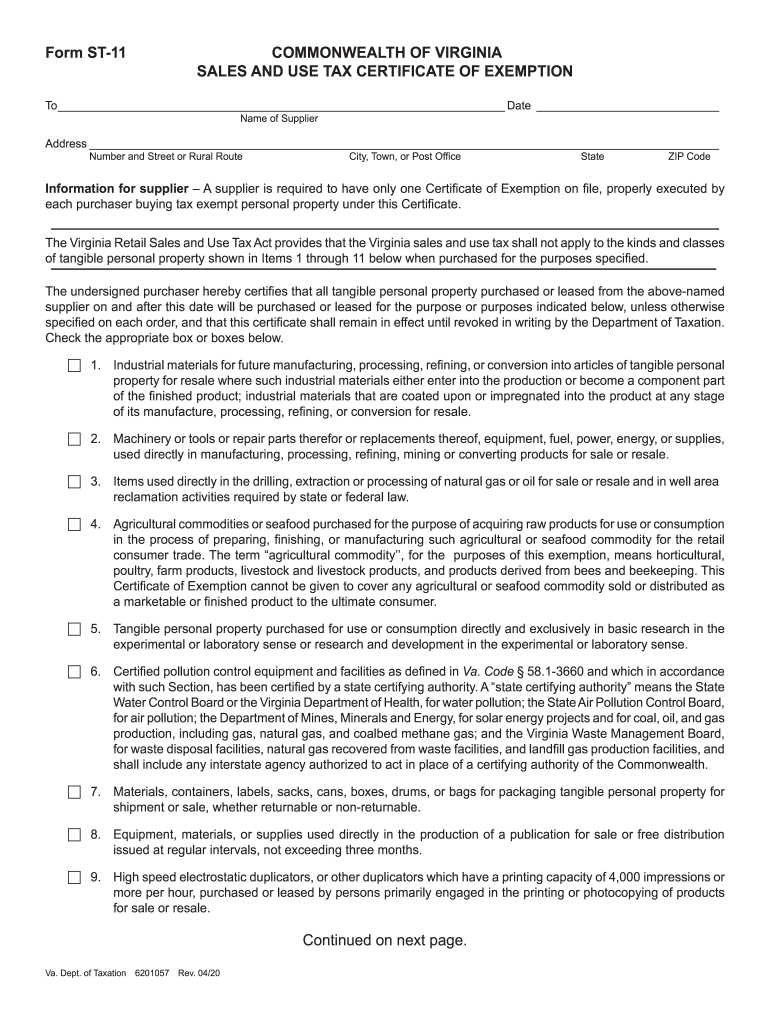
Name of Supplier Address Number and Street or Rural Route City, Town, or Post Office State ZIP Code Information for supplier A supplier is required to have only one Certificate of Exemption on file, properly executed by each purchaser buying tax exempt personal property under this Certificate. The Virginia Retail Sales and Use Tax Act provides that the Virginia sales and use tax.
Loading

Open form follow the instructions

Easily sign the form with your finger

Send filled & signed form or save
How to fill out the VA DoT ST-11 online
The VA DoT ST-11 is a certificate of exemption for sales and use tax in Virginia. This guide will walk you through the process of completing the form online, ensuring that you provide accurate and necessary information.
Follow the steps to complete your VA DoT ST-11 form online.
- Press the ‘Get Form’ button to access the VA DoT ST-11 form and open it in your document editor.
- In the first section, enter the name and address of the supplier. Make sure to include the complete street address, city, state, and ZIP code.
- Next, indicate the purpose of the exemption by checking the appropriate box or boxes for the types of tangible personal property you are purchasing, as outlined in items 1 through 11.
- Then, provide your name and address as the purchaser, including the trading name if applicable, and indicate the type of business you are engaged in.
- Lastly, sign the certificate, providing your title if you are signing on behalf of an organization. Ensure that the information provided is accurate to the best of your knowledge.
- Once you have filled out all sections, you can save your changes, download a copy, print the form, or share it as needed.
Complete your VA DoT ST-11 online today for a seamless exemption process.
Experience a faster way to fill out and sign forms on the web. Access the most extensive library of templates available.
Related content
Use professional pre-built templates to fill in and sign documents online faster. Get access to thousands of forms.
If you believe that this page should be taken down, please follow our DMCA take down process here.
This form is available in several versions. Select the version you need from the drop-down list below.