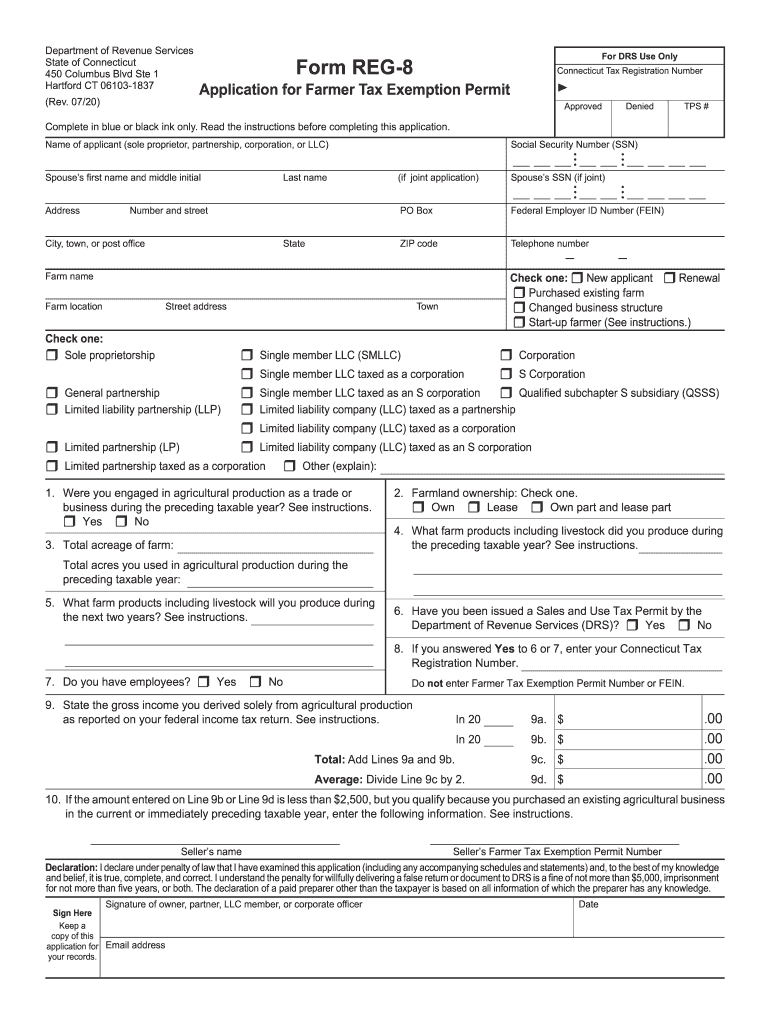
Instructions. In 20 9a. $ .00 In 20 9b. $ .00 Total: Add Lines 9a and 9b. 9c. $ .00 Average: Divide Line 9c by 2. 9d. $ .00 10. If the amount entered on Line 9b or Line 9d is less than $2,500, but you qualify because you purchased an existing agricultural business in the current or immediately preceding taxable year, enter the following information. See instructions. Seller s name Seller s Farmer Tax Exemption Permit Number Declaration:.
Loading

Open form follow the instructions

Easily sign the form with your finger

Send filled & signed form or save
How to fill out the CT REG-8 online
Filling out the CT REG-8, the Application for Farmer Tax Exemption Permit, is essential for those engaged in agricultural production seeking tax exemption benefits in Connecticut. This guide will provide users with a clear and structured approach to completing the form online.
Follow the steps to effectively complete the CT REG-8 form online:
- Press the ‘Get Form’ button to access the CT REG-8 document and open it in your preferred online editor.
- Begin by filling out your name, indicating your status (sole proprietor, partnership, corporation, or LLC), and providing your Social Security Number.
- If you are submitting a joint application, list your partner's first name and middle initial along with their Social Security Number.
- Enter your address details, including PO Box if applicable, Federal Employer ID Number, ZIP code, and your telephone number.
- Select the type of business structure by checking the appropriate box (e.g., sole proprietorship, partnership, LLC).
- Indicate whether you are a new applicant or renewing your application, and specify if you purchased an existing farm or changed your business structure.
- Provide your farm name and the location, including the town.
- Answer the question regarding your agricultural production involvement during the previous year by checking 'Yes' or 'No'.
- Select your farmland ownership status by checking the appropriate box: own, lease, or own part and lease part.
- State the total acreage of your farm and list the farm products you produced in the previous taxable year.
- Indicate the types of farm products you plan to produce in the next two years.
- Respond to whether you have employees and if you possess a Sales and Use Tax Permit, entering your Connecticut Tax Registration Number if applicable.
- Report your gross income derived solely from agricultural production as it appears on your federal income tax return for the past two years.
- If your gross income is less than $2,500, fill out the required information if you qualify by purchasing an existing agricultural business.
- Sign and date the application, keeping a copy for your records.
- Once completed, save your changes and choose to download, print, or share the form as needed.
Complete your CT REG-8 application online for a seamless filing experience.
Experience a faster way to fill out and sign forms on the web. Access the most extensive library of templates available.
Related content
In addition to Form REG-1, you must complete and attach the appropriate ... 2010. REG-8...
PreACT 8/9. Provides 8th and 9th graders with short practice for the ACT test. ACT Stack...
9/8/2018. • Updated table of contents. • Section 4.3, Rule - Changed the wording...
Get answers to your most pressing questions about US Legal Forms API.
What is Connecticut use tax?
Anyone who purchases goods or services for use in Connecticut and does not pay Connecticut sales tax must pay the use tax. If you do not comply with the use tax provisions, you may owe tax plus penalties and interest. In general, the use tax rate for purchases of taxable goods or services is 6%.
How do you calculate capital gains tax?
Determine your realized amount. This is the sale price minus any commissions or fees paid. Subtract your basis (what you paid) from the realized amount (how much you sold it for) to determine the difference. If you sold your assets for more than you paid, you have a capital gain.
What is taxable income in CT?
Connecticut Median Household Income If you are single or married and filing separately, the tax rate is 3% for those who make $10,000 or less in taxable income; 5% for up to $50,000; 5.5% for up to $100,000; 6% for up to $200,000; 6.5% for up to $250,000; 6.9% for up to $500,000 and 6.99% for over $500,000.
How are capital gains taxed in 2019?
The current capital gains tax rates under the new 2018 tax law are zero, 15 percent and 20 percent, depending on your income. The 2018 capital gains tax rate is holding steady through 2019, but the income required for each rate has changed.
What is the capital gains tax rate in Connecticut?
Capital gains are currently taxed at Connecticut's top income tax rate of 6.99 percent.
How are capital gains taxed in CT?
A. An individual's net capital gains are taxed at the rate of 7%. Dividends and interest income are taxed at a rate based on Connecticut Adjusted Gross Income. The rates vary from 1% to 14%.
Who is exempt from federal withholding?
When you file exempt with your employer for federal tax withholding, you do not make any tax payments during the year. Without paying tax, you do not qualify for a tax refund unless you qualify to claim a refundable tax credit, like the Earned Income Tax Credit.
What is CT payroll tax rate?
Connecticut State Payroll Taxes It's a progressive income tax that ranges from 3% to 6.99%.
What is CT withholding tax?
Withholding is the money an employer withholds from each employee's wages to help prepay the state income tax of the employee. An employer must withhold Connecticut tax if the employee is a resident of Connecticut, performing services in the state.
What is CT State tax withholding?
State Withholding is the money an employer withholds from each employee's wages to help prepay the state income tax of the employee. An employer must withhold Connecticut tax if the employee is a resident of Connecticut, performing services in the state.
Use professional pre-built templates to fill in and sign documents online faster. Get access to thousands of forms.
If you believe that this page should be taken down, please follow our DMCA take down process here.