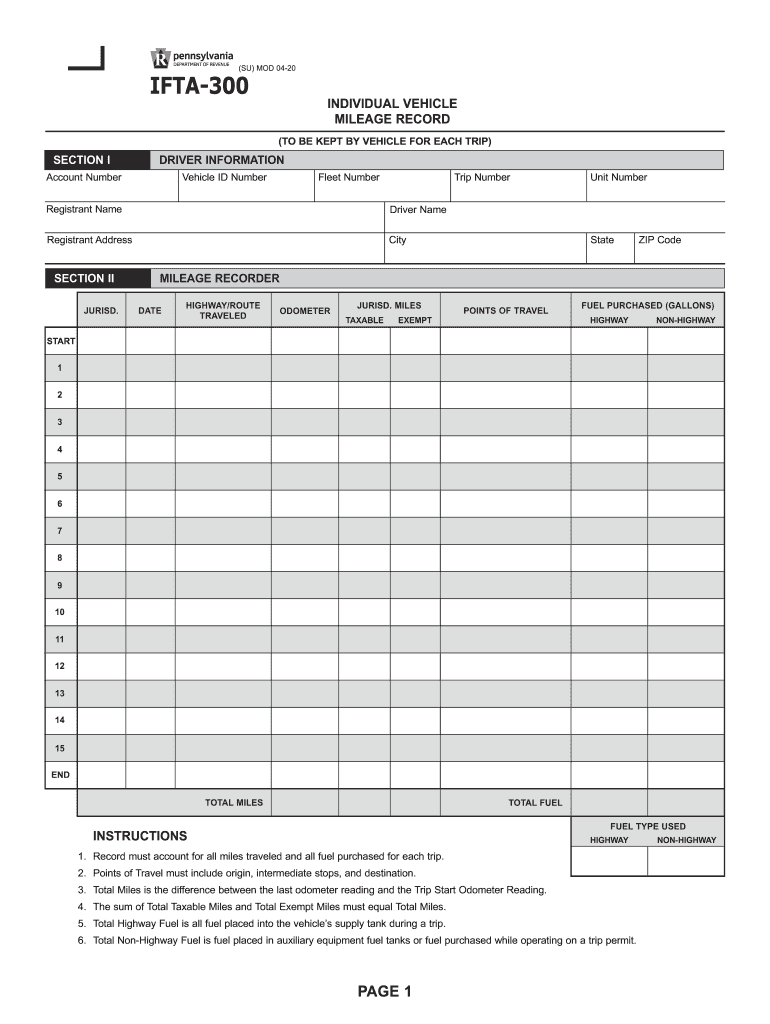
Driver Name Registrant Address City SECTION II JURISD. Unit Number State ZIP Code MILEAGE RECORDER DATE HIGHWAY/ROUTE TRAVELED ODOMETER JURISD. MILES TAXABLE EXEMPT POINTS OF TRAVEL FUEL PURCHASED (GALLONS) HIGHWAY NON-HIGHWAY START 1 2 3 4 5 6 7 8 9 10 11 12 13 14 15 END TOTAL MILES TOTAL FUEL FUEL TYPE USED INSTRUCTIONS HIGHWAY 1. Record must account for all miles traveled and all fuel purchased for each trip. 2. Points of Travel must include origin, intermediate stops, and.
Loading

Open form follow the instructions

Easily sign the form with your finger

Send filled & signed form or save
How to fill out the PA IFTA-300 online
Filling out the PA IFTA-300, the individual vehicle mileage record, is essential for managing your fuel tax information accurately. This guide provides step-by-step instructions to ensure you complete the form correctly and efficiently.
Follow the steps to complete your PA IFTA-300 form online
- Press the ‘Get Form’ button to obtain the form and open it in the editor.
- In Section I, enter the driver information. Fill in the account number, vehicle ID number, fleet number, and trip number. Then provide the registrant name, driver name, and registrant address, including city.
- Proceed to Section II, Jurisdictions. Fill in the unit number, state, and ZIP code. For the mileage recorder, record the date, highway or route traveled, and odometer readings.
- For each trip, document the jurisdiction miles in the taxable and exempt fields. Additionally, list points of travel, indicating origin, any intermediate stops, and the final destination.
- Input the gallons of fuel purchased under the highway and non-highway sections. Ensure that the total miles traveled are calculated by finding the difference between the last odometer reading and the trip start odometer reading.
- Verify that the sum of total taxable miles and total exempt miles equals total miles. Total highway fuel should encompass all fuel added to the vehicle's supply tank, and total non-highway fuel is for fuel in auxiliary tanks or purchased while operating on a trip permit.
- Once all the information is filled out accurately, review the form for any errors. Save your changes, download the completed form, print it for your records, or share it as needed.
Get started by completing your PA IFTA-300 form online today.
Experience a faster way to fill out and sign forms on the web. Access the most extensive library of templates available.
Related content
IFTA-300 -- Individual Vehicle Mileage Records · REV-1026 ... REV-1026A -- Information...
Last, we identify lessons from IFTA that have relevance for SSTP. .... of a use tax...
These are the Exciter portion of the EX / CNTL and the Power Amplifier (PA). ...... SPI...
Get answers to your most pressing questions about US Legal Forms API.
How do I pay IFTA?
Locate your state's website. If you want to pay your IFTA taxes online, you typically must open an account with the taxation or revenue agency in the state where your business is based. ... Set up a user account. ... Complete your return. ... Enter payment information. ... Print your confirmation.
What is IFTA sticker?
The International Fuel Tax Agreement (or IFTA) is an agreement between the lower 48 states of the United States and the Canadian provinces, to simplify the reporting of fuel use by motor carriers that operate in more than one jurisdiction.
Do I need an IFTA sticker?
Carriers need an IFTA license if they're based in a member state and operate across two or more member jurisdictions.
Where do IFTA stickers need to be displayed?
The decals must be displayed on both sides of each qualified vehicle operated in Pennsylvania: A carrier operating inside and outside PA that selects PA as its base jurisdiction must purchase and display PA IFTA decals.
Where can I buy PA IFTA stickers?
Where and how can I purchase Motor Carrier Road Tax/IFTA (International Fuel Tax Agreement) decals? Decals can also be purchased in person at the PA DOT Riverfront Office Center in Harrisburg, PA or at the Motor and Alternative Fuel Taxes District Offices in Norristown, Pittsburgh, or Scranton.
How do I get an IFTA sticker in PA?
Where and how can I purchase Motor Carrier Road Tax/IFTA (International Fuel Tax Agreement) decals? Decals can also be purchased in person at the PA DOT Riverfront Office Center in Harrisburg, PA or at the Motor and Alternative Fuel Taxes District Offices in Norristown, Pittsburgh, or Scranton.
Use professional pre-built templates to fill in and sign documents online faster. Get access to thousands of forms.
If you believe that this page should be taken down, please follow our DMCA take down process here.