0001-2633 PAYROLL # W-2 COORDINATOR NAME AGENCY PHONE (if known) EMPLOYEE SECTION M.I. FIRST EMPLOYEE IDENTIFICATION MAILING ADDRESS (Address to which copies of documents will be mailed) DAYTIME TELEPHONE SOCIAL SECURITY NUMBER STREET ADDRESS LAST EMAIL ADDRESS CHECK HERE IF THIS IS AN AGENCY ADDRESS STREET ADDRESS CONTINUATION BOROUGH / CITY / TOWN STATE Enter the year(s) of your request (YYYY). YEAR TAX YEAR(S) REQUESTED YEAR YEAR YEAR W-2 Employee Signature REQUES.

How it works
  • Open form

    Open form follow the instructions

  • Easily sign form

    Easily sign the form with your finger

  • Share form

    Send filled & signed form or save

How to fill out the NY W-2 Duplicate/ Correction Request Form online

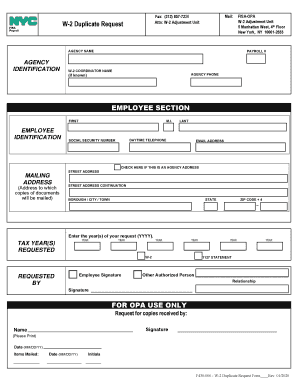
Filling out the NY W-2 Duplicate/ Correction Request Form online is a straightforward process that allows users to request duplicate copies of their W-2 forms or correct any inaccuracies. This guide will provide detailed, step-by-step instructions to ensure that you complete the form accurately and efficiently.

Follow the steps to successfully complete the NY W-2 Duplicate/ Correction Request Form online.

  1. Press the ‘Get Form’ button to access the document and open it in the editor.
  2. In the agency identification section, enter the agency name and payroll number of the employer. Provide the name of the W-2 coordinator and their contact phone number if known.
  3. In the employee section, fill out your personal information. Enter your first name, middle initial, last name, social security number, and daytime telephone number. Include your email address if applicable.
  4. Provide your mailing address where copies of the documents will be sent. Ensure to include street address, city/town, state, and ZIP code.
  5. Indicate if the mailing address is an agency address by checking the appropriate box.
  6. Enter the tax year(s) for which you are requesting copies. Use the 'YYYY' format to specify up to four years. Leave additional entries blank if not required.
  7. If another authorized person is requesting the duplicate, provide their full name and relationship to you. Ensure their signature is included in the designated area.
  8. After completing all sections, review the information you have entered for accuracy.
  9. Once the form is finalized, you can save your changes. Options to download, print, or share the completed form will be available.

Complete your W-2 Duplicate/ Correction Request Form online today for a hassle-free experience.

Get form

Experience a faster way to fill out and sign forms on the web. Access the most extensive library of templates available.

Related content

Get Your W-2 Statement - OPA - NYC.gov

Electronic W-2 form delivery is voluntary, secure, and accurate. This paperless option...

Learn more
W-2 Info | SUNY Geneseo

Current employees can get a duplicate W-2 statement, by accessing NYSPO. ... (for example...

Learn more
Form IT 203 I PBF203B It203i - UserManual.wiki

Use Form: IT-2 to: report wages and NYS, NYC, or Yonkers tax withheld (do not submit Form...

Learn more
Questions & Answers

Get answers to your most pressing questions about US Legal Forms API.

Contact support

Can you access your w2 online?

Find Your W-2 Online With Ease No problem! The database is updated weekly. Just enter your email address and we'll let you know when it's available. To find your employer, search by employer name or enter your FEIN.

If you have an online IRS account, use the search on its website (IRS.gov) for "Get Transcript Online" and follow the instructions for accessing this information online. ... Call the IRS at 800-908-9946, which is its automated transcript order service, to request your copy of the 1099 transcript by mail.

Order online. Use the 'Get Transcript ' tool available on IRS.gov. There is a link to it under the red TOOLS bar on the front page. ... Order by phone. The number to call is 800-908-9946. Order by mail. Complete and send either Form 4506-T or Form 4506T-EZ to the IRS to get one by mail.

You can request an IRS transcript of your tax return from the IRS website. A transcript includes items from your tax return as it was originally filed and will meet lending or immigration requirements. There are three ways to request a transcript: Visit the IRS website for instant online access to your transcript.

Requesting a Duplicate W-2 from a Previous Tax Year. Use Form 4506 to order a copy of a previous year's tax return from the IRS. The IRS keeps copies of W-2 forms from your previous tax years. To get a copy from the IRS you must order a copy of your entire tax return by using Form 4506.

W-2 Wages for Income Taxes In box 1 of the Form W-2, your company reports the total taxable wages of the employee for IRS record keeping. When you calculate this number, take out any pretax deductions from an employee's pay because they do not count as income for federal income taxes.

The Treasury Department and the IRS are working to incorporate changes into the Form W-4, Employee's Withholding Allowance Certificate, for 2020. The current 2019 version of the Form W-4 is similar to last year's 2018 version.

A W-2 tax form shows the amount of taxes withheld from your paycheck for the year and is used to file your federal and state taxes.

When you receive your IRS W-2 form each year from your employer, box 2, "Federal income tax withheld," shows the amount of tax money your employer deducted from your pay and sent to the IRS to cover the income taxes you owe.

A W-2 form, also known as the Wage and Tax Statement, is the document an employer is required to send to each of their employees and the Internal Revenue Service (IRS) at the end of the year. The W-2 form reports the employee's annual wages and the amount of taxes withheld from his or her paychecks.

Get This Form Now!

Use professional pre-built templates to fill in and sign documents online faster. Get access to thousands of forms.

If you believe that this page should be taken down, please follow our DMCA take down process here.

Get NY W-2 Duplicate/ Correction Request Form