Dingly. EMPLOYER'S WITHHOLDING CHANGE ORDER Employer's Identification Number listed with West Virginia **INDICATE CHANGES ONLY** FEIN (WV State ID# if different) attach explanation Filing Status Annual to Quarterly Business Name Employer's Name (if different) Address City State Zip Code If you are no longer liable for West Virginia withholding tax, check explanation below; Business Sold Date Effective: Business permanently discontinued Date Effective:.
Loading

Open form follow the instructions

Easily sign the form with your finger

Send filled & signed form or save
How to fill out the WV DoR IT-103 online
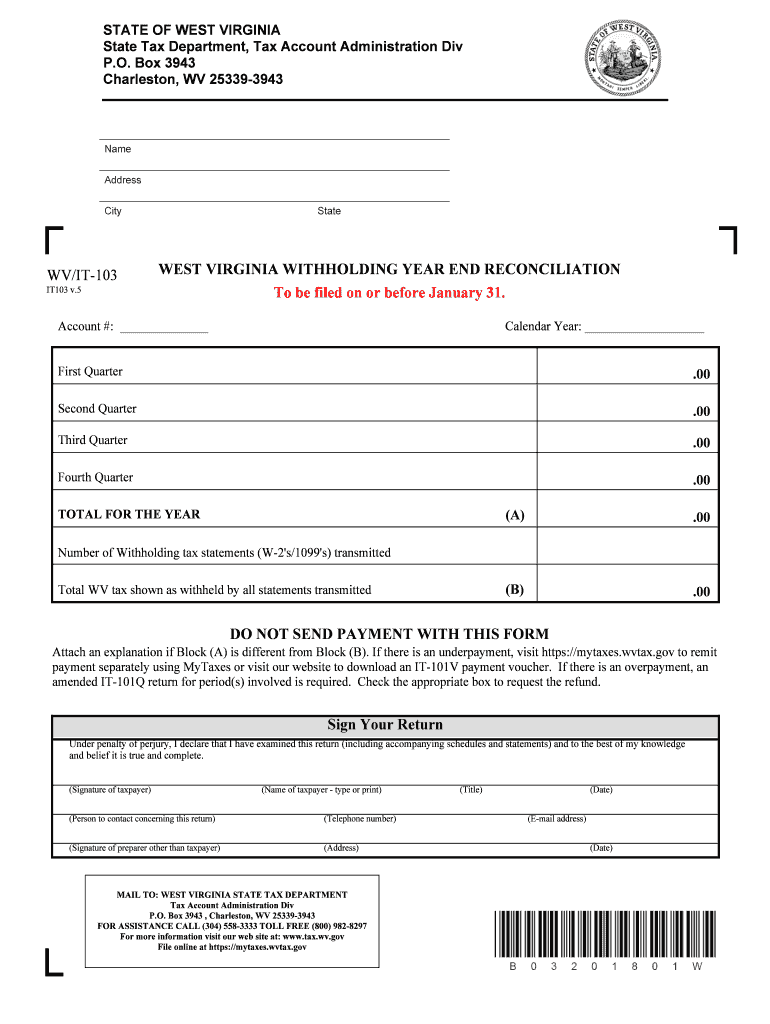
The WV DoR IT-103 form is essential for employers in West Virginia to report their withholding tax information to the State Tax Department. This guide provides straightforward, step-by-step instructions to help you complete the form efficiently online.
Follow the steps to fill out the WV DoR IT-103 online.
- Press the ‘Get Form’ button to access the form and open it in the editor.
- Provide your account number in the designated section. This number identifies your tax account with the State Tax Department.
- Indicate the calendar year for which you are filing the reconciliation. Ensure it reflects the correct year.
- Enter the withheld tax amounts for each quarter under the respective headings: First Quarter, Second Quarter, Third Quarter, and Fourth Quarter. Make sure to total them accurately in the provided field for Total for the Year (Block A).
- Input the total number of withholding tax statements (W-2's/1099's) transmitted in the designated box.
- Record the total West Virginia tax withheld as shown by all statements transmitted (Block B).
- If the total for the year differs between Block A and Block B, you must attach an explanation in the space provided.
- Sign your return. Below the signature line, type or print your name as the taxpayer.
- Designate a person to contact regarding this return, including their telephone number.
- If someone other than the taxpayer prepared the form, include their signature, name, address, and contact details as indicated.
- Review the form for completeness and accuracy. Once verified, you can save changes, download, print, or share the completed form as needed.
Complete your WV DoR IT-103 form online today for a streamlined filing experience.
Experience a faster way to fill out and sign forms on the web. Access the most extensive library of templates available.
Related content
IT-102-1 Affidavit of West Virginia Income Tax Withheld by Employer. IT-103 Withholding...
For federal income tax purposes, the distribution results in $20 million of gain under...
02/23/2018 0051 Updated the definition for surcharge in the table of. Section 4.3.2...
Get answers to your most pressing questions about US Legal Forms API.
Can you write off lottery tickets in Ohio?
Report All Gambling Winnings These winnings are taxable regardless of whether you have losing lottery tickets or other gambling losses to deduct. Your lottery and other gambling winnings can only be reported on the other income line of Form 1040.
Can you deduct gambling losses?
You may deduct gambling losses only if you itemize your deductions on Form 1040, Schedule A (PDF) and kept a record of your winnings and losses. The amount of losses you deduct can't be more than the amount of gambling income you reported on your return.
Can you deduct gambling losses in 2018?
You can write off gambling losses as a miscellaneous itemized deduction. While miscellaneous deductions subject to the 2% of adjusted gross income floor are not allowed for 2018 through 2025 under the TCJA, the deduction for gambling losses isn't subject to that floor. So gambling losses are still deductible.
Can you deduct gambling losses in Ohio?
You can itemize deductions for your gambling losses if your gambling losses and itemized expenses are greater than the standard deduction for your filing status. If you are an individual who claims the standard deduction, you must report and pay tax on all winnings that were accrued throughout the year.
What taxes do you pay in West Virginia?
West Virginia income tax rates West Virginia has five tax rates 3%, 4%, 4.5%, 6% and 6.5%. Your tax rate and additional tax amount will depend on your filing status and taxable income.
How long do you have to live in West Virginia to be considered a resident?
You are considered a resident of West Virginia if you spend more than 30 days in West Virginia with the intent of West Virginia becoming your permanent residence, or if you are a domiciliary resident of Pennsylvania or Virginia and you maintain a physical presence in West Virginia for more than 183 days of the taxable ...
Does military pay state taxes in West Virginia?
Most military retired pay based on service-related disabilities also is free from federal income tax, but there is no guarantee of total protection. West Virginia State Taxes on U.S. Department of Veterans Affairs Disability Dependency and Indemnity Compensation: Not subject to federal or state taxes.
When can you file WV state taxes?
West Virginia Income Taxes and WV State Tax Forms. West Virginia State Income Tax Return forms for Tax Year 2018 (Jan. 1 - Dec. 31, 2018) can be e-Filed together with an IRS Income Tax Return until October 15, 2019. In January 2020, you can e-File Tax Year 2019.
Do you have to file state taxes in West Virginia?
All West Virginia residents who filed a federal return are required to file a resident tax return in West Virginia. If you did not file a federal return and your allowable deductions from personal exemptions do not exceed your adjusted gross income, you are required to file a West Virginia state income tax return.
What happens if I don't report my gambling winnings?
Claiming big gambling losses or not reporting gambling winnings. ... In fact, what you should do is deduct your losses only to the extent that you report your gambling winnings. For example, if you were to report you had won $5000 gambling but had losses of $20,000, this could cause a red flag.
Use professional pre-built templates to fill in and sign documents online faster. Get access to thousands of forms.
If you believe that this page should be taken down, please follow our DMCA take down process here.