Street address (including apt. no.) For State Tax Department 6 Taxable grants $ 7 Agriculture payments 8 Check if box 2 is trade or business income Copy 1 9 Market gain City or town, state or province, country, and ZIP or foreign postal code $ 10a State Form 1099-G 10b State identification no. 11 State income tax withheld $ $ Account number (see instructions) www.irs.gov/Form1099G Department of the Treasury - Internal Revenue Service CORRECTED (if checked) PAYER S name, st.

Open form follow the instructions

Easily sign the form with your finger

Send filled & signed form or save
How to fill out the IRS 1099-G online
The IRS 1099-G is a form used to report certain government payments, including unemployment compensation and state tax refunds. This guide will provide you with a clear and concise method to fill out this form online.
Follow the steps to complete the IRS 1099-G form online effectively.
- Click ‘Get Form’ button to access the IRS 1099-G form and open it for editing.
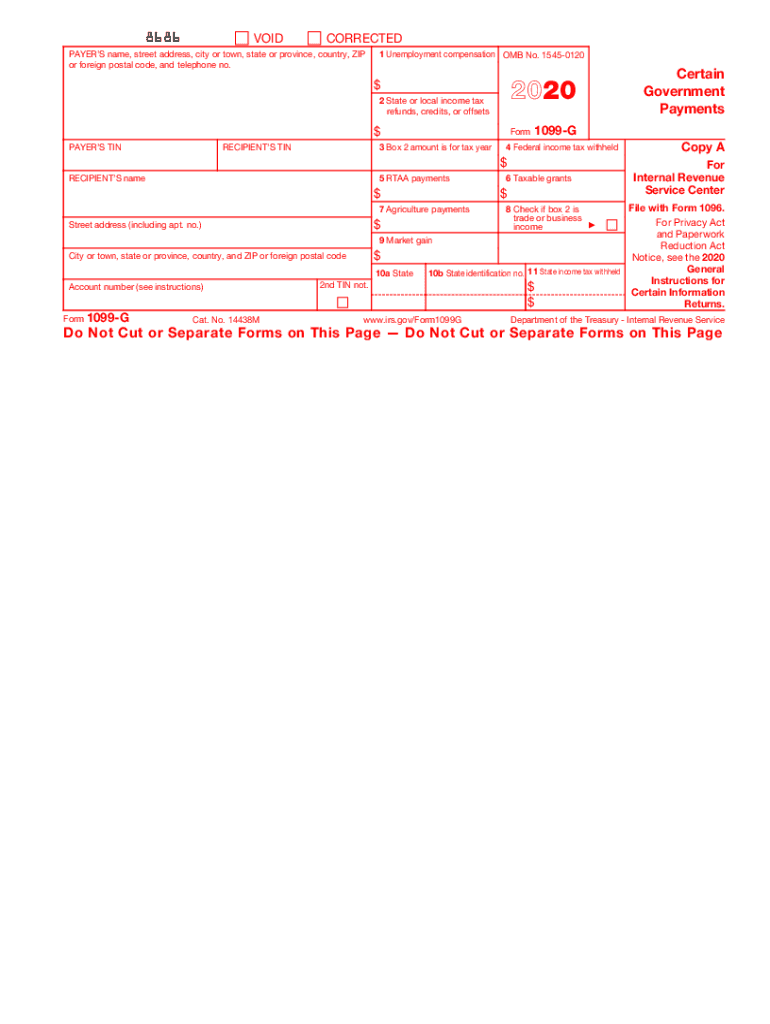
- Locate the ‘Payer’s name’ section and enter the required information, including the name, street address, city or town, state or province, country, ZIP or foreign postal code, and telephone number.
- Fill in the ‘Payer’s TIN’ (Tax Identification Number) in the designated field. This information is crucial for the IRS.
- Input the ‘Recipient’s TIN’ as per the guidelines. This is typically the social security number or tax identification number of the recipient.
- In Box 1, report the total amount of unemployment compensation received during the tax year.
- Fill out Box 2 with any state or local income tax refunds, credits, or offsets that you may have received.
- Identify the tax year related to the amount in Box 2 by entering the year in Box 3.
- Complete Box 4 if there was any federal income tax withheld.
- If applicable, enter any RTAA payments received in Box 5.
- Fill in Box 6 with details of any taxable grants received.
- Complete Box 7 for agriculture payments and ensure you report accurately.
- If applicable, check the box in Step 8 if the amount in Box 2 is related to income from a trade or business.
- Report any market gain from Box 9 as required.
- For state income tax details, complete Boxes 10a, 10b, and 11 as necessary.
- Once all fields are correctly filled, save your changes, and choose to download, print, or share the form as needed.
Start filling out the IRS 1099-G online today to meet your tax obligations promptly.
Experience a faster way to fill out and sign forms on the web. Access the most extensive library of templates available.
Related content
Information about Form 1099-G, Certain Government Payments (Info Copy Only), including...
Payment Arrangement · View My1099-G (link is external) · E-file Your Taxes for Free ·...
We do not mail Form 1099-G, Statement for Recipients of State Income Tax Refunds....
Get answers to your most pressing questions about US Legal Forms API.
Is 1099 G taxable income?
Unemployment compensation is generally taxable income to you, so Form 1099-G gives you the amount of unemployment benefits you must report on your tax return. You may opt to have federal income tax withheld on those benefits.
Where do I enter a 1099 G on TurboTax?
Tap in the upper left corner to open the menu. Select Federal, and then Wages & Income. Select Other Common Income, then select Refunds Received for State/Local Tax Returns. Follow the screens to enter your 1099-G information.
How do I enter a 1099 G on TurboTax?
To enter your 1099-G for a state income tax refund in TurboTax Online (for TurboTax Online sign-in, click Here, select "Take Me To My Return") or Desktop, please follow these steps: Once you are in your tax return, click on the Federal Taxes tab ("Personal" tab in TurboTax Home & Business)
What happens if you send a 1099 late?
The penalty for late filing of forms 1099-MISC is $50 per form if late for 30 days or less and $100 per form if late more than 30 days. You can wait to receive a letter from the IRS to pay the penalty. There will be no interest on the penalty if you pay the penalty by the date indicated in the IRS letter.
Will the IRS catch a missing 1099?
When a 1099-R you receive is not reported on your original tax return, the IRS may conduct an audit, but this is not always a standard procedure performed in every such instance. ... However, you may find it beneficial to correct missing 1099-R issues as soon as you notice the omission by filing an amended return.
What happens if I don't issue a 1099?
If you receive a Form 1099-MISC that reports your miscellaneous income and you don't include the income on your tax return, you may also be subject to a penalty. Failing to report income may cause your return to understate your tax liability.
What happens if I don't file a 1099?
If you receive a Form 1099-MISC that reports your miscellaneous income and you don't include the income on your tax return, you may also be subject to a penalty. Failing to report income may cause your return to understate your tax liability.
Where do I report unemployment on my taxes?
You report your unemployment compensation on your federal tax return in the income section. The amount will show up on a specific line of your tax form. Remember to keep all of your forms, including any 1099-G form you receive, with your tax records.
Is TurboTax free if I have a 1099?
Can I still use TurboTax All Free even with a 1099-MISC? You cannot enter a 1099Misc or self-employment income when you are using the Free Edition. If you qualify, there is another free software program available from TurboTax which will allow you to enter self-employment income.
How do I file a 1099 G on TurboTax?
Tap in the upper left corner to open the menu. Select Federal, and then Wages & Income. Select Other Common Income, then select Refunds Received for State/Local Tax Returns. Follow the screens to enter your 1099-G information.
Use professional pre-built templates to fill in and sign documents online faster. Get access to thousands of forms.
If you believe that this page should be taken down, please follow our DMCA take down process here.
This form is available in several versions. Select the version you need from the drop-down list below.