Loading
Form preview
  • US Legal Forms
  • Other Templates
  • Tax Forms
  • Executive Department Treasury IRS Forms
  • Irs 941-pr 2018

Get Irs 941-pr 2018

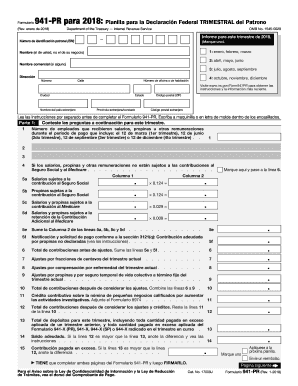
Para este trimestre de 2018. N mero de identificaci n patronal (EIN) (Marque uno). 1: enero, febrero, marzo Nombre (el de usted, no el de su negocio) 2: abril, mayo, junio Nombre comercial (si alguno) 3: julio, agosto, septiembre Direcci n N mero Calle 4: octubre, noviembre, diciembre N mero de oficina o de habitaci n Visite www.irs.gov/Form941PR para obtener las instrucciones y la informaci n m s reciente. Ciudad Nombre del pa s extranjero C digo postal (ZIP) Estad.

This website is not affiliated with IRS

How it works

  1. Open form

    Open form follow the instructions

  2. Easily sign form

    Easily sign the form with your finger

  3. Share form

    Send filled & signed form or save

How to fill out the IRS 941-PR online

Filling out the IRS 941-PR is essential for employers to report payroll taxes. This guide aims to provide clear, step-by-step instructions on how to complete this form online, ensuring that users can navigate through each section confidently.

Follow the steps to successfully complete the IRS 941-PR form.

  1. Click ‘Get Form’ button to obtain the form and open it in your document editor.
  2. Enter your employer identification number (EIN). This unique number is crucial for processing your form.
  3. In Part 1, respond to the questions concerning the number of employees who received wages during the quarter.
  4. In Part 2, indicate your deposit schedule based on your tax liability for the quarter. Make sure to identify if you're a monthly or semi-weekly depositor.
  5. In Part 3, provide any necessary information about your business operations, marking if your business has ceased operations or if you are an seasonal employer.
  6. In Part 4, designate a third-party representative if applicable, providing their contact details.
  7. Review the entire form for accuracy, save your changes, download a copy, and consider printing it for your records or sharing it as necessary.

Complete your IRS 941-PR form online today to ensure timely and accurate reporting.

Get form

Experience a faster way to fill out and sign forms on the web. Access the most extensive library of templates available.

Related content

About Form 941 (PR), Employer's Quarterly Federal...
Nov 12, 2024 — Employers in Puerto Rico use this form to: Report income taxes, social...
Learn more
Document 6186
“Employment Tax, Total” includes paper and electronic Forms 940, 940-EZ,. 940-PR, 941...
Learn more
Publication 3823 (Rev. 9-2014)
MeF will accept Forms 940, 940-PR, 941, 941-PR, 941-SS, 943, 943-PR, 944, and 945. The...
Learn more

Related links form

TX DMV VTR-34 2017 CA BBS 37A-201 2015 CA CDPH 512 2014 CA DCSS 0569 2005

Questions & Answers

Get answers to your most pressing questions about US Legal Forms API.

Contact support

The IRS 941-PR and 941-R serve different purposes. The 941 form is for standard employer payroll reporting, while the 941-R is used for adjusting previously filed 941 forms. Understanding which form to use is essential for maintaining accurate payroll records and tax compliance.

A 941-PR is a quarterly payroll tax form specifically for employers operating in Puerto Rico. This form reports wages and withheld taxes for employees, as well as the employer's contribution to Social Security and Medicare. Filing the IRS 941-PR accurately ensures you remain compliant with tax regulations in Puerto Rico.

The 1040 PR form is the Puerto Rico version of the individual income tax return for residents. It allows individuals living in Puerto Rico to report their income and claim various deductions and credits. It's tailored to meet the specific tax situation of Puerto Rican residents.

The primary difference between the IRS 941 and 941-PR is that the 941-PR is specifically designed for employers in Puerto Rico, while the regular 941 applies to all employers in the mainland U.S. The 941-PR accommodates local tax requirements, taking into account the unique employment laws of Puerto Rico. Utilizing the correct form ensures compliance with federal and local regulations.

Receiving a 941 refund check usually means you overpaid your payroll taxes during a previous quarter. Adjustments or credits you claimed on your IRS 941-PR filing may also result in a refund. If you are unsure why you received it, reviewing your past filings or consulting a tax professional could clarify.

You should send the IRS 941-PR to the specific IRS address designated for your type of filing, which depends on whether you are including a payment. For exact mailing details, it's best to visit the IRS website. This ensures that your form reaches the right department without any complications.

The IRS 941 payment refers to the amount you owe to the IRS related to your employees’ withheld taxes and your share of Social Security and Medicare taxes. Businesses must make these payments quarterly, as they report on the IRS 941-PR form. It helps maintain compliance and avoid penalties, ensuring you meet your tax obligations.

To file the IRS 941-PR, you should send it to the appropriate IRS address based on your location. It's crucial to check the IRS website for the correct mailing address, as it can change depending on whether you are including a payment or not. Always ensure that you send it to the address specifically designated for the 941-PR forms to avoid delays.

You can determine if you are a monthly or quarterly depositor by checking your filing history or reviewing your IRS notice. Typically, the IRS assigns your deposit schedule based on the amount of payroll taxes you reported in the previous year. Understanding your deposit schedule is important to ensure you comply with IRS requirements and avoid penalties.

The IRS 941-PR report is commonly referred to as the Employer's Quarterly Federal Tax Return. This name emphasizes its purpose in reporting federal income taxes withheld from employees and the employer's share of Social Security and Medicare taxes. Familiarizing yourself with both names can help you communicate more effectively about your tax responsibilities.

Get This Form Now!

Use professional pre-built templates to fill in and sign documents online faster. Get access to thousands of forms.
If you believe that this page should be taken down, please follow our DMCA take down processhere.
Get IRS 941-PR
  • Adoption
  • Bankruptcy
  • Contractors
  • Divorce
  • Home Sales
  • Employment
  • Identity Theft
  • Incorporation
  • Landlord Tenant
  • Living Trust
  • Name Change
  • Personal Planning
  • Small Business
  • Wills & Estates
  • Packages A-Z
  • Affidavits
  • Bankruptcy
  • Bill of Sale
  • Corporate - LLC
  • Divorce
  • Employment
  • Identity Theft
  • Internet Technology
  • Landlord Tenant
  • Living Wills
  • Name Change
  • Power of Attorney
  • Real Estate
  • Small Estates
  • Wills
  • All Forms
  • Forms A-Z
  • Other Templates
  • Legal Hub
  • About Us
  • Help Portal
  • Legal Resources
  • Blog
  • Affiliates
  • Contact Us
  • Delete My Account
  • Site Map
  • Industries
  • Forms in Spanish
  • Localized Forms
  • State-specific Forms
  • Forms Kit
  • Real Estate Handbook
  • All Guides
  • Notarize
  • Incorporation services
  • For Consumers
  • For Small Business
  • For Attorneys
  • USLegal
  • FormsPass
  • pdfFiller
  • signNow
  • altaFlow
  • DocHub
  • Instapage
Form Packages
  • Adoption
  • Bankruptcy
  • Contractors
  • Divorce
  • Home Sales
  • Employment
  • Identity Theft
  • Incorporation
  • Landlord Tenant
  • Living Trust
  • Name Change
  • Personal Planning
  • Small Business
  • Wills & Estates
  • Packages A-Z
Form Categories
  • Affidavits
  • Bankruptcy
  • Bill of Sale
  • Corporate - LLC
  • Divorce
  • Employment
  • Identity Theft
  • Internet Technology
  • Landlord Tenant
  • Living Wills
  • Name Change
  • Power of Attorney
  • Real Estate
  • Small Estates
  • Wills
  • All Forms
  • Forms A-Z
  • Other Templates
Customer Service
  • Legal Hub
  • About Us
  • Help Portal
  • Legal Resources
  • Blog
  • Affiliates
  • Contact Us
  • Delete My Account
  • Site Map
  • Industries
  • Forms in Spanish
  • Localized Forms
  • State-specific Forms
  • Forms Kit
Legal Guides
  • Real Estate Handbook
  • All Guides
Prepared for you
  • Notarize
  • Incorporation services
Our Customers
  • For Consumers
  • For Small Business
  • For Attorneys
Our Sites
  • USLegal
  • FormsPass
  • pdfFiller
  • signNow
  • altaFlow
  • DocHub
  • Instapage
Social Media
Call us now toll free:
+1 833 426 79 33
As seen in:
© Copyright 1999-2026 airSlate Legal Forms, Inc. 17 Station Street, Suite 303, Brookline, MA 02445
  • Your Privacy Choices
  • Terms of Service
  • Privacy Notice
  • Content Takedown Policy
  • Bug Bounty Program
IRS 941-PR
This form is available in several versions.
Select the version you need from the drop-down list below.
2023 IRS 941-PR
Select form
  • 2023 IRS 941-PR
  • 2022 IRS 941-PR
  • 2021 IRS 944-PR
  • 2020 IRS 941-PR
  • 2019 IRS 941-PR
  • 2018 IRS 941-PR
  • 2017 IRS 941-PR
  • 2016 IRS 941-PR
  • 2015 IRS 941-PR
  • 2014 IRS 941-PR
  • 2003 IRS 941-PR
  • 1995 IRS 941-PR
  • 2021 Form 941 Pr
Select form