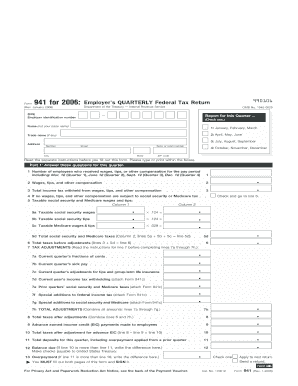
Act Notice, see the back of the Payment Voucher. Cat. No. 17001Z Apply to next return. Send a refund. Next Form 941 (Rev. 1-2006) OTC 6 I.R.S. SPECIFICATIONS TO BE REMOVED BEFORE PRINTING INSTRUCTIONS TO PRINTERS FORM 941, PAGE 2 of 4 MARGINS: TOP 13 mm (1 2 ") CENTER SIDES. PAPER: WHITE, WRITING, SUB. 20 FLAT SIZE: 216 mm (81 2 ") x 279 mm (11") PERFORATE: NONE PRINTS: HEAD TO HEAD INK: BLACK DO NOT PRINT DO NOT PRINT DO NOT PRINT DO NOT PRINT 990206 Name (not y.
Open form follow the instructions
Easily sign the form with your finger
Send filled & signed form or save
How to fill out the IRS 941 online
Filling out the IRS 941, the Employer’s Quarterly Federal Tax Return, can seem daunting. This guide provides clear, step-by-step instructions to help you complete the form accurately and efficiently online.
Follow the steps to fill out the IRS 941 online.
- Click ‘Get Form’ button to obtain the form and open it in the editor.
- Enter your employer identification number (EIN) at the top of the form. This is a crucial identifier for your business.
- Provide your name, trade name (if applicable), and address. Ensure all information is entered accurately.
- In Part 1, answer questions regarding the number of employees and the total wages, tips, and other compensation for the quarter.
- Report the total income tax withheld from your employees' wages in the appropriate field.
- Complete the sections detailing taxable social security and Medicare wages and tips. Don’t forget to calculate the total taxes for these categories.
- Proceed to Part 2 to describe your deposit schedule and tax liability. Make sure to fill out the appropriate fields regarding your tax deposits.
- In Part 3, indicate if your business has closed or if you stopped paying wages. Provide a final date if applicable.
- If you wish to designate a third-party to discuss this return with the IRS, fill out Part 4 with their details.
- Lastly, sign and date the form in Part 5. Ensure you have completed both sides of the form.
- After completing the form, you can save your changes, download, print, or share it as needed.
Complete your IRS 941 form online today for a seamless filing experience.
Experience a faster way to fill out and sign forms on the web. Access the most extensive library of templates available.
Related content
Jul 10, 2025 — Employers use Form 941 to: Report federal income, social security, and...
Print 941 Form from QuickBooks, or prepare manually, and mail form to designated...
Provide America's taxpayers top quality service by helping them understand and meet their...
Get answers to your most pressing questions about US Legal Forms API.
Do I need to file form 941 for my LLC?
If your LLC has employees, you are typically required to file IRS 941. This form reports payroll taxes and ensures compliance with federal tax laws. However, if your LLC is a single-member entity with no employees, you may not need to file. Utilizing resources like US Legal Forms can clarify your specific requirements.
What happens if I don't file form 941?
If you don't file your IRS 941, the IRS may impose penalties and interest on the unpaid taxes. Additionally, failing to file can complicate your tax situation, potentially leading to increased scrutiny from the IRS. It's crucial to rectify any missed filings quickly, and US Legal Forms can assist you in navigating the process.
What is the penalty for not filing 941?
Not filing your IRS 941 on time can lead to substantial penalties. The IRS imposes a late filing penalty that increases the longer you delay. This penalty can be a percentage of the unpaid tax and can accumulate over time, making prompt filing more beneficial. US Legal Forms can provide you with valuable resources to avoid these issues.
Is form 941 mandatory?
Form 941 is generally mandatory for employers who withhold payroll taxes. This form is used to report income taxes, Social Security tax, and Medicare tax withheld from employee wages. Failure to file this form when required can lead to penalties, so it's important to understand your obligations regarding the IRS 941.
Can I file my own 941 electronically?
Yes, you can file your IRS 941 electronically. The IRS offers e-filing options that make the process easier and quicker. Using a secure tax software can simplify this task, allowing you to transmit your information directly to the IRS with confidence. Consider platforms like US Legal Forms for guidance and tools that facilitate the e-filing process.
Who prepares Form 941?
Typically, Form 941 is prepared by business owners, accountants, or payroll professionals. It is crucial to ensure this form is accurate and submitted on time. Utilizing a service like US Legal Forms can streamline this process and help you avoid common mistakes.
Can I pull my own IRS transcripts online?
Yes, you can pull your IRS transcripts online through the IRS website. This convenient option allows you to access your tax information anytime. Simply create an account, verify your identity, and you can view or print your transcripts as needed.
How can I get my 941 form?
To get your IRS 941 form, you can visit the IRS website where all tax forms are available for download. The IRS provides clear instructions on how to fill it out, making the process manageable. If you need further assistance, consider using US Legal Forms for guided support.
How do I get my 941 transcript from the IRS?
You can request your IRS 941 transcript by visiting the IRS website and using the online request tool. This service allows you to easily access your Form 941 information. Alternatively, you can also contact the IRS directly to receive this transcript.
How do I get my business tax transcript from the IRS?
To get your business tax transcript from the IRS, you can use the IRS's online tools. Simply visit their website, navigate to the 'Get Transcript' section, and follow the prompts to request your transcript online. This provides a quick and efficient way to access your business tax information.
Use professional pre-built templates to fill in and sign documents online faster. Get access to thousands of forms.
If you believe that this page should be taken down, please follow our DMCA take down process here.
This form is available in several versions. Select the version you need from the drop-down list below.