Loading
Get Il St-556 (1) Instructions 2019
How it works
-

Open form follow the instructions
-

Easily sign the form with your finger
-

Send filled & signed form or save
How to fill out the IL ST-556 (1) Instructions online
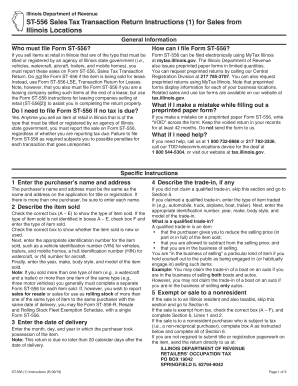
This guide provides a detailed, step-by-step approach to filling out the IL ST-556 (1) Instructions electronically. Designed for ease of use, it aims to assist users with varying levels of experience in completing this important sales tax transaction return.
Follow the steps to accurately complete the IL ST-556 (1) Instructions online.
- Click ‘Get Form’ button to obtain the form and open it in your editor.
- Enter the purchaser’s name and address in Section 1. Ensure that the name matches exactly with the title or registration application.
- In Section 4, describe any trade-in items. If no trade-in is applicable, move directly to Section 5.
- In Section 2, indicate the type of item sold by checking the appropriate box (A - E), and provide necessary identification numbers like VIN or HIN.
- Enter the date of delivery in Section 3, which is when the purchaser takes possession of the item.
- For Section 5, if the sale is exempt or to a nonresident, check the appropriate box and provide additional necessary information.
- Complete Section 6 by entering the total selling price and any applicable trade-in credit. Make sure to round values as instructed.
- Calculate the tax due based on the instructions provided in Section 6, ensuring accuracy in rates applied.
- Both the seller and all purchasers must sign the return in accordance with the guidelines provided.
- Finally, review your entries, then save your changes, download, print, or share the completed form as necessary.
Start completing your documents online today for a streamlined process.
Get form
Experience a faster way to fill out and sign forms on the web. Access the most extensive library of templates available.
The letter will state an expiration date, which is approximately five years from the date of the letter (the first day of the month following the fifth anniversary). To renew its exemption, the organization must submit documentation similar to that provided in its original request.
Get This Form Now!
Use professional pre-built templates to fill in and sign documents online faster. Get access to thousands of forms.