Cat. No. 17001Z Form 941 (Rev. 1-2013) 950213 Name (not your trade name) Part 2: Employer identification number (EIN) Tell us about your deposit schedule and tax liability for this quarter. If you are unsure about whether you are a monthly schedule depositor or a semiweekly schedule depositor, see Pub. 15 (Circular E), section 11. 16 Check one: Line 10 on this return is less than $2,500 or line 10 on the return for the prior quarter was less than $2,500, and you did not incur a $100,000.
Loading

Open form follow the instructions

Easily sign the form with your finger

Send filled & signed form or save
How to fill out the IRS 941 online
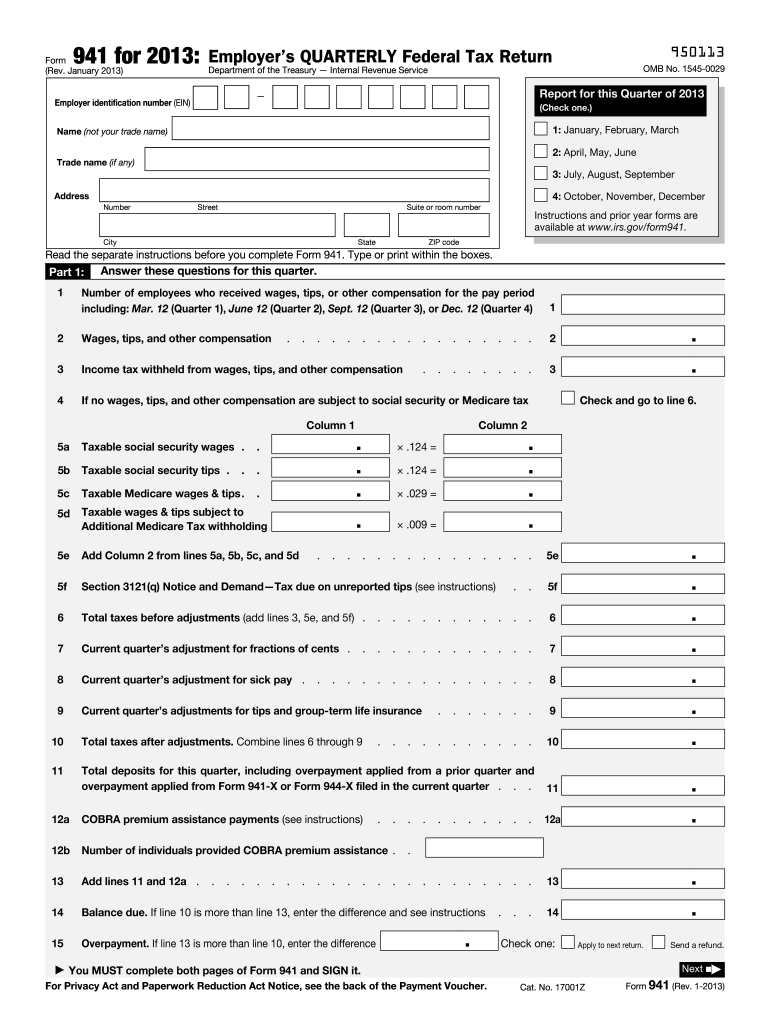
Completing the IRS Form 941 is essential for employers to report federal income taxes withheld and the employer's share of Social Security and Medicare taxes. This guide will walk you through the process of filling out the form online with clarity and precision.
Follow the steps to fill out the IRS 941 online accurately
- Click ‘Get Form’ button to obtain the form and open it in the editor.
- Select the appropriate quarter by checking the box for January to March, April to June, July to September, or October to December.
- Provide your Employer Identification Number (EIN) and the name of your business. Ensure the name is not your trade name.
- Complete the address section by typing or printing your business's street address, city, state, and ZIP code.
- In Part 1, answer the questions regarding the number of employees who received wages, tips, or other compensations during the specified pay periods.
- Report total wages, tips, and other compensations on lines 2 and 3, ensuring accurate values for income tax withheld.
- Fill in the taxable wages and tips on lines 5a, 5b, 5c, and 5d according to the earnings subject to Social Security and Medicare taxes.
- Calculate total taxes before adjustments on line 6 by adding lines 3, 5e, and any applicable amounts from line 5f.
- Enter any adjustments for fractions of cents, sick pay, and tips on lines 7, 8, and 9 as needed.
- Calculate total taxes after adjustments on line 10 by combining lines 6 through 9.
- Enter the total deposits for the current quarter on line 11, including any prior overpayments that were applied.
- If applicable, input COBRA premium assistance payments on lines 12a and 12b.
- Determine if there is a balance due or an overpayment on lines 14 and 15 and indicate how you would like the overpayment handled.
- In Part 2, specify your deposit schedule and tax liability for the quarter, noting if you were a monthly or semiweekly schedule depositor.
- Fill in any relevant business information in Part 3, indicating if your business has closed or if you are a seasonal employer.
- Designate a third-party designee in Part 4, if necessary, by providing their contact information.
- Sign and date the form in Part 5, ensuring that both pages of Form 941 are fully completed before final submission.
- Once finished, save changes to the document. You can then download, print, or share the completed form as needed.
Complete your IRS 941 form online to ensure accurate and timely tax reporting.
Experience a faster way to fill out and sign forms on the web. Access the most extensive library of templates available.
Related content
Jul 10, 2025 — Employers use Form 941 to: Report federal income, social security, and...
Print 941 Form from QuickBooks, or prepare manually, and mail form to designated...
Provide America's taxpayers top quality service by helping them understand and meet their...
Get answers to your most pressing questions about US Legal Forms API.
How do I submit my 941 to the IRS?
You can submit your IRS 941 either by mail or electronically. If submitting by mail, ensure that you send the form to the correct address based on your location and whether you include a payment. Electronic submissions are available and often more efficient, allowing for faster processing. Platforms like USLegalForms can assist you in understanding the best submission method for your needs.
How do I send documents to the IRS?
To send documents to the IRS, prepare each document according to the specific instructions provided by the IRS for each form. Use certified mail or a mail service that provides tracking for added security. This is especially important when sending documents like the IRS 941, as timely and accurate submissions help avoid delays. If you prefer convenience, online submission options can be a practical choice.
Can I submit 941 electronically?
Indeed, you can submit your IRS 941 electronically. Using IRS-approved e-file software allows for a quick submission that reduces the chance of errors. This method also provides immediate confirmation of receipt, contributing to peace of mind. Be sure to check the IRS's guidelines for electronic filing of Form 941.
How do I make a 941 tax payment?
You can make your IRS 941 tax payment through several methods, including electronic funds withdrawal, credit card payment, or check payment. If paying by check, enclose it with your filed 941 form to the appropriate IRS address. Online payment options are often the most convenient and expedite the payment process. Consider services like USLegalForms to guide you in making your payments correctly.
How do I file my 941 quarterly report?
To file your IRS 941 quarterly report, first complete the form accurately, ensuring all information is current. You can file it by mail or electronically using IRS-approved software. If you choose to file electronically, you will benefit from faster processing and confirmation. Others, however, may opt for mailing, ensuring they include the correct address per the IRS guidelines.
When should form 941 be filed?
Form 941 must be filed quarterly by employers who withhold taxes from employee wages, generally due on the last day of the month following the end of each quarter. The quarters end on March 31, June 30, September 30, and December 31. Filing on time is crucial to avoid penalties. Utilizing services like USLegalForms can streamline this process and ensure timely submissions.
Can 941x be filed electronically?
Yes, you can file Form 941-X electronically through the IRS e-file system if you use approved tax software. This option simplifies the correction of previously submitted 941 forms. Electronic filing not only saves time but also allows for faster processing. Always check for the latest updates on electronic filing options with IRS 941.
Where do I send my 941 to the IRS?
You should send your IRS 941 form to the address specified for your state in the form's instructions. The correct address varies based on whether you are enclosing a payment or not. If you are making a payment, ensure you use the appropriate address for payments. Using the correct address helps avoid processing delays.
What happens if I don't file form 941?
If you fail to file IRS form 941, the IRS may impose penalties for non-compliance, which can be intrusive and costly. Additionally, your failure to report can result in interest accruing on unpaid taxes. Ignoring this obligation can lead to serious consequences, including audits or levies. To avoid these issues, consider resources such as US Legal Forms to ensure timely and accurate filing.
What is IRS form 941 used for?
The IRS form 941 is used by employers to report income taxes, social security tax, and Medicare tax withheld from employee wages. This form helps the IRS track how much tax you owe and how much you have already deposited. It's essential for ensuring compliance with federal tax obligations. Understanding IRS 941 is critical for accurate tax reporting.
Use professional pre-built templates to fill in and sign documents online faster. Get access to thousands of forms.
If you believe that this page should be taken down, please follow our DMCA take down process here.
This form is available in several versions. Select the version you need from the drop-down list below.