Loading
Get Irs 941 2014
This website is not affiliated with IRS
How it works
-

Open form follow the instructions
-

Easily sign the form with your finger
-

Send filled & signed form or save
How to fill out the IRS 941 online
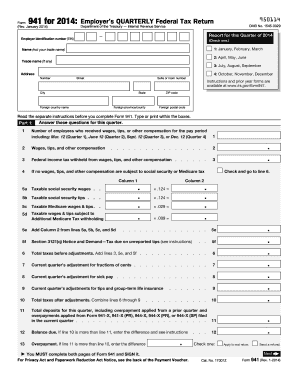
Filling out the IRS 941 form online can be a streamlined process, benefiting employers in managing their quarterly federal tax return obligations. This guide provides a step-by-step approach to efficiently complete the form, ensuring all necessary information is accurately reported.
Follow the steps to successfully complete your IRS 941 form online.
- Click the ‘Get Form’ button to access the IRS 941 form and open it in your digital editor.
- At the top of the form, input your employer identification number (EIN) and select the applicable quarter by checking the appropriate box for January to March, April to June, July to September, or October to December.
- Enter your business name and trade name (if applicable) in the designated fields, along with your business address, including street number, suite number, city, state, ZIP code, and any relevant foreign postal information.
- In Part 1, provide the total number of employees who received wages for the pay period that includes the 12th day of the month for the respective quarter.
- Report the total wages, tips, and other compensation paid to employees in the appropriate field.
- Complete the section for federal income tax withheld from the reported wages. If you have no wages subject to social security or Medicare tax, indicate that accordingly.
- Fill in the separate lines for taxable social security wages, tips, and taxable Medicare wages and tips, ensuring to total these figures as instructed.
- Calculate the total taxes before adjustments by summing up the relevant lines mentioned in the instructions.
- Make any necessary quarter adjustments for fractions of cents, sick pay, tips, and group-term life insurance.
- Combine the totals from the adjustments to arrive at your total taxes after adjustments.
- Specify the total deposits made for the quarter and determine if there is a balance due or an overpayment.
- Follow the guidance for your deposit schedule to indicate whether you are a monthly or semiweekly schedule depositor, providing the necessary tax liability information.
- If applicable, check if your business has closed, or if you are a seasonal employer needing to file only for certain quarters.
- Designate a third-party designee if you wish to allow someone else to discuss your return with the IRS, providing their name and contact information.
- Finally, sign and date the form, certifying that the information provided is complete and accurate.
- Once all fields are completed, you can save changes, download, print, or share your filled IRS 941 form as needed.
Complete your IRS 941 form online today to stay compliant with federal tax requirements.
Get form
Experience a faster way to fill out and sign forms on the web. Access the most extensive library of templates available.
Certain employers, such as those solely using independent contractors, may be exempt from filing the IRS 941 form. Additionally, if your business does not meet certain thresholds, you may not be required to file. Always check with the IRS or use services like US Legal Forms to understand your specific filing obligations.
Get This Form Now!
Use professional pre-built templates to fill in and sign documents online faster. Get access to thousands of forms.