Loading
Form preview
  • US Legal Forms
  • Form Library
  • Tax Forms
  • Executive Department Treasury IRS Forms
  • Irs 940-pr 2016

Get Irs 940-pr 2016

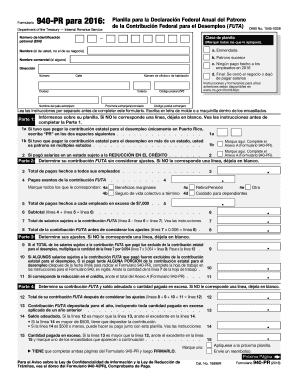
Anote la cantidad de la l nea 7 de la hoja de trabajo . 11 Si corresponde la reducci n en el cr dito, anote el total del Anexo A (Formulario 940-PR) . . . . . 11 Parte 4: Determine su contribuci n FUTA y saldo adeudado o cantidad pagada en exceso. Si NO le corresponde una l nea, d jela en blanco. 12 Total de su contribuci n FUTA despu s de considerar los ajustes (l neas 8 + 9 + 10 + 11 l nea 12) . . 12 13 Contribuci n FUTA depositada para el a o, incluyendo toda cantidad p.

This website is not affiliated with IRS

How it works

  1. Open form

    Open form follow the instructions

  2. Easily sign form

    Easily sign the form with your finger

  3. Share form

    Send filled & signed form or save

How to fill out the IRS 940-PR online

The IRS 940-PR form is essential for employers in Puerto Rico to report their federal unemployment tax obligations. This guide will provide clear, step-by-step instructions to help users complete the form accurately online.

Follow the steps to successfully fill out the IRS 940-PR online.

  1. Use the 'Get Form' button to access the IRS 940-PR online and open it for completion.
  2. Begin by filling out your employer identification number (EIN) at the top of the form. If you do not have an EIN, you can obtain one through the IRS.
  3. Indicate the type of form you are submitting by marking the applicable boxes, such as amended or successor employer.
  4. Enter your name and business name (if applicable) along with your full address in the designated fields.
  5. In Part 1, inform the IRS about your payroll situation. If you only paid unemployment contributions in Puerto Rico, write 'PR' in the specified space.
  6. Proceed to Part 2, where you will need to calculate your federal unemployment tax contributions without adjustments. Record total payments made to all employees.
  7. Next, identify any payments that are exempt from FUTA contributions and total them, then document all relevant amounts.
  8. Moving to Part 3, determine any adjustments that may affect your contributions. If any of your FUTA-subject wages were excluded from state unemployment contributions, note those amounts.
  9. In Part 4, add up all relevant calculations to finalize your total FUTA contribution after adjustments.
  10. Complete Part 5 if your contributions exceed $500, and report the amounts owed quarterly for the FUTA contribution.
  11. Part 6 allows you to authorize someone else to discuss your form with the IRS, should you choose to do so.
  12. Make sure to sign the form in Part 7, affirming that the information provided is complete and accurate.
  13. After completing both pages of the IRS 940-PR, ensure to save your changes, download, print, or share the form as needed.

Complete your IRS 940-PR online today to ensure compliance and streamline your reporting process.

Get form

Experience a faster way to fill out and sign forms on the web. Access the most extensive library of templates available.

Related content

About Form 940, Employer's Annual Federal ...
Jun 26, 2025 — Use Form 940 to report your annual Federal Unemployment Tax Act (FUTA)...
Learn more
2012 Instrucciones para el Formulario 940-PR
Tasa de la contribución FUTA. La tasa de la contribución federal para el desempleo...
Learn more
2017 Schedule A (Form 940)
Because you paid wages in a state that is subject to credit reduction, you must complete...
Learn more

Related links form

SSA-445 2006 SSA-4734-F4-SUP 1985 SSA-5665-BK 2011 SSA-632-BK 2002

Questions & Answers

Get answers to your most pressing questions about US Legal Forms API.

Contact support

When sending your IRS 940-PR form, address it to the designated submission location listed in the IRS instructions for Form 940. This can vary based on whether you are including payment or not. Make sure to check the latest guidelines to avoid any delays in processing your form. Properly sending your form helps ensure compliance with the IRS rules.

IRS Form 1040 PR is a tax form used by residents of Puerto Rico to report their individual income taxes. Unlike IRS 940-PR, which pertains to unemployment taxes, this form primarily focuses on personal income. It's essential to understand the differences between these forms to ensure correct filing. Therefore, if you are looking for guidance on income tax in Puerto Rico, consider consulting with a tax professional.

To file Form 941 by mail, you need to send it to the address indicated on the form's instructions. Like other IRS forms, the mailing address can vary depending on whether you make a payment. Always verify the address to ensure it is current. If you are uncertain, ulegalforms can provide helpful guidance on where to send your Form 941.

To mail your IRS 940-PR, refer to the IRS guidelines for the mailing address specific to your situation. Generally, the address will depend on whether you are making a payment along with the form. Check the instructions carefully to avoid delays. For additional clarity on this process, ulegalforms offers templates and instructions that can simplify filing.

Yes, you can file your own Form 941 electronically. The IRS allows businesses to submit this form online through various software and e-filing platforms. Opting for electronic filing can streamline your submission process, making it easier and faster. ulegalforms can guide you through the electronic filing options available for IRS 940-PR and Form 941.

The address to send mail to the IRS depends on the form you are submitting, such as the IRS 940-PR. Typically, you will find the correct mailing address in the instructions for the specific form. Verify this information carefully to ensure timely processing of your documents. For assistance, consider using ulegalforms, which can direct you to the right resources and addresses.

Form 940-PR is the annual return used by employers in Puerto Rico to report their Federal Unemployment Tax Act (FUTA) tax. This form helps the IRS track your unemployment tax obligations and ensure compliance. Understanding this form is critical for employers, and using platforms like ulegalforms can provide you with clear instructions and tips on completing it accurately.

To mail Form 940-PR, send it to the address specified in the instructions for the form. Typically, the mailing address varies based on whether you are including a payment. Ensure you check the latest guidelines to avoid any mailing errors. If you need more guidance, ulegalforms offers resources to help you navigate these specifics.

Yes, you can file IRS 940-PR by paper. This option is still widely used by many employers who prefer physical documents over electronic submissions. When filing by paper, ensure all information is accurate and complete to avoid potential delays or penalties. If you need assistance with this process, ulegalforms provides easy-to-use templates and guides.

You can file your IRS 940-PR form without payment by mailing it to the designated IRS address for your state. Be sure to check the most recent guidelines to ensure you're sending it to the correct location. If you use the uslegalforms platform, you can streamline this process and find the necessary forms more easily.

Get This Form Now!

Use professional pre-built templates to fill in and sign documents online faster. Get access to thousands of forms.
If you believe that this page should be taken down, please follow our DMCA take down processhere.

Industry-leading security and compliance

US Legal Forms protects your data by complying with industry-specific security standards.
  • In businnes since 1997
    25+ years providing professional legal documents.
  • Accredited business
    Guarantees that a business meets BBB accreditation standards in the US and Canada.
  • Secured by Braintree
    Validated Level 1 PCI DSS compliant payment gateway that accepts most major credit and debit card brands from across the globe.
Get IRS 940-PR
  • Adoption
  • Bankruptcy
  • Contractors
  • Divorce
  • Home Sales
  • Employment
  • Identity Theft
  • Incorporation
  • Landlord Tenant
  • Living Trust
  • Name Change
  • Personal Planning
  • Small Business
  • Wills & Estates
  • Packages A-Z
  • Affidavits
  • Bankruptcy
  • Bill of Sale
  • Corporate - LLC
  • Divorce
  • Employment
  • Identity Theft
  • Internet Technology
  • Landlord Tenant
  • Living Wills
  • Name Change
  • Power of Attorney
  • Real Estate
  • Small Estates
  • Wills
  • All Forms
  • Forms A-Z
  • Form Library
  • Legal Hub
  • About Us
  • Help Portal
  • Legal Resources
  • Blog
  • Affiliates
  • Contact Us
  • Delete My Account
  • Site Map
  • Industries
  • Forms in Spanish
  • Localized Forms
  • State-specific Forms
  • Forms Kit
  • Real Estate Handbook
  • All Guides
  • Notarize
  • Incorporation services
  • For Consumers
  • For Small Business
  • For Attorneys
  • USLegal
  • FormsPass
  • pdfFiller
  • signNow
  • altaFlow
  • DocHub
  • Instapage
Form Packages
  • Adoption
  • Bankruptcy
  • Contractors
  • Divorce
  • Home Sales
  • Employment
  • Identity Theft
  • Incorporation
  • Landlord Tenant
  • Living Trust
  • Name Change
  • Personal Planning
  • Small Business
  • Wills & Estates
  • Packages A-Z
Form Categories
  • Affidavits
  • Bankruptcy
  • Bill of Sale
  • Corporate - LLC
  • Divorce
  • Employment
  • Identity Theft
  • Internet Technology
  • Landlord Tenant
  • Living Wills
  • Name Change
  • Power of Attorney
  • Real Estate
  • Small Estates
  • Wills
  • All Forms
  • Forms A-Z
  • Form Library
Customer Service
  • Legal Hub
  • About Us
  • Help Portal
  • Legal Resources
  • Blog
  • Affiliates
  • Contact Us
  • Delete My Account
  • Site Map
  • Industries
  • Forms in Spanish
  • Localized Forms
  • State-specific Forms
  • Forms Kit
Legal Guides
  • Real Estate Handbook
  • All Guides
Prepared for you
  • Notarize
  • Incorporation services
Our Customers
  • For Consumers
  • For Small Business
  • For Attorneys
Our Sites
  • USLegal
  • FormsPass
  • pdfFiller
  • signNow
  • altaFlow
  • DocHub
  • Instapage
Social Media
Call us now toll free:
+1 833 426 79 33
As seen in:
© Copyright 1999-2026 airSlate Legal Forms, Inc. 3720 Flowood Dr, Flowood, Mississippi 39232
  • Your Privacy Choices
  • Terms of Service
  • Privacy Notice
  • Content Takedown Policy
  • Bug Bounty Program
IRS 940-PR
This form is available in several versions.
Select the version you need from the drop-down list below.
2022 IRS 940-PR
Select form
  • 2022 IRS 940-PR
  • 2021 IRS 940-PR
  • 2020 IRS 940-PR
  • 2019 IRS 940-PR
  • 2018 IRS 940-PR
  • 2017 IRS 940-PR
  • 2016 IRS 940-PR
  • 2015 IRS 940-PR
  • 2014 IRS 940-PR
  • 2013 IRS 940-PR
  • 2012 IRS 940-PR
  • 2011 IRS 940-PR
Select form