CO CT DE DC Montana Nebraska Nevada New Hampshire New Jersey New Mexico New York North Carolina North Dakota MT NE NV NH NJ NM NY NC ND Florida Georgia Hawaii Idaho Illinois Indiana Iowa Kansas Kentucky FL GA HI ID IL IN IA KS KY Ohio Oklahoma Oregon Pennsylvania Rhode Island South Carolina South Dakota Tennessee Texas OH OK OR PA RI SC SD TN TX Louisiana Maine Maryland Massachusetts Michigan Minnesota Mississippi Missouri LA ME MD MA MI MN MS MO Utah Vermont Virginia Washington West V.

Open form follow the instructions

Easily sign the form with your finger

Send filled & signed form or save
How to fill out the IRS 940 - Schedule A online
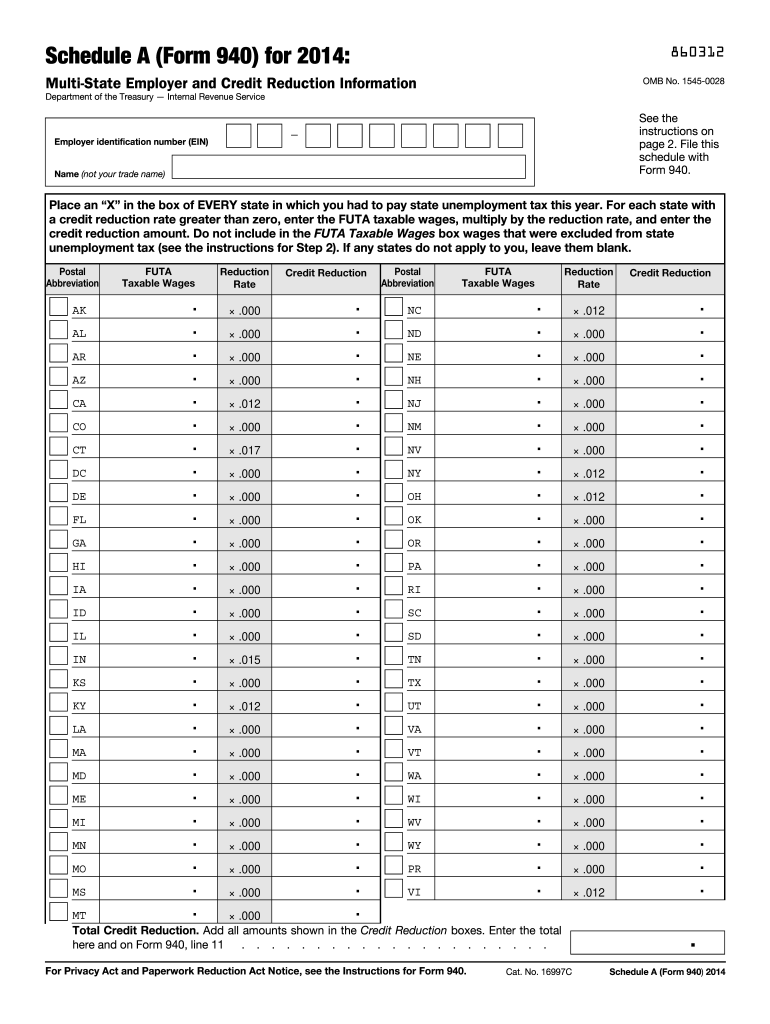
Filling out the IRS 940 - Schedule A is essential for employers who need to report multi-state unemployment tax information. This guide will walk you through the form's components with clear, step-by-step instructions so you can complete it online with confidence.
Follow the steps to complete Schedule A accurately online.
- Click ‘Get Form’ button to obtain the form and open it in the editor.
- Begin by placing an 'X' in the box for every state where you paid state unemployment taxes during the year. This includes the District of Columbia, Puerto Rico, and the U.S. Virgin Islands, regardless of the credit reduction rate.
- Ensure you enter the FUTA taxable wages for each state that has a credit reduction rate greater than zero. Do not report wages that were excluded from state unemployment tax.
- Multiply the FUTA taxable wages by the applicable reduction rate for each state and enter the calculated credit reduction amount in the provided boxes.
- Add all amounts from the Credit Reduction boxes to find the Total Credit Reduction. Enter this total in the designated area and carry it over to Form 940, line 11.
- After completing all entries, you can save your changes, download a copy of the form, print it for your records, or share it as needed.
Complete your IRS forms online for ease and accuracy.
Experience a faster way to fill out and sign forms on the web. Access the most extensive library of templates available.
Related content
Because you paid wages in a state that is subject to credit reduction, you must complete...
Nov 22, 2011 — Then fill out Schedule A (Form 940), and attach it to your Form 940. Type...
Because you paid wages in a state that is subject to credit reduction, you must complete...
Get answers to your most pressing questions about US Legal Forms API.
What address do I mail IRS forms to?
The mailing address for IRS forms varies based on the form type and your location. For the IRS 940 - Schedule A, check the specific instructions corresponding to your form and filing circumstances. Accurate addressing is crucial for proper processing of your tax forms. If you find the instructions confusing, consider using services like US Legal Forms for clearer guidance.
How do I file FUTA tax?
To file your FUTA tax, start by calculating the taxable wages for each employee. You then complete the IRS 940 form, including the Schedule A if necessary for adjustments. Make sure to adhere to the annual deadlines, typically at the end of January for the previous calendar year. Properly filing your FUTA ensures compliance and avoids potential penalties.
Where do I mail my payroll tax return?
Mailing your payroll tax return requires you to first identify the correct IRS address based on the form you are filing. For the IRS 940 - Schedule A, refer to the procedures noted in the form's instructions. Ensuring that you choose the right address based on payment status can avoid processing errors. If you need help, our platform, US Legal Forms, offers detailed guidance on filing IRS tax forms accurately.
What is the schedule a on the 940?
The Schedule A on the IRS 940 form is used to report any adjustments to your FUTA tax. It helps you determine your taxable wages and calculate your tax liability accurately. Completing this schedule is vital if you have state unemployment taxes that affect your FUTA tax credit. Therefore, ensuring you understand it will streamline your IRS 940 filing process.
Where do you mail a 940 FUTA tax return?
You can mail your 940 FUTA tax return to the address specified in the IRS instructions for the form. For those filing without payment, the return should be mailed to the appropriate IRS center based on your state. If you are including payment, the address will differ, so be sure to check the IRS guidelines. Using the correct address helps ensure your submission is processed smoothly.
On what line of form 940 is the total from schedule A entered?
The total from Schedule A is entered on Line 11 of Form 940, which is vital for determining your overall tax liability. This entry is important as it reflects your calculations from Schedule A accurately, ensuring that your filings are thorough and correct. Always double-check your entries to comply with IRS requirements, particularly using IRS 940 - Schedule A.
How do I calculate my FUTA tax?
To calculate your FUTA tax, take the total taxable wages from your employees, multiply this amount by the FUTA tax rate, which is typically 6.0% up to a certain limit. Afterward, you can apply any permissible credits or reductions using information from IRS 940 - Schedule A. This process ensures that you arrive at an accurate FUTA tax obligation.
What is the credit reduction on form 940?
The credit reduction on Form 940 refers to a decrease in the amount of FUTA tax credit you can take, resulting from unpaid state unemployment taxes. This reduction may affect your overall tax liability, making it essential to understand and plan accordingly. Utilizing IRS 940 - Schedule A allows you to assess how credit reductions will impact your final tax amount.
On what line of form 940 is the total from schedule A entered if a credit reduction applies?
If a credit reduction applies, you will enter the total from Schedule A on Line 11 of Form 940. This crucial line reflects any applicable reductions that can lower your FUTA tax liability. Properly completing IRS 940 - Schedule A helps you ensure compliance and accuracy in this calculation.
What is line 16 quarter 1 on form 940?
Line 16 in quarter 1 on Form 940 is designated for reporting your total FUTA tax for the year before any credit reductions are applied. This is your gross FUTA tax liability and serves as a starting point for your calculations. By referring to IRS 940 - Schedule A, you can ensure that you factor in any adjustments correctly.
Use professional pre-built templates to fill in and sign documents online faster. Get access to thousands of forms.
If you believe that this page should be taken down, please follow our DMCA take down process here.
This form is available in several versions. Select the version you need from the drop-down list below.