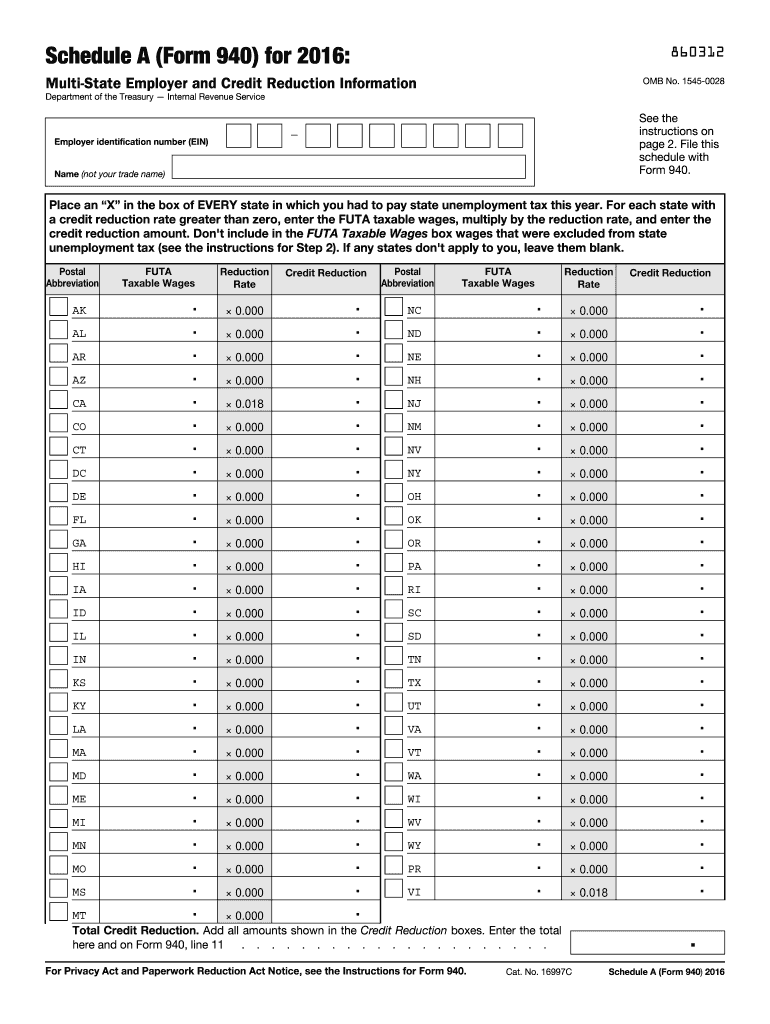
E 2. File this schedule with Form 940. Employer identification number (EIN) Name (not your trade name) Place an X in the box of EVERY state in which you had to pay state unemployment tax this year. For each state with a credit reduction rate greater than zero, enter the FUTA taxable wages, multiply by the reduction rate, and enter the credit reduction amount. Don't include in the FUTA Taxable Wages box wages that were excluded from state unemployment tax (see the instructions for St.
Loading

Open form follow the instructions

Easily sign the form with your finger

Send filled & signed form or save
How to fill out the IRS 940 - Schedule A online
Filling out the IRS 940 - Schedule A can seem daunting, but with the right guidance, you can complete it efficiently. This guide provides a comprehensive, step-by-step approach to assist you in accurately filling out the online form.
Follow the steps to complete the IRS 940 - Schedule A online.
- Click ‘Get Form’ button to obtain the form and open it in the editor.
- Indicate every state where you paid state unemployment taxes by placing an ‘X’ in the corresponding boxes. Ensure you include the District of Columbia, Puerto Rico, and the U.S. Virgin Islands.
- For states with a credit reduction rate above zero, enter the total FUTA taxable wages for each state in the designated box. Remember, do not include wages excluded from state unemployment tax in this box.
- Multiply the FUTA taxable wages by the state's credit reduction rate and enter that amount in the Credit Reduction box for that state.
- To find the total credit reduction, sum up all entries in the Credit Reduction boxes. Enter this total in the Total Credit Reduction box.
- Finally, report this total on Form 940, line 11. You can then save your changes, download, print, or share the completed form.
Get started now and efficiently complete your IRS 940 - Schedule A online!
Experience a faster way to fill out and sign forms on the web. Access the most extensive library of templates available.
Related content
Because you paid wages in a state that is subject to credit reduction, you must complete...
Nov 22, 2011 — Then fill out Schedule A (Form 940), and attach it to your Form 940. Type...
Because you paid wages in a state that is subject to credit reduction, you must complete...
Get answers to your most pressing questions about US Legal Forms API.
Can I submit 940 online?
Yes, you can submit Form 940 online using the IRS e-file system, which is an efficient and secure way to file your taxes. E-filing allows you to file your IRS 940 - Schedule A quickly, ensuring timely submission and reducing the risk of errors. Additionally, platforms such as US Legal Forms provide guidance on the e-filing process, making it easier for you to complete your filing with confidence.
Is form 940 filed quarterly or annually?
Form 940 is filed annually, which summarizes your FUTA tax obligations for the year. While you must deposit FUTA taxes quarterly, the actual Form 940 is due by January 31 of the following year. This annual filing helps employers report their federal unemployment tax accurately, and using tools like US Legal Forms makes the process straightforward and organized.
When must FUTA tax be deposited?
FUTA tax must be deposited quarterly, typically by the last day of the month following the end of each quarter. For example, the deposit for the first quarter is due by April 30. Timely deposits ensure compliance and avoid penalties, allowing you to maintain peace of mind when it comes to the IRS 940 - Schedule A filing. Using a reliable platform like US Legal Forms can additionally help remind you of upcoming deadlines.
How do I file a Schedule A for 940?
Filing a Schedule A for IRS Form 940 involves filling out the schedule to report state unemployment tax information. You must first complete Form 940 before attaching Schedule A, which is designed to document your total taxable wages and collected taxes. Many find it beneficial to use US Legal Forms, as they offer easy-to-fill templates specifically for IRS forms, ensuring accuracy and compliance.
How do I record a FUTA payment in QuickBooks?
To record a FUTA payment in QuickBooks, start by creating an expense account specifically for FUTA taxes. Then, navigate to the 'Create' menu, select 'Check,' and fill in the payment details, ensuring you use your designated expense account. By accurately recording your FUTA payment, you prepare for filing the IRS 940 - Schedule A, making it easier during tax time.
How do I submit a payment to FUTA?
To submit a payment to FUTA, you can use the Electronic Federal Tax Payment System (EFTPS). This system enhances the payment process by allowing you to track your payments efficiently. Another method is through mailing a check along with your Schedule A attached, following the instructions in the IRS 940 guidelines. Using a professional platform such as US Legal Forms can simplify this process by providing templates and clear instructions.
What is the Schedule A standard deduction?
The Schedule A standard deduction is a fixed dollar amount that reduces your taxable income. For many taxpayers, this deduction simplifies the filing process since it does not require itemizing expenses. When comparing tax strategies, knowing about IRS 940 - Schedule A can help clarify the difference between personal and business tax obligations.
What is Schedule A on my tax return?
Schedule A is used for itemizing your deductions when you file your individual tax return. It includes deductions for home mortgage interest, medical expenses, and charitable contributions, among others. If you are filing IRS 940 - Schedule A, it’s important to distinguish between personal tax deductions and employer-related taxes.
What is the Schedule A on the 940?
The Schedule A on the 940 is part of the FUTA tax reporting process. It allows you to calculate your state unemployment tax credit for the year. If you aim to maximize your benefits while filing, understanding the IRS 940 - Schedule A helps you take full advantage of state tax credits.
Where do you mail a 940 FUTA tax return?
You can mail your 940 FUTA tax return to the address provided on the IRS instructions for Form 940. Typically, it varies based on your location and whether you are including a payment. Ensure you check the latest guidelines on mailing addresses for the IRS 940 - Schedule A to avoid any potential delays.
Use professional pre-built templates to fill in and sign documents online faster. Get access to thousands of forms.
If you believe that this page should be taken down, please follow our DMCA take down process here.
This form is available in several versions. Select the version you need from the drop-down list below.