Loading
Form preview
  • US Legal Forms
  • Form Library
  • Tax Forms
  • Executive Department Treasury IRS Forms
  • Irs 8917 2014

Get Irs 8917 2014

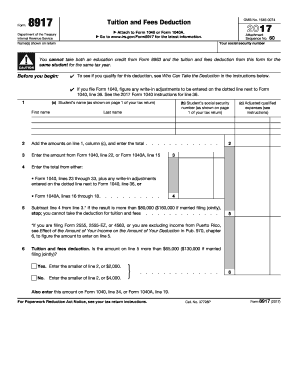
Ction. See Form 8863, Education Credits, and Pub. 970, Tax Benefits for Education, for more information about these credits. Who Can Take the Deduction You may be able to take the deduction if you, your spouse, or a dependent you claim on your tax return was a student enrolled at or attending an eligible educational institution. The deduction is based on the amount of qualified education expenses you paid for the student in 2014 for academic periods beginning in 2014 or beginning in the first 3.

This website is not affiliated with IRS

How it works

  1. Open form

    Open form follow the instructions

  2. Easily sign form

    Easily sign the form with your finger

  3. Share form

    Send filled & signed form or save

How to fill out the IRS 8917 online

The IRS Form 8917 is used to claim the tuition and fees deduction, allowing users to reduce their taxable income based on educational expenses. This guide provides clear, step-by-step instructions to assist individuals in completing the form online.

Follow the steps to complete the IRS 8917 online.

  1. Click ‘Get Form’ button to obtain the form and open it in the editor.
  2. Enter the student's name and social security number in lines 1(a) and 1(b), respectively. Ensure that the information matches what is shown on your tax return.
  3. In line 1(c), input the total adjusted qualified expenses that you have calculated for the student.
  4. In line 2, total the adjusted qualified expenses from all entries in line 1(c). This total will be used for further calculations.
  5. Enter the amount from either Form 1040, line 22 or Form 1040A, line 15 in line 3. This amount reflects your adjusted gross income.
  6. In line 4, subtract the amount on line 3 from the total on line 2. If your income exceeds the specified limit, you will not be eligible for the deduction.
  7. For line 6, determine if the result from line 5 is higher than the threshold amounts provided. Enter the smaller amount based on your eligibility: $2,000 or $4,000.
  8. Lastly, make sure to enter the deduction amount from line 6 on Form 1040, line 34 or Form 1040A, line 19. Review your information for accuracy.
  9. Once all fields are completed, save your changes, download a copy, print, or share the document as needed.

Complete your IRS 8917 form online today to take advantage of your eligible tuition and fees deduction.

Get form

Experience a faster way to fill out and sign forms on the web. Access the most extensive library of templates available.

Related content

About Form 8917, Tuition and Fees Deduction
Feb 19, 2025 — Use Form 8917 to figure and take the deduction for tuition and fees...
Learn more
IRS Educational Tax Credits and Deductions
The Student Loan Deduction is available for taxpayers who have taken loans to pay...
Learn more
2016 Publication 560
Jan 26, 2017 — Attach Form 8917 . . . . . . . 34. 35. Domestic production activities...
Learn more

Related links form

George Washington University Anti-Money Laundering Policy 2014 Harley-Davidson Motor Company Licensee Application Form 2012 Lands' End Return Form LMCC 793-3

Questions & Answers

Get answers to your most pressing questions about US Legal Forms API.

Contact support

IRS Form 8917 is designed for taxpayers to claim a deduction for qualified tuition and related expenses. This form helps reduce your taxable income, providing a potential tax savings. To effectively utilize IRS Form 8917, ensure you meet all eligibility requirements, including keeping detailed records of your educational costs.

Yes, if you receive tuition reimbursement from your employer, you must report it on your taxes. However, you might be able to deduct certain educational expenses if you are claiming IRS Form 8917. Just make sure you meet all necessary criteria when preparing your tax return.

Typically, the person who pays the tuition can claim the 1098-T form when filing taxes. If the student is independent, they may claim it on their tax return. However, if the parents are paying for the education, they should include it in their tax filings, which can lead to benefits like those provided by IRS Form 8917.

Filling out the education tax credit involves using either IRS Form 8863 or Form 8917, depending on the credit you qualify for. You will need to gather information such as tuition costs and your 1098-T form. Be accurate with your calculations, as this will help you maximize your benefits while minimizing errors.

Yes, tuition payments can be deducted on your taxes through educational tax benefits. The IRS Form 8917 allows eligible taxpayers to claim a deduction for certain expenses related to higher education. If you qualify, it can help reduce your taxable income, so it's worth exploring this option as you prepare your taxes.

Certain individuals cannot claim education credits, including those who have a felony drug conviction, or if they are claimed as a dependent on someone else's tax return. Additionally, if your income exceeds specific thresholds set by the IRS, you may not qualify. It’s essential to check these criteria to avoid mistakes when filing. If needed, consulting with tax specialists can provide further insight into your eligibility using IRS 8917.

To determine your eligibility for a student tax credit, you need to review IRS guidelines, which include factors like enrollment status, income, and the type of education expenses incurred. Each credit has different terms, such as the American Opportunity Credit and Lifetime Learning Credit, which you can explore using IRS 8917. Ensure your education expenses are well-documented to support your claim. You might also consider using educational platforms like uslegalforms for more clarity.

To receive the full $2,500 American Opportunity Credit, you need to meet specific requirements, including being enrolled at least half-time for one academic period. You should also have qualified education expenses and an adjusted gross income beneath the threshold set by the IRS. Filing IRS 8917 accurately will help you organize your education expenses properly to maximize your claims. Always keep your school records handy as they can provide necessary proof.

To qualify for tuition tax credits, you must be enrolled in a degree or certificate program at an eligible institution. Your income also plays a crucial role; specific income limits apply, which determine your eligibility for credits like the American Opportunity Credit. Using IRS 8917 can help you understand the criteria better. Make sure to review your circumstances against IRS guidelines to determine your eligibility.

The IRS form you would typically use to report college tuition is Form 1098-T, which colleges and universities provide. This form reports tuition payments and can help students claim education credits or deductions, including benefits available through IRS 8917. Checking for your Form 1098-T after the tax year can provide necessary information for your filing. Being organized and attentive to these forms can simplify your tax preparation.

Get This Form Now!

Use professional pre-built templates to fill in and sign documents online faster. Get access to thousands of forms.
If you believe that this page should be taken down, please follow our DMCA take down processhere.

Industry-leading security and compliance

US Legal Forms protects your data by complying with industry-specific security standards.
  • In businnes since 1997
    25+ years providing professional legal documents.
  • Accredited business
    Guarantees that a business meets BBB accreditation standards in the US and Canada.
  • Secured by Braintree
    Validated Level 1 PCI DSS compliant payment gateway that accepts most major credit and debit card brands from across the globe.
Get IRS 8917
  • Adoption
  • Bankruptcy
  • Contractors
  • Divorce
  • Home Sales
  • Employment
  • Identity Theft
  • Incorporation
  • Landlord Tenant
  • Living Trust
  • Name Change
  • Personal Planning
  • Small Business
  • Wills & Estates
  • Packages A-Z
  • Affidavits
  • Bankruptcy
  • Bill of Sale
  • Corporate - LLC
  • Divorce
  • Employment
  • Identity Theft
  • Internet Technology
  • Landlord Tenant
  • Living Wills
  • Name Change
  • Power of Attorney
  • Real Estate
  • Small Estates
  • Wills
  • All Forms
  • Forms A-Z
  • Form Library
  • Legal Hub
  • About Us
  • Help Portal
  • Legal Resources
  • Blog
  • Affiliates
  • Contact Us
  • Delete My Account
  • Site Map
  • Industries
  • Forms in Spanish
  • Localized Forms
  • State-specific Forms
  • Forms Kit
  • Real Estate Handbook
  • All Guides
  • Notarize
  • Incorporation services
  • For Consumers
  • For Small Business
  • For Attorneys
  • USLegal
  • FormsPass
  • pdfFiller
  • signNow
  • altaFlow
  • DocHub
  • Instapage
Form Packages
  • Adoption
  • Bankruptcy
  • Contractors
  • Divorce
  • Home Sales
  • Employment
  • Identity Theft
  • Incorporation
  • Landlord Tenant
  • Living Trust
  • Name Change
  • Personal Planning
  • Small Business
  • Wills & Estates
  • Packages A-Z
Form Categories
  • Affidavits
  • Bankruptcy
  • Bill of Sale
  • Corporate - LLC
  • Divorce
  • Employment
  • Identity Theft
  • Internet Technology
  • Landlord Tenant
  • Living Wills
  • Name Change
  • Power of Attorney
  • Real Estate
  • Small Estates
  • Wills
  • All Forms
  • Forms A-Z
  • Form Library
Customer Service
  • Legal Hub
  • About Us
  • Help Portal
  • Legal Resources
  • Blog
  • Affiliates
  • Contact Us
  • Delete My Account
  • Site Map
  • Industries
  • Forms in Spanish
  • Localized Forms
  • State-specific Forms
  • Forms Kit
Legal Guides
  • Real Estate Handbook
  • All Guides
Prepared for you
  • Notarize
  • Incorporation services
Our Customers
  • For Consumers
  • For Small Business
  • For Attorneys
Our Sites
  • USLegal
  • FormsPass
  • pdfFiller
  • signNow
  • altaFlow
  • DocHub
  • Instapage
Social Media
Call us now toll free:
+1 833 426 79 33
As seen in:
© Copyright 1999-2026 airSlate Legal Forms, Inc. 3720 Flowood Dr, Flowood, Mississippi 39232
  • Your Privacy Choices
  • Terms of Service
  • Privacy Notice
  • Content Takedown Policy
  • Bug Bounty Program
IRS 8917
This form is available in several versions.
Select the version you need from the drop-down list below.
2020 IRS 8917
Select form
  • 2020 IRS 8917
  • 2018 IRS 8917
  • 2017 IRS 8917
  • 2016 IRS 8917
  • 2015 IRS 8917
  • 2014 IRS 8917
  • 2013 IRS 8917
  • 2012 IRS 8917
  • 2011 IRS 8917
  • 2010 IRS 8917
  • 2009 IRS 8917
Select form