Loading
Form preview
  • US Legal Forms
  • Other Templates
  • Tax Forms
  • Executive Department Treasury IRS Forms
  • Irs 8917 2017

Get Irs 8917 2017

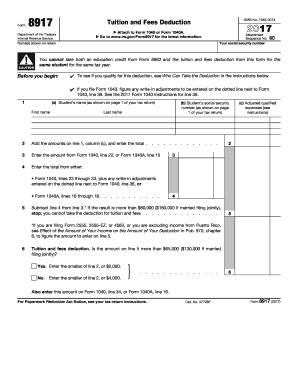
St information. Attachment Sequence No. Your social security number Name(s) shown on return ! CAUTION 60 You cannot take both an education credit from Form 8863 and the tuition and fees deduction from this form for the same student for the same tax year. Before you begin: To see if you qualify for this deduction, see Who Can Take the Deduction in the instructions below. If you file Form 1040, figure any write-in adjustments to be entered on the dotted line next to Form 1040, l.

This website is not affiliated with IRS

How it works

  1. Open form

    Open form follow the instructions

  2. Easily sign form

    Easily sign the form with your finger

  3. Share form

    Send filled & signed form or save

How to fill out the IRS 8917 online

This guide aims to assist users in accurately completing IRS Form 8917, which is used for claiming the tuition and fees deduction. By following these steps, you can ensure that you successfully navigate the form online while understanding each component involved.

Follow the steps to accurately complete Form 8917.

  1. Click 'Get Form' button to access the form and open it in the editor.
  2. In line 1, enter the student's name and social security number. This should match the information provided on page 1 of your tax return.
  3. For line 2, add the amounts from line 1, column (c), which reflect the adjusted qualified education expenses for each student.
  4. On line 3, input the amount from Form 1040, line 22, or Form 1040A, line 15, determining your adjusted income.
  5. Complete line 4 by entering the total from either Form 1040, lines 23 through 33, plus any adjustments from Form 1040, line 36.
  6. Subtract line 4 from line 3. If this amount exceeds $80,000 ($160,000 for married filing jointly), you are not eligible for the deduction.
  7. For line 6, assess if the figure from line 5 is greater than $65,000 ($130,000 for married filing jointly). If yes, enter the smaller of line 2 or $2,000. If no, enter the smaller of line 2 or $4,000.
  8. Finally, record the amount from line 6 on Form 1040, line 34, or Form 1040A, line 19. Ensure all entries are correct before saving.
  9. Once you have completed the form, you can save your changes, download, print, or share the document as needed.

Don't hesitate to complete your IRS forms online to ensure accurate tax filing and deductions.

Get form

Experience a faster way to fill out and sign forms on the web. Access the most extensive library of templates available.

Related content

About Form 8917, Tuition and Fees Deduction
Feb 19, 2025 — Use Form 8917 to figure and take the deduction for tuition and fees...
Learn more
IRS Educational Tax Credits and Deductions
The Student Loan Deduction is available for taxpayers who have taken loans to pay...
Learn more
2016 Publication 560
Jan 26, 2017 — Attach Form 8917 . . . . . . . 34. 35. Domestic production activities...
Learn more

Related links form

ME Electrical Permit Application TX MHD FORM 1023 2018 TX TDLR LIC002 2015 Aquatic Management Accident/Report Form

Questions & Answers

Get answers to your most pressing questions about US Legal Forms API.

Contact support

Form 8917 is used to claim the Tuition and Fees Deduction, while Form 8863 is used to claim education credits. The primary distinction lies in the benefits received: the Tuition and Fees Deduction can reduce your taxable income, whereas education credits directly reduce your tax bill. Understanding when to use each form is essential for maximizing your education-related tax benefits. If you're unsure, both forms are essential for your educational expense filings.

To determine your eligibility for an education credit from the IRS, you must meet specific criteria regarding your enrollment in or attendance at an eligible educational institution. For example, the American Opportunity Credit applies for students in their first four years of higher education, while the Lifetime Learning Credit serves students pursuing advanced degrees or coursework. Evaluating your situation in combination with IRS Form 8917 can clarify what deductions and credits you may qualify for.

Form 8863 is primarily used to claim education credits on your tax return. It helps you determine if you qualify for the American Opportunity Credit or the Lifetime Learning Credit, both of which can significantly reduce your tax burden. Filing this form accurately allows you to benefit from available educational incentives while ensuring compliance with IRS regulations. If you're also claiming deductions through IRS Form 8917, it's essential to handle both forms correctly.

No, Form 8863 and Schedule 3 serve different purposes in your tax filing. Form 8863 is specifically used to claim education credits such as the American Opportunity Credit and the Lifetime Learning Credit. In contrast, Schedule 3 is used to report additional credits and payments, which may include non-refundable credits. It's beneficial to understand how both forms relate to your overall tax return, especially if you're utilizing IRS Form 8917 for education expenses.

To receive the full $2,500 American Opportunity Credit, ensure you meet all eligibility requirements, including enrollment status, income limits, and having qualified education expenses. It's also important to accurately complete and submit the IRS 8863 tax form and use IRS 8917 to report any qualifying tuition. Staying organized will help maximize your claims.

For the American Opportunity Credit, the maximum income limit is $80,000 for single filers and $160,000 for married couples filing jointly. Earning above these thresholds can reduce or eliminate your eligibility for the credit. Always double-check your eligibility when preparing your forms, including the IRS 8917.

To qualify for the full $2,500 American Opportunity Credit, you must be enrolled at least half-time in an eligible program, meet income thresholds, and have qualified expenses. Make sure to track and document all qualified expenses using IRS 8917. This information is essential for maximizing your claim.

Not receiving the full American Opportunity Credit may result from factors like exceeding income limits or not meeting enrollment requirements. Additionally, the credit may be reduced if you receive other forms of financial aid. Reviewing your situation with IRS 8917 and form 8863 will help clarify any discrepancies.

To claim the American Opportunity Tax Credit, complete IRS form 8863 and ensure you meet eligibility requirements, such as enrollment status and income limits. Make sure to include the relevant expenses you incurred during the academic year. Completing IRS 8917 can also help you track your qualified expenses.

Yes, you can deduct certain tuition payments on your taxes using IRS Form 8917. This form allows you to claim the Tuition and Fees Deduction, which can help reduce your taxable income. Keep in mind that you must meet specific eligibility criteria to qualify for this deduction.

Get This Form Now!

Use professional pre-built templates to fill in and sign documents online faster. Get access to thousands of forms.
If you believe that this page should be taken down, please follow our DMCA take down processhere.
Get IRS 8917
  • Adoption
  • Bankruptcy
  • Contractors
  • Divorce
  • Home Sales
  • Employment
  • Identity Theft
  • Incorporation
  • Landlord Tenant
  • Living Trust
  • Name Change
  • Personal Planning
  • Small Business
  • Wills & Estates
  • Packages A-Z
  • Affidavits
  • Bankruptcy
  • Bill of Sale
  • Corporate - LLC
  • Divorce
  • Employment
  • Identity Theft
  • Internet Technology
  • Landlord Tenant
  • Living Wills
  • Name Change
  • Power of Attorney
  • Real Estate
  • Small Estates
  • Wills
  • All Forms
  • Forms A-Z
  • Other Templates
  • Legal Hub
  • About Us
  • Help Portal
  • Legal Resources
  • Blog
  • Affiliates
  • Contact Us
  • Delete My Account
  • Site Map
  • Industries
  • Forms in Spanish
  • Localized Forms
  • State-specific Forms
  • Forms Kit
  • Real Estate Handbook
  • All Guides
  • Notarize
  • Incorporation services
  • For Consumers
  • For Small Business
  • For Attorneys
  • USLegal
  • FormsPass
  • pdfFiller
  • signNow
  • altaFlow
  • DocHub
  • Instapage
Form Packages
  • Adoption
  • Bankruptcy
  • Contractors
  • Divorce
  • Home Sales
  • Employment
  • Identity Theft
  • Incorporation
  • Landlord Tenant
  • Living Trust
  • Name Change
  • Personal Planning
  • Small Business
  • Wills & Estates
  • Packages A-Z
Form Categories
  • Affidavits
  • Bankruptcy
  • Bill of Sale
  • Corporate - LLC
  • Divorce
  • Employment
  • Identity Theft
  • Internet Technology
  • Landlord Tenant
  • Living Wills
  • Name Change
  • Power of Attorney
  • Real Estate
  • Small Estates
  • Wills
  • All Forms
  • Forms A-Z
  • Other Templates
Customer Service
  • Legal Hub
  • About Us
  • Help Portal
  • Legal Resources
  • Blog
  • Affiliates
  • Contact Us
  • Delete My Account
  • Site Map
  • Industries
  • Forms in Spanish
  • Localized Forms
  • State-specific Forms
  • Forms Kit
Legal Guides
  • Real Estate Handbook
  • All Guides
Prepared for you
  • Notarize
  • Incorporation services
Our Customers
  • For Consumers
  • For Small Business
  • For Attorneys
Our Sites
  • USLegal
  • FormsPass
  • pdfFiller
  • signNow
  • altaFlow
  • DocHub
  • Instapage
Social Media
Call us now toll free:
+1 833 426 79 33
As seen in:
© Copyright 1999-2026 airSlate Legal Forms, Inc. 17 Station Street, Suite 303, Brookline, MA 02445
  • Your Privacy Choices
  • Terms of Service
  • Privacy Notice
  • Content Takedown Policy
  • Bug Bounty Program
IRS 8917
This form is available in several versions.
Select the version you need from the drop-down list below.
2020 IRS 8917
Select form
  • 2020 IRS 8917
  • 2018 IRS 8917
  • 2017 IRS 8917
  • 2016 IRS 8917
  • 2015 IRS 8917
  • 2014 IRS 8917
  • 2013 IRS 8917
  • 2012 IRS 8917
  • 2011 IRS 8917
  • 2010 IRS 8917
  • 2009 IRS 8917
Select form