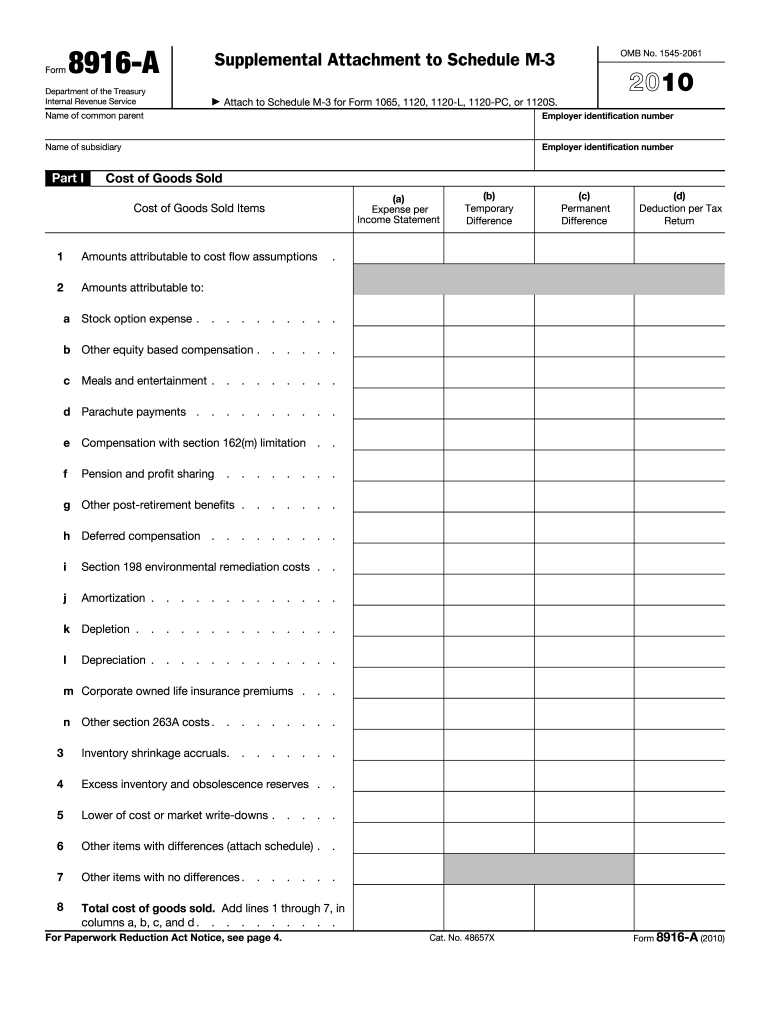
(Form 1120S) Part III, line 26. Form 8916-A (2010) Page 3 Form 8916-A (2010) General Instructions Section references are to the Internal Revenue Code unless otherwise noted. Purpose of Form Use Form 8916-A to provide a detailed schedule of the amounts reported on the applicable Schedule M-3 for cost of goods sold, interest income and interest expense. Who Must File Form 8916-A must be filed for each separate entity required to file a Schedule M-3 for Form 1120, Form 1065, Form 1065-B, For.
Loading

Open form follow the instructions

Easily sign the form with your finger

Send filled & signed form or save
How to fill out the IRS 8916-A online
Filling out the IRS 8916-A form can seem daunting, but with clear guidance, you can complete it efficiently. This form is a supplemental attachment required for various tax forms, such as 1065 and 1120. This guide aims to provide you with a straightforward, step-by-step process to fill it out online.
Follow the steps to complete the IRS 8916-A form online.
- Click ‘Get Form’ button to obtain the form and open it in the editor.
- Begin filling out the first section, which concerns the name of the common parent and their employer identification number. Confirm that the information matches your records.
- In Part I, complete the temporary and permanent difference columns as applicable. Ensure each deduction per tax return aligns accurately with your accounting records.
- For each interest income item, fill in the respective columns for expense per income statement, temporary difference, permanent difference, and the deduction per tax return.
- Finally, review all entries for accuracy. Once you have completed the form, you can save changes, download, print, or share the completed document as necessary.
Complete your IRS forms online with confidence by following this guide.
Experience a faster way to fill out and sign forms on the web. Access the most extensive library of templates available.
Related content
Jan 29, 2025 — Form 8916-A provides a detailed schedule of the amounts reported on the...
Interest income (attach Form 8916-A). 14. Hedging transactions. 16. Mark-to-market income...
(IRS Employer Identification No.) 2700 Coast Avenue, Mountain View, CA 94043. (Address of...
Get answers to your most pressing questions about US Legal Forms API.
How much do you have to owe the IRS before they put a lien?
The IRS typically files a lien when you owe $10,000 or more in federal tax debt. This amount can vary in special cases, but it generally serves as a threshold. Knowing this limit helps you manage your tax obligations and avoid complications, especially when utilizing IRS 8916-A for tax-related processes.
At what point does the IRS file a tax lien?
The IRS files a tax lien once you owe back taxes and have failed to respond to their notices. This legal claim secures the IRS's interest in your property, ensuring they can collect the owed tax. It’s crucial to address your tax issues promptly to avoid a lien, especially if you are using IRS 8916-A for tax resolution.
What is the purpose of the Form 8916 A?
Form 8916-A serves to inform the IRS about your entitlement to a tax change for a particular year. This form helps ensure that the IRS has accurate information regarding your tax returns, particularly if you are dealing with scenarios related to liens. By accurately filling out this form, you can clarify your tax situation and avoid potential complications arising from misunderstandings.
How to fill out a withholding exemption form?
To fill out a withholding exemption form, begin by reviewing the IRS guidelines that specify who qualifies for exemptions. You will need to provide your details, including your Social Security number, and always consider the adjustments necessary if you are referencing the IRS 8916-A in your filing. Uslegalforms can provide templates and instructions to make this process easier for you.
What is the main purpose of form 1098?
Form 1098 is primarily used to report mortgage interest payments made by individuals to lenders. This form aids taxpayers in claiming deductions related to mortgage interest on their tax returns. Additionally, if you leverage the IRS 8916-A for specific deductions related to your mortgage, ensure you reference this to maximize your benefits. To learn more about handling Form 1098, check out uslegalforms.
What is the main purpose of a form?
The main purpose of tax forms is to provide a standardized method for taxpayers to report their income, expenses, and tax liabilities to the IRS. Each form, including the IRS 8916-A, serves a specific function, ensuring compliance with tax laws. These forms help maintain transparency and accountability in the tax system. For guidance on filling out various tax forms, uslegalforms offers valuable resources.
What if I have more than $1500 in taxable interest income?
If your taxable interest income exceeds $1,500, you must report it on Schedule B of your tax return. Additionally, be aware that the IRS requires more detailed reporting, which may involve referencing the IRS 8916-A for certain tax considerations. This situation may also require the use of forms from uslegalforms to guide you through accurately reporting and filing your taxes.
How to fill out a 3949A?
To complete Form 3949-A, start by accurately describing the suspected tax fraud or issues you wish to report. Provide clear information about the person or business involved, including their name and address. Furthermore, when relevant, mention Form 8916-A to indicate specific tax implications. You can find helpful templates and instructions on uslegalforms to assist you in this process.
How to fill out a tax amendment form?
Filling out a tax amendment form involves gathering your original tax information and any new details that affect your return. You should use the IRS Form 1040-X to amend your federal tax return. Make sure to reference the IRS 8916-A if your amendment pertains to specific deductions or credits, ensuring accurate reporting. Consider visiting uslegalforms for guides and resources that simplify this process.
Do I need to report dividends under $100?
Dividends under $100 still need to be reported on your tax return. While they may not significantly impact your overall tax liability, accurate reporting is necessary to avoid complications. Using the IRS 8916-A form can aid in ensuring that all dividend income, regardless of the amount, is properly documented.
Use professional pre-built templates to fill in and sign documents online faster. Get access to thousands of forms.
If you believe that this page should be taken down, please follow our DMCA take down process here.
This form is available in several versions. Select the version you need from the drop-down list below.