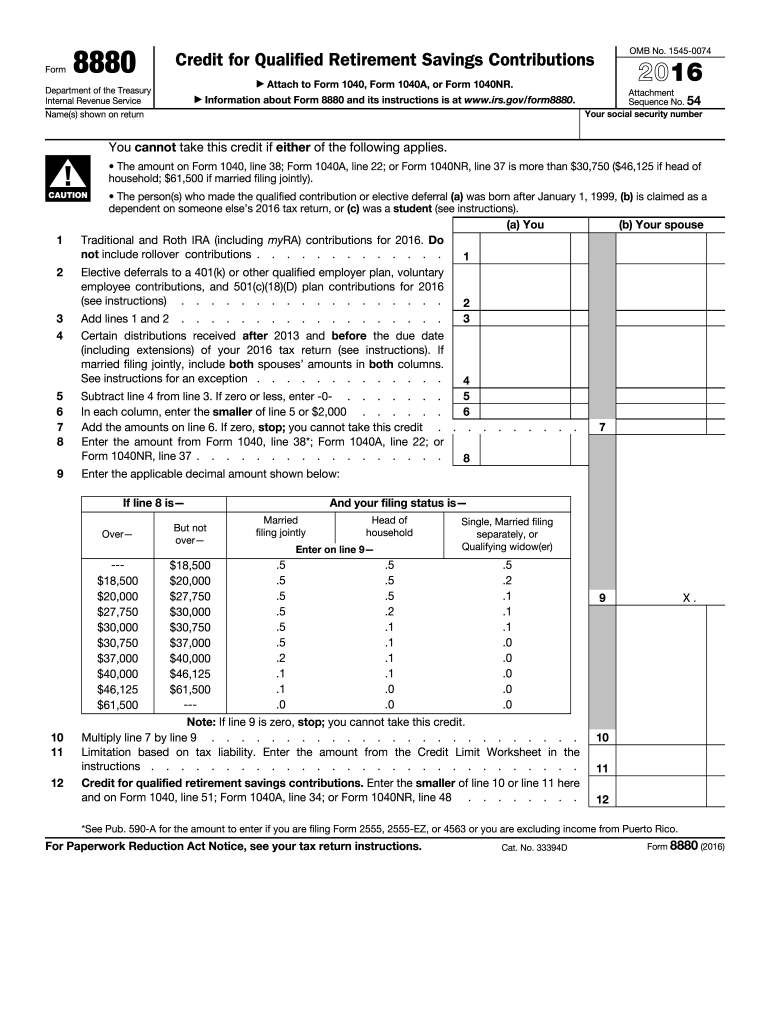
Ointly). The person(s) who made the qualified contribution or elective deferral (a) was born after January 1, 1999, (b) is claimed as a dependent on someone else s 2016 tax return, or (c) was a student. ! CAUTION You will need to refigure the amount on Form 1040, line 38, if you are filing Form 2555, 2555-EZ, or 4563 or you are excluding income from Puerto Rico. See Pub. 590-A for details. You were a student if during any part of 5 calendar months of 2016 you: Were enrolled as a.
Loading

Open form follow the instructions

Easily sign the form with your finger

Send filled & signed form or save
How to fill out the IRS 8880 online
The IRS Form 8880 is used to calculate the retirement savings contributions credit, often referred to as the saver’s credit. This guide will provide you with clear instructions on how to fill out the form online, ensuring you understand each section and field.
Follow the steps to complete the Form 8880 online.
- Click ‘Get Form’ button to obtain the form and open it in the editor.
- Begin by entering the name(s) shown on your tax return in the designated field. Make sure that the names match with the Social Security Administration records.
- Input your Social Security number in the appropriate field. This is essential for identification and processing by the IRS.
- Review the eligibility section carefully. Ensure that you meet the requirements to claim the credit, such as income thresholds and age conditions.
- In lines 1 and 2, enter the qualifying contributions made to traditional or Roth IRAs, and to retirement plans like 401(k)s. Be precise and do not include any rollover contributions.
- Add the amounts from lines 1 and 2 and record the total on line 4, ensuring to follow the instructions regarding distributions if applicable.
- In line 8, enter the smaller of line 5 or $2,000 for each individual contributing. If the total is zero or less, you will not be able to claim this credit.
- Complete line 8 based on your filing status to determine the applicable decimal amount. Follow the guidelines provided to accurately calculate the figure.
- Multiply the result of line 7 by the decimal amount from line 9 to find the potential credit amount.
- Enter the smaller of line 10 or the amount derived from the credit limit worksheet into line 11.
- Finally, check all entries for accuracy, save your changes, and prepare to download or print the completed form for submission.
Complete your IRS Form 8880 online today and maximize your retirement savings contributions credit.
Experience a faster way to fill out and sign forms on the web. Access the most extensive library of templates available.
Related content
Use Form 8880 to figure the amount, if any, of your retirement savings ... Also enter this...
Form 8880, credit for qualified retirement savings contributions. Online. Available...
Jan 26, 2017 — To take the credit, use Form 8880, Credit for Qualified Re tirement...
Get answers to your most pressing questions about US Legal Forms API.
Do I have to file form 8880 H&R Block?
You are not required to file form 8880 with H&R Block unless you are claiming the retirement savings contribution credit. If you made eligible contributions, completing and filing IRS 8880 is essential to ensure you receive the credit. Seek assistance from H&R Block or consider using platforms like US Legal Forms to guide you through the process of filing this form accurately.
Should I fill out form 8880?
You should fill out form 8880 if you made contributions to eligible retirement accounts and your income falls within the IRS guidelines for claiming the retirement savings contribution credit. Completing this form can potentially reduce your tax liability. If you're unsure about how to complete IRS 8880, platforms like US Legal Forms can provide support and resources.
Do you get a tax break for retirement contributions?
Yes, you can receive a tax break for retirement contributions through credits and deductions, such as the retirement savings contribution credit outlined in IRS 8880. This credit particularly benefits lower-to-middle-income taxpayers who contribute to retirement accounts. Not only does this credit lessen your tax burden, but it also encourages saving for your future.
How do I report retirement savings on my taxes?
To report retirement savings on your taxes, you will typically need to include your contributions on the appropriate lines of your tax return, such as Form 1040. If you are claiming the retirement savings contribution credit, you must also complete the IRS Schedule 8880. Using clear instructions from US Legal Forms can help ensure you accurately report your retirement savings, allowing you to maximize your potential credits.
How do I claim my retirement savings contributions credit?
To claim your retirement savings contributions credit, you must complete the IRS Schedule 8880 and include it with your federal tax return. Ensure that you accurately detail your contributions to eligible retirement accounts and check if your income falls within the allowable limits. Resources on platforms like US Legal Forms can assist you in filling out this form correctly, making the process smoother.
Why is TurboTax giving me a retirement savings contribution credit?
TurboTax provides the retirement savings contribution credit based on your contributions to qualifying retirement accounts, along with your income level and filing status. If you qualify based on IRS guidelines, TurboTax automatically calculates and applies the credit to your tax return. This can significantly decrease your tax bill, making it essential to ensure accurate reporting when using the IRS 8880.
What is the IRS Schedule 8880?
The IRS Schedule 8880 is a form used to calculate the retirement savings contribution credit, designed to encourage contributions to retirement accounts. By completing this schedule, you can report your contributions and determine the amount of credit you qualify for, which can reduce your tax liability significantly. Utilizing platforms like US Legal Forms can simplify the process of filling out IRS 8880 by providing clear guidelines and templates.
Why am I not getting the retirement savings contribution credit?
If you are not receiving the retirement savings contribution credit, it may be due to your income exceeding the eligibility limits set by the IRS. Additionally, if you do not contribute to a qualified retirement plan, you cannot claim this credit. Review the criteria for the IRS 8880 to ensure you meet the requirements, and consider discussing your situation with a tax professional for clarity.
What carries to form 8880?
Form 8880 can carry certain information from your tax return, such as your adjusted gross income and your contributions to qualified retirement accounts. This information is crucial for determining your eligibility for the Retirement Savings Contributions Credit. Thus, ensuring accurate entries will facilitate potential tax credits, benefiting your overall tax return.
Where do I get my form 8880?
You can obtain IRS Form 8880 from the official IRS website or through various tax preparation software platforms. Additionally, tax professionals and services like uslegalforms can provide the form and necessary guidance on filling it out correctly. Simplifying the process ensures you have all the right documents for claiming your credits.
Use professional pre-built templates to fill in and sign documents online faster. Get access to thousands of forms.
If you believe that this page should be taken down, please follow our DMCA take down process here.
This form is available in several versions. Select the version you need from the drop-down list below.