Open form follow the instructions
Easily sign the form with your finger
Send filled & signed form or save
How to fill out the IRS 8879-S online
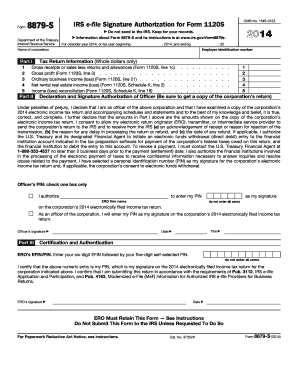
The IRS 8879-S form is essential for electronically signing an S corporation's income tax return using a personal identification number (PIN). Follow this guide to understand each component of the form and fill it out accurately online.
Follow the steps to complete the IRS 8879-S online:
- Select the ‘Get Form’ button to access the IRS 8879-S form and open it in your online editor.
- Enter the employer identification number at the top of the form to identify the corporation clearly.
- Fill in the corporation's name, ensuring it matches the official records for accuracy.
- In Part I, provide the following financial details: gross receipts or sales (line 1c), gross profit (line 3), ordinary business income or loss (line 21), net rental real estate income or loss (Schedule K, line 2), and income or loss reconciliation (Schedule K, line 18). Only whole dollar amounts should be included.
- Proceed to Part II to authorize an electronic return originator (ERO) to enter your PIN or decide to enter it personally.
- Indicate your PIN (a 5-digit number that is not all zeros) in the designated area if you authorize the ERO to enter it on your behalf.
- As an officer, provide your signature, title, and date at the bottom of Part II to certify the information provided is accurate and complete.
- Complete Part III by entering the ERO’s electronic filing identification number (EFIN) and your self-selected PIN. Ensure the values are accurate as this section serves as your official signature.
- Once all sections are accurately completed, save your changes, and download or print the form for your records.
Complete the IRS 8879-S form online today for efficient processing of your corporate tax return.
Experience a faster way to fill out and sign forms on the web. Access the most extensive library of templates available.
Related content
Jan 28, 2025 — A corporate officer and an electronic return originator (ERO) use this...
(Whole Dollars Only). Check the box for the return for which you are using this Form...
Dec 21, 2011 — employer or financial institution if they offer IRS e-file as an. You...
Get answers to your most pressing questions about US Legal Forms API.
What is tax form 8879 s?
IRS Form 8879-S is an e-file authorization document specifically for S corporations. This form allows EROs and taxpayers to sign electronically, streamlining the filing process. Understanding the purpose and requirements of IRS 8879-S can make your tax filings smoother and more efficient.
Who files 8879 corp?
Form 8879-C, or 8879 Corp, is filed by the ERO of a corporation that is submitting its tax returns electronically. The ERO, typically a certified tax preparer, must ensure the form is completed accurately and submitted alongside the tax return. You can stay organized by using platforms like uslegalforms to manage your filing.
What is the 3 day rule for 8879?
The '3 day rule' refers to the requirement that tax preparers must give clients a copy of Form 8879-S after signing, within three days of the electronic return's transmission. This practice ensures that taxpayers are fully aware and have a record of their consent regarding the filing. Adhering to this rule can help prevent misunderstandings with the IRS.
Who must file form 8879?
Generally, any taxpayer involved in an S corporation that uses an electronic filer's service must file IRS Form 8879-S. This includes the corporation's representatives and tax professionals who assist in preparing the tax return. Understanding your filing requirements is crucial for timely and accurate submissions.
How long does a tax preparer have to keep form 8879?
A tax preparer must retain Form 8879-S for a minimum of three years following the electronic filing of the tax return. This retention period allows for the IRS to review any submitted documents in case of audits or inquiries. Partnering with uslegalforms can help you streamline record-keeping and compliance processes.
Who signs as the ERO on a tax return?
The Electronic Return Originator (ERO) is typically the tax professional who prepares the tax return. This individual must sign Form 8879-S to indicate that they have prepared the return and are authorized to file it electronically. It's essential to ensure the ERO's signature is present to comply with IRS regulations.
Did 8879 Corp replace 8879 S?
Yes, Form 8879-C, also known as 8879 Corp, has replaced the IRS 8879-S for corporations. The main distinction is that 8879-S is specifically designed for S corporations, while 8879-C is for C corporations. Make sure to use the correct form based on your entity type to avoid any issues with the IRS.
Who do I send form 8879 to?
You must send Form 8879-S to the Internal Revenue Service (IRS). This form is essentially a declaration that the tax return has been prepared and allows electronic filing of the tax documents. It is vital to ensure that you keep a copy for your records. Using a professional service like uslegalforms can simplify this process.
How long does it take to keep 8879?
You should keep the IRS 8879-S form for a minimum of three years after the date you file your tax return. Proper record-keeping is essential for any potential audits or follow-up inquiries from the IRS. Utilizing a platform like US Legal Forms can assist in managing and storing important tax documents securely.
Does the IRS accept electronic signatures on form 8879 S?
Yes, the IRS accepts electronic signatures on form 8879-S, which allows for a streamlined e-filing process. When using electronic methods, ensure that authentication steps are followed to validate the signature. This feature helps incorporate efficiency into your tax preparation, making life easier during tax season.
Use professional pre-built templates to fill in and sign documents online faster. Get access to thousands of forms.
If you believe that this page should be taken down, please follow our DMCA take down process here.
This form is available in several versions. Select the version you need from the drop-down list below.