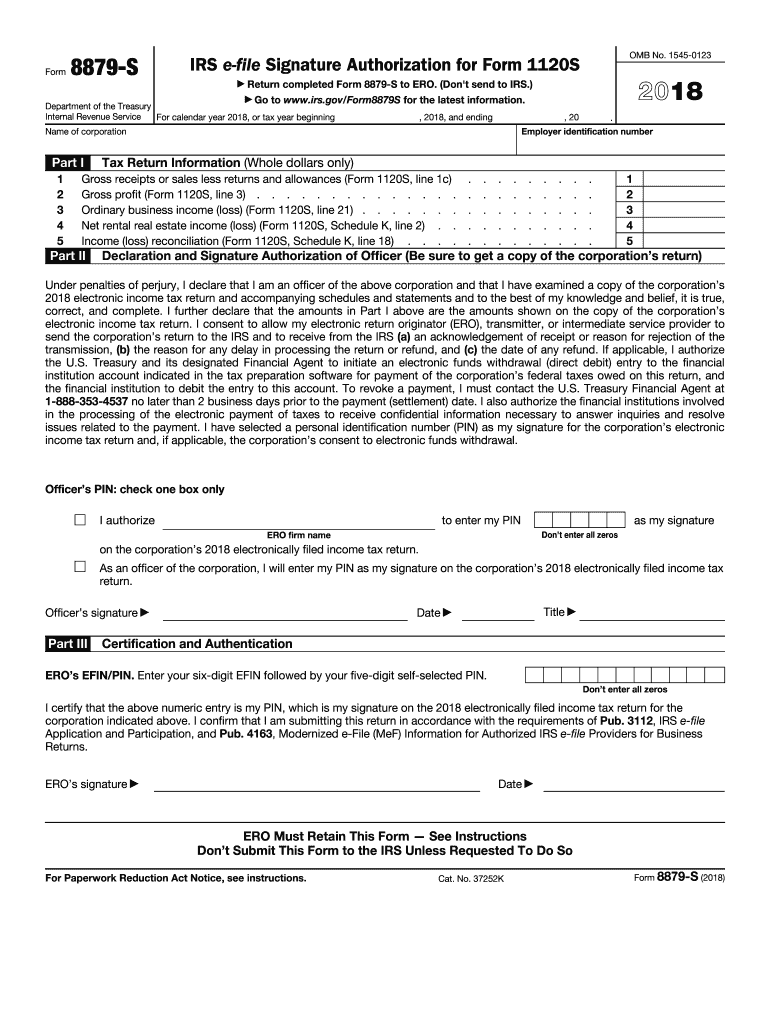
Part III Title Date Certification and Authentication ERO s EFIN/PIN. Enter your six-digit EFIN followed by your five-digit self-selected PIN. Don t enter all zeros I certify that the above numeric entry is my PIN, which is my signature on the 2018 electronically filed income tax return for the corporation indicated above. I confirm that I am submitting this return in accordance with the requirements of Pub. 3112, IRS e-file Application and Participation, and Pub. 4163, Moderniz.

Open form follow the instructions

Easily sign the form with your finger

Send filled & signed form or save
How to fill out the IRS 8879-S online
Filling out the IRS 8879-S form is an essential step for S corporations to authorize their electronic tax returns. This guide provides a clear and supportive walkthrough of the form's components, ensuring that each user can confidently complete it online.
Follow the steps to fill out the IRS 8879-S form accurately.
- Click ‘Get Form’ button to access the IRS 8879-S form and open it in your preferred digital environment.
- In Part I, start by entering the tax return information. Fill out each applicable field: gross receipts or sales (line 1c), gross profit (line 3), ordinary business income or loss (line 21), net rental real estate income or loss (Schedule K, line 2), and income or loss reconciliation (Schedule K, line 18). Ensure you input amounts as whole dollars only.
- Proceed to Part II. Here, input the employer identification number and the name of the corporation. It is crucial to verify that this information matches the corporation's official records.
- In the declaration and signature section, confirm your status as an officer of the corporation. Validate the accuracy of the 2018 electronic income tax return and ensure that the amounts shown in Part I are correct.
- Select how you wish to authorize your electronic return originator (ERO) to enter your personal identification number (PIN). Either authorize them or indicate that you will enter it yourself. The PIN must be a five-digit number that is not all zeros. Fill in your title, date, and sign.
- Complete Part III, where the ERO enters their six-digit EFIN followed by a five-digit self-selected PIN. The ERO should then sign and date this section. Remember, the completed form must be retained by the ERO.
Complete your IRS 8879-S form online now to ensure timely filing of your corporation's tax return.
Experience a faster way to fill out and sign forms on the web. Access the most extensive library of templates available.
Related content
Jan 28, 2025 — A corporate officer and an electronic return originator (ERO) use this...
(Whole Dollars Only). Check the box for the return for which you are using this Form...
Dec 21, 2011 — employer or financial institution if they offer IRS e-file as an. You...
Get answers to your most pressing questions about US Legal Forms API.
What is the 3-day rule for 8879?
The 3-day rule for form 8879-S refers to the requirement that the signing party must retain a copy of the signed form for at least three days prior to submitting the tax return. This retention ensures that the taxpayer has time to review and verify the details before filing. Following this rule helps maintain accountability and prevents errors in your tax submissions. Consider using an organized record-keeping system to manage these documents effectively.
Can form 2553 be signed electronically?
Form 2553 can be signed electronically, streamlining the process of electing S corporation status with the IRS. When submitting form 2553, ensure that your electronic signature complies with IRS regulations. The ability to sign online simplifies the process for businesses looking to make this election quickly. Using an efficient platform like uslegalforms can help facilitate this process.
Did 8879-Corp replace 8879-S?
The IRS 8879-Corp did not replace the 8879-S; instead, it serves a different purpose. While both forms are used for electronic filing, the 8879-Corp is specifically for corporations, whereas the 8879-S is intended for S corporations. Understanding the differences between these forms helps ensure that you are using the correct one during your tax filing. If you’re unsure, consider consulting with a tax professional to clarify.
Can 8879 be electronically signed?
The IRS 8879 can indeed be electronically signed, which simplifies the tax filing experience. An electronic signature allows for quick authorization of your tax return without the need for physical paperwork. Be aware that using approved software solutions ensures that you meet all IRS guidelines. This feature is particularly beneficial for busy business owners looking to save time.
Does the IRS accept electronic signatures on form 8879-S?
Yes, the IRS accepts electronic signatures on the form 8879-S, making the filing process more efficient. This acceptance allows for faster tax processing and adds convenience for taxpayers who prefer digital solutions. Utilizing e-signatures can expedite the entire filing process without sacrificing security. Be sure you are using a system compatible with IRS requirements.
Are digital records acceptable for IRS?
Digital records are accepted by the IRS as long as they meet specific criteria. You must ensure that your records are complete, accurate, and securely stored. For businesses filing using IRS 8879-S, keeping digital copies of your documentation is crucial for audits or verifications. Always refer to the IRS’s guidelines for maintaining electronic records to stay compliant.
Does the IRS allow electronic signatures?
Yes, the IRS allows electronic signatures on certain forms, including the IRS 8879-S. This feature is especially useful for those who file taxes online, as it streamlines the process significantly. Electronic signatures provide a convenient method for taxpayers to authorize their tax returns securely. However, you must use an IRS-approved e-signature software to ensure compliance.
Who fills out form 8879?
The IRS 8879-S form is typically filled out by the business owner's tax professional or preparer. This form serves as a declaration that the information provided on the tax return is accurate. Business owners should have their financial documents ready for the preparer to ensure a smooth process. Once completed, it should be signed by the entity’s responsible party.
Do you need an 8879 for an amended tax return?
Yes, you need an 8879 form for an amended tax return if you plan to e-file. The IRS requires a signature authorization for any tax return that is filed electronically, including amendments. Utilizing the IRS 8879-S in this context helps ensure that your amended returns comply with IRS e-filing requirements.
Does the IRS accept electronic signatures on form 8879 S?
Yes, the IRS accepts electronic signatures on the 8879-S form. This feature enhances convenience as it allows S corporations to authorize their tax preparers for e-filing without the need for physical signatures. Using the IRS 8879-S form with electronic signatures makes the entire process smoother and quicker.
Use professional pre-built templates to fill in and sign documents online faster. Get access to thousands of forms.
If you believe that this page should be taken down, please follow our DMCA take down process here.
This form is available in several versions. Select the version you need from the drop-down list below.