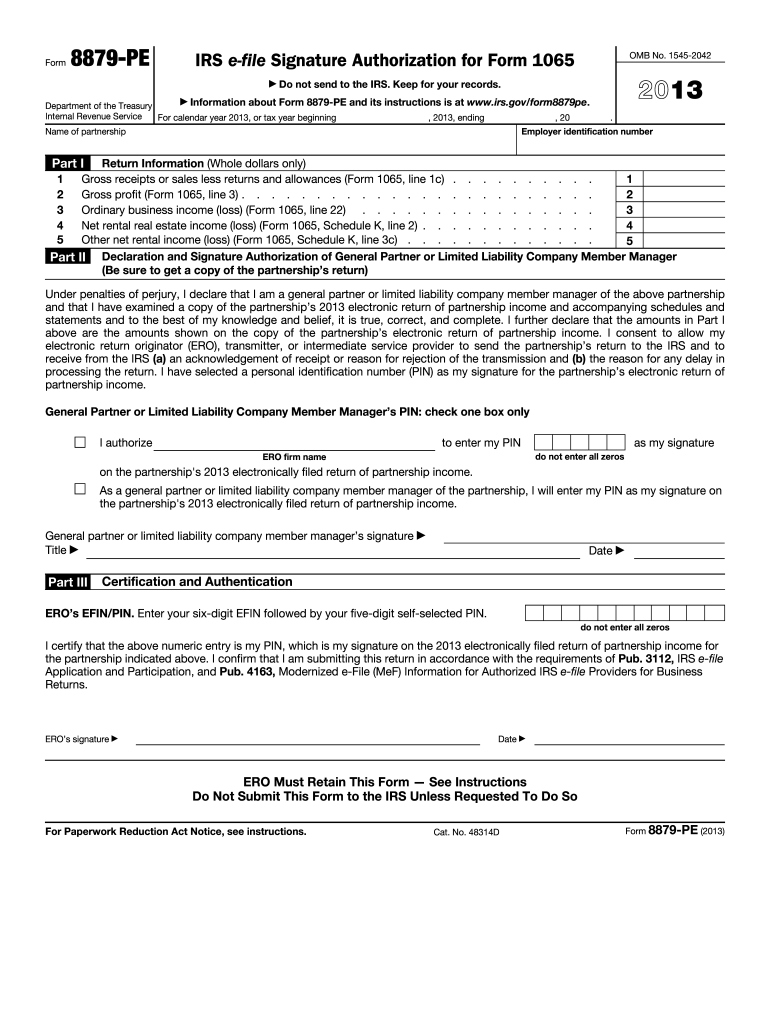
S is at www.irs.gov/form8879pe. Department of the Treasury Internal Revenue Service For calendar year 2013, or tax year beginning , 2013, ending , 20 . Employer identification number Name of partnership Part I Return Information (Whole dollars only) 1 Gross receipts or sales less returns and allowances (Form 1065, line 1c) . . . . . . . . . . Gross profit (Form 1065, line 3) . . . . . . . . . . . . . . . . . . . . . . . . 2 Ordinary business income (loss) (Form 1065, line 22) . . . . . . .

Open form follow the instructions

Easily sign the form with your finger

Send filled & signed form or save
How to fill out the IRS 8879-PE online
The IRS Form 8879-PE is essential for general partners or limited liability company member managers who need to electronically sign a partnership's return. This guide provides a comprehensive step-by-step process for filling out the form online, ensuring clarity and accuracy.
Follow the steps to complete the IRS 8879-PE online.
- Click the ‘Get Form’ button to access the document and open it in your preferred editing tool.
- Enter the employer identification number (EIN) and name of the partnership at the top of the form as required.
- In Part I, input the gross receipts or sales, along with additional figures from the partnership's Form 1065 as indicated for each respective line.
- Complete all specified fields in Part I, ensuring that the amounts reflect what was reported on the partnership's electronic return.
- In Part II, declare your status by signing as the general partner or a limited liability company member manager. Enter your personal identification number (PIN) carefully.
- Choose whether to authorize the electronic return originator (ERO) to input your PIN by checking the appropriate box.
- Sign, date, and include your title in Part II. Ensure you verify all details for accuracy.
- In Part III, the ERO must enter their six-digit EFIN followed by their five-digit self-selected PIN, ensuring it is not all zeros.
- Complete the form by confirming all entries. Save your changes, and ensure you keep a copy for your records.
- Finally, share the completed form with the ERO via delivery method of your choice, such as email or personal submission.
Complete your IRS 8879-PE form online today to ensure timely processing!
Experience a faster way to fill out and sign forms on the web. Access the most extensive library of templates available.
Related content
Jun 21, 2025 — Use this form when the general partner or limited liability company...
"IRS 8879 - PE Form 1-19-12" (2023). Transactional Matter Files. 65...
Feb 23, 2021 — The company is structured as a real estate investment trust, or REIT...
Get answers to your most pressing questions about US Legal Forms API.
What does tax form 8879 mean?
Tax form 8879 is a declaration document that signifies taxpayer consent for electronic filing of their tax return. It plays a crucial role in ensuring that the IRS recognizes the validity of the e-filed return. Essentially, if you complete form 8879, it guarantees that your submission is legitimate and authorized. Understanding this form is essential for all taxpayers looking to avoid any filing discrepancies.
What is the difference between 8879 PE and 8453 PE?
The difference lies primarily in the type of tax return they support. IRS form 8879 PE is specific for partnerships, serving as a declaration of consent for electronic filing. On the other hand, 8453 PE is a form used to authenticate the electronic submission itself. Both forms are vital; however, IRS form 8879 PE confirms consent, while 8453 PE validates that submission.
Who fills out form 8879?
Form 8879 is filled out by the taxpayer whose tax return is being filed electronically. In case of a partnership, each partner must review and sign their respective IRS form 8879 PE. This collaborative process ensures that all parties are on board with filing and that their consent is documented. Using US Legal Forms can help you access and complete the necessary forms effortlessly.
What is IRS form 8879 PE?
IRS form 8879 PE is specifically designed for partnerships, serving as a declaration for electronic filing. It confirms that the partners of the partnership agree to submit their tax returns electronically. By using IRS form 8879 PE, all partners maintain their compliance while simplifying the filing process. This form is a crucial tool for streamlining partnership tax returns.
What is the IRS form 8879 used for?
The IRS form 8879 is a declaration document that confirms the taxpayer's consent to electronically file their tax return. This form acts as an electronic signature, allowing you to transmit your return securely. Importantly, using IRS form 8879 streamlines the filing process, removing the need for physical paperwork. This form is essential for ensuring that your tax return is both authentic and timely.
What is form 8453 PE used for?
Form 8453 PE is used to authenticate electronic tax returns for partnerships. Taxpayers must submit this form to the IRS after transmitting their returns electronically. It ensures that the return is valid and that the party responsible for filing has signed off on it. By using form 8453 PE, you maintain compliance with IRS electronic filing regulations.
What is form 8879 irs e-file signature authorization?
IRS form 8879-PE, known as the e-file signature authorization, functions as a key document for partnerships filing their tax returns electronically. This form confirms that the taxpayer provides electronic signature consent for the submission of their return. By using IRS 8879-PE, you facilitate a smoother, paperless submission process while maintaining compliance with IRS requirements.
What is the 3 day rule for 8879?
The 3-day rule for IRS 8879-PE requires taxpayers to maintain proper documentation for three days following the e-filing of their tax return. During this time, the signed form must be securely stored, as the IRS may request to review it. By adhering to this rule, you ensure that you have verification of your electronic signature, which can be vital in case of any discrepancies or audits.
How do I download IRS tax forms?
To download IRS tax forms, visit the official IRS website where you can find the necessary forms, including IRS 8879-PE. You can easily search for specific forms or browse through categories. Once you locate the desired form, simply click on the download link. If you prefer a more guided approach, USLegalForms can assist you in accessing and completing these forms.
Who signs IRS form 8879?
The IRS form 8879 is typically signed by the taxpayer and the tax preparer. As a taxpayer, it's your responsibility to review the information carefully before signing. The tax preparer certifies that they have completed the return based on the information you provided. If you use a platform like USLegalForms, it makes the signing process straightforward.
Use professional pre-built templates to fill in and sign documents online faster. Get access to thousands of forms.
If you believe that this page should be taken down, please follow our DMCA take down process here.
This form is available in several versions. Select the version you need from the drop-down list below.