Loading
Form preview
  • US Legal Forms
  • Other Templates
  • Tax Forms
  • Executive Department Treasury IRS Forms
  • Irs 8879-pe 2015

Get Irs 8879-pe 2015

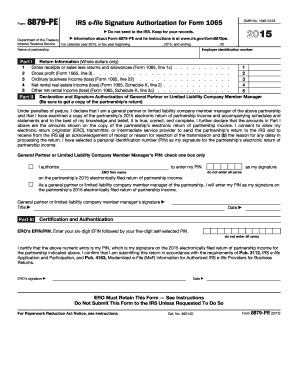
MeF) Information for Authorized IRS e-file Providers for Business Returns. ERO s signature Date ERO Must Retain This Form See Instructions Do Not Submit This Form to the IRS Unless Requested To Do So For Paperwork Reduction Act Notice, see instructions. Cat. No. 48314D Form 8879-PE (2015) Page 2 Form 8879-PE (2015) Future Developments For the latest information about developments related to Form 8879-PE and its instructions, such as legislation enacted after they were publ.

This website is not affiliated with IRS

How it works

  1. Open form

    Open form follow the instructions

  2. Easily sign form

    Easily sign the form with your finger

  3. Share form

    Send filled & signed form or save

How to fill out the IRS 8879-PE online

Form 8879-PE is the IRS e-file signature authorization for partnerships. This guide provides clear, step-by-step instructions to assist users in completing the form effectively online.

Follow the steps to accurately complete the IRS 8879-PE online.

  1. Click the ‘Get Form’ button to obtain the form and open it in your editor.
  2. Begin by entering the partnership's basic information at the top of the form, including the employer identification number and the name of the partnership.
  3. In Part I, provide the return information by filling in the gross receipts or sales, gross profit, ordinary business income or loss, and net rental income or loss for the year as required.
  4. Proceed to Part II to declare and authorize your personal identification number (PIN). Indicate whether you authorize the electronic return originator (ERO) to enter your PIN or if you will enter it yourself.
  5. In Part II, detail the general partner or limited liability company member manager's signature, title, and date appropriately.
  6. Complete Part III by entering the ERO’s six-digit EFIN followed by the five-digit self-selected PIN, ensuring not to enter all zeros.
  7. Once all sections are completed, ensure to review the information entered for accuracy. After confirming everything is correct, save changes to the form.
  8. You can download, print, or share the form as needed, ensuring you retain a copy for your records.

Start completing your IRS 8879-PE document online today!

Get form

Experience a faster way to fill out and sign forms on the web. Access the most extensive library of templates available.

Related content

About Form 8879-PE, IRS e-file Signature...
Jun 21, 2025 — Use this form when the general partner or limited liability company...
Learn more
"IRS 8879 - PE Form 1-19-12"
"IRS 8879 - PE Form 1-19-12" (2023). Transactional Matter Files. 65...
Learn more
FORM 10-K
Feb 23, 2021 — The company is structured as a real estate investment trust, or REIT...
Learn more

Related links form

NY W-700D 2014 OK DOC Form 030118B 2012 PA Standard Right-to-Know Request Form WI DoJ DJ-LE-287 2013

Questions & Answers

Get answers to your most pressing questions about US Legal Forms API.

Contact support

An IRS e-file signature authorization is a formal agreement allowing the ERO to file a taxpayer’s return electronically with consent. This authorization protects the integrity of the filing process and ensures proper compliance with IRS regulations. Utilizing IRS 8879-PE makes it easier for partnerships to navigate electronic filing while maintaining legal right and ownership of their tax documents.

Form 8879, or IRS e-file signature authorization, is a critical document that allows an ERO to electronically file a tax return by validating a taxpayer's consent. This form ensures that the submitted return is legitimate and authorized by the taxpayer. By signing IRS 8879-PE, partnerships can quickly and securely execute their electronic filing responsibilities.

The 3-day rule for IRS form 8879 mandates that the taxpayer must sign and return the form to the ERO within three days of the electronic submission of the tax return. This rule is vital to maintain compliance and verify the authenticity of the submitted data. Remember that timely action on IRS 8879-PE helps avert any potential issues with the IRS regarding your submission.

The IRS form 8879-PE is specifically designed for partnerships, allowing them to authorize an ERO to e-file, while IRS form 8453 PE is used for paper filing purposes. Essentially, 8879-PE focuses on electronic submissions and provides a digital signature option. Understanding this difference can enhance how you manage tax filings as a partnership.

IRS form 8879 serves as an e-file signature authorization for individual tax returns and includes the necessary confirmations from the taxpayer. It allows the ERO to file the tax return electronically, ensuring that all data is transmitted securely. By utilizing IRS 8879-PE, partnerships can streamline their digital filing process efficiently.

IRS form 8879-PE is a significant document that allows partnerships to authorize the ERO to e-file their tax returns. This form acts as a declaration that the information provided is accurate and complete to the best of the taxpayer's knowledge. Completing IRS 8879-PE is essential for ensuring a smooth and compliant e-filing process.

A signature authorization form allows taxpayers to grant permission for an ERO to file their tax return electronically on their behalf. This form ensures that the ERO can legally submit the return while preserving the taxpayer's rights. IRS 8879-PE serves as a primary example of such a form, confirming the taxpayer’s consent for electronic filing.

The Electronic Return Originator (ERO) signs the tax return as a representative of the taxpayer. Typically, this person is responsible for submitting the return electronically to the IRS. They must hold an appropriate identification number issued by the IRS. For those using IRS 8879-PE, this signature identifies the ERO's authority in the filing process.

An authorized signer to the IRS is an individual designated to sign tax documents on behalf of the entity or taxpayer. This may include partners, members, or corporate officers, depending on the entity type. Knowing who qualifies as an authorized signer is essential for proper compliance and filing, especially when using forms like the IRS 8879-PE.

IRS form 8879 requires signatures from both the taxpayer and the ERO. The taxpayer ensures the information provided is accurate, while the ERO signifies their role in electronically filing the partnership return. This dual signature process helps maintain accountability in tax filings.

Get This Form Now!

Use professional pre-built templates to fill in and sign documents online faster. Get access to thousands of forms.
If you believe that this page should be taken down, please follow our DMCA take down processhere.
Get IRS 8879-PE
  • Adoption
  • Bankruptcy
  • Contractors
  • Divorce
  • Home Sales
  • Employment
  • Identity Theft
  • Incorporation
  • Landlord Tenant
  • Living Trust
  • Name Change
  • Personal Planning
  • Small Business
  • Wills & Estates
  • Packages A-Z
  • Affidavits
  • Bankruptcy
  • Bill of Sale
  • Corporate - LLC
  • Divorce
  • Employment
  • Identity Theft
  • Internet Technology
  • Landlord Tenant
  • Living Wills
  • Name Change
  • Power of Attorney
  • Real Estate
  • Small Estates
  • Wills
  • All Forms
  • Forms A-Z
  • Other Templates
  • Legal Hub
  • About Us
  • Help Portal
  • Legal Resources
  • Blog
  • Affiliates
  • Contact Us
  • Delete My Account
  • Site Map
  • Industries
  • Forms in Spanish
  • Localized Forms
  • State-specific Forms
  • Forms Kit
  • Real Estate Handbook
  • All Guides
  • Notarize
  • Incorporation services
  • For Consumers
  • For Small Business
  • For Attorneys
  • USLegal
  • FormsPass
  • pdfFiller
  • signNow
  • altaFlow
  • DocHub
  • Instapage
Form Packages
  • Adoption
  • Bankruptcy
  • Contractors
  • Divorce
  • Home Sales
  • Employment
  • Identity Theft
  • Incorporation
  • Landlord Tenant
  • Living Trust
  • Name Change
  • Personal Planning
  • Small Business
  • Wills & Estates
  • Packages A-Z
Form Categories
  • Affidavits
  • Bankruptcy
  • Bill of Sale
  • Corporate - LLC
  • Divorce
  • Employment
  • Identity Theft
  • Internet Technology
  • Landlord Tenant
  • Living Wills
  • Name Change
  • Power of Attorney
  • Real Estate
  • Small Estates
  • Wills
  • All Forms
  • Forms A-Z
  • Other Templates
Customer Service
  • Legal Hub
  • About Us
  • Help Portal
  • Legal Resources
  • Blog
  • Affiliates
  • Contact Us
  • Delete My Account
  • Site Map
  • Industries
  • Forms in Spanish
  • Localized Forms
  • State-specific Forms
  • Forms Kit
Legal Guides
  • Real Estate Handbook
  • All Guides
Prepared for you
  • Notarize
  • Incorporation services
Our Customers
  • For Consumers
  • For Small Business
  • For Attorneys
Our Sites
  • USLegal
  • FormsPass
  • pdfFiller
  • signNow
  • altaFlow
  • DocHub
  • Instapage
Social Media
Call us now toll free:
+1 833 426 79 33
As seen in:
© Copyright 1999-2026 airSlate Legal Forms, Inc. 17 Station Street, Ste. 203, Brookline, MA 02445
  • Your Privacy Choices
  • Terms of Service
  • Privacy Notice
  • Content Takedown Policy
  • Bug Bounty Program
IRS 8879-PE
This form is available in several versions.
Select the version you need from the drop-down list below.
2020 IRS 8879-PE
Select form
  • 2020 IRS 8879-PE
  • 2019 IRS 8879-PE
  • 2018 IRS 8879-PE
  • 2017 IRS 8879-PE
  • 2016 IRS 8879-PE
  • 2015 IRS 8879-PE
  • 2014 IRS 8879-PE
  • 2013 IRS 8879-PE
  • 2011 IRS 8879-PE
  • 2010 IRS 8879-PE
Select form